

OpenExo GUI is made and published by Biomotum. AppBrain is an independent app data site and isn't affiliated with Biomotum. The app name, icon, screenshots and description belong to Biomotum and are shown as published on the App Store.
AppBrain's verdict
- Last updated
- May 15, 2026
Rankings
App Store top chartsApp Store Rankings for OpenExo GUI
This app is not ranked
Releases
Updates seen on the App Store- Version
- 1.0
- Launched
- May 2026
No changelog data
User feedback
Ratings and reviews on the App StoreComments on OpenExo GUI for iOS
We don't have enough comments to show example comments. Please check back later.
Technology
Found in the app by AppBrain- Price
- Free
- App size
- 1.11 MB
- Content rating
- Everyone
Technologies used by OpenExo GUI
About the app and developer
About OpenExo GUI
OpenExo GUI is an utilities app developed by Biomotum.
What is the rating of OpenExo GUI?
OpenExo GUI has no ratings yet.
Is OpenExo GUI free?
OpenExo GUI is free. The app size is 1.11 MB. The latest version available is 1.0. The last update was on May 15, 2026.
What are the requirements for OpenExo GUI?
The app has a content rating of Everyone. The app has been available on the App Store since May 2026.
Developer information for Biomotum
Address:
Store listing
By Biomotum, from the App Store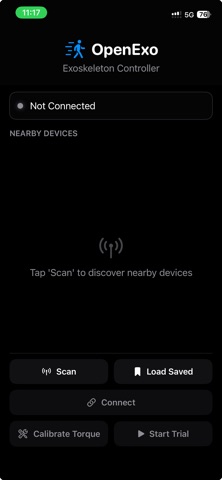
Screenshots by Biomotum, from the the App Store listing
Description by Biomotum Written by the developer, not by AppBrain. Click to read.
OpenExo GUI is the companion app for OpenExo devices, giving users a simple and intuitive way to connect, configure, and control their exoskeleton system from an iPhone.
Designed for researchers, developers, clinicians, and advanced users, the app provides streamlined access to key device functions, allowing you to monitor status, adjust settings, and manage operation in real time.
With OpenExo GUI, you can connect to supported OpenExo devices, view device information, check system status, adjust control parameters, and start or stop device functions from a clean mobile interface.
Whether you are testing new configurations, conducting research, or operating an OpenExo device in a controlled environment, OpenExo GUI helps simplify device interaction and improve workflow.
Key Features:
Connect to supported OpenExo devices
Monitor device status and connection state
Configure device settings and operating parameters
Start, stop, and manage device operation
Designed for research, development, and controlled-use environments
Important Notice:
OpenExo is not FDA-approved and is not intended for personal, medical, or commercial use. Use at your own risk. We are not liable for any harms or losses. By accessing OpenExo materials, you agree to these terms.
Designed for researchers, developers, clinicians, and advanced users, the app provides streamlined access to key device functions, allowing you to monitor status, adjust settings, and manage operation in real time.
With OpenExo GUI, you can connect to supported OpenExo devices, view device information, check system status, adjust control parameters, and start or stop device functions from a clean mobile interface.
Whether you are testing new configurations, conducting research, or operating an OpenExo device in a controlled environment, OpenExo GUI helps simplify device interaction and improve workflow.
Key Features:
Connect to supported OpenExo devices
Monitor device status and connection state
Configure device settings and operating parameters
Start, stop, and manage device operation
Designed for research, development, and controlled-use environments
Important Notice:
OpenExo is not FDA-approved and is not intended for personal, medical, or commercial use. Use at your own risk. We are not liable for any harms or losses. By accessing OpenExo materials, you agree to these terms.