

Optics Simulator - Ray Diagram
Optics Simulator - Ray Diagram is made and published by My Call Bag LLC. AppBrain is an independent app data site and isn't affiliated with My Call Bag LLC. The app name, icon, screenshots and description belong to My Call Bag LLC and are shown as published on the App Store.
AppBrain's verdict
- Last updated
- May 29, 2026
Rankings
App Store top chartsApp Store Rankings for Optics Simulator - Ray Diagram
Competitors
Similar apps and more from My Call Bag LLCMore from My Call Bag LLC







Releases
Updates seen on the App Store- Version
- 1.0
- Launched
- May 2026
No changelog data
User feedback
Ratings and reviews on the App StoreComments on Optics Simulator - Ray Diagram for iOS
We don't have enough comments to show example comments. Please check back later.
Technology
Found in the app by AppBrain- Price
- $1.99
- App size
- 681.0 KB
- Content rating
- Everyone
Technologies used by Optics Simulator - Ray Diagram
About the app and developer
About Optics Simulator - Ray Diagram
Optics Simulator - Ray Diagram is an education app developed by My Call Bag LLC.
User Ratings
The app has no ratings yet.
App Information
Optics Simulator - Ray Diagram costs $1.99. The app size is 681.00 kB. The latest version available is 1.0. The last update was on May 29, 2026.
Technical Requirements
The app has a content rating of Everyone. The app has been available on the App Store since May 2026.
Developer information for My Call Bag LLC
Address:
Frequently asked questions about Optics Simulator - Ray Diagram
Is Optics Simulator - Ray Diagram free?
No. Optics Simulator - Ray Diagram costs $1.99 on the App Store.
Is Optics Simulator - Ray Diagram still available?
Yes. Optics Simulator - Ray Diagram is on the App Store, and the last update we saw was on May 29, 2026.
How large is Optics Simulator - Ray Diagram?
Optics Simulator - Ray Diagram is 681.00 kB.
Is Optics Simulator - Ray Diagram suitable for children?
App Store rates the content of Optics Simulator - Ray Diagram as suitable for everyone.
Who made Optics Simulator - Ray Diagram?
Optics Simulator - Ray Diagram was developed by My Call Bag LLC. It is listed in the education category on the App Store.
Store listing
By My Call Bag LLC, from the App Store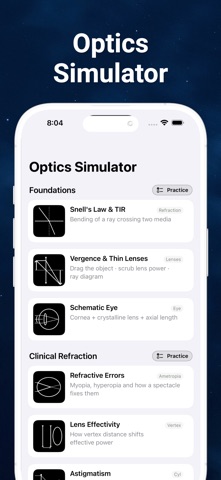


Description by My Call Bag LLC Written by the developer, not by AppBrain. Click to read.
Each simulator displays its governing equation in textbook serif math, with the current numerical values substituted alongside, so you can connect the picture to the formula. A built-in practice section quizzes the underlying concepts with parameterised diagrams (the answer is hidden in the stem and revealed once you check your work).
INCLUDED SIMULATORS
• Snell's Law and Total Internal Reflection — refraction at an interface
• Vergence and Thin Lenses — draggable object and lens, full three-ray construction
• Schematic Eye — cornea + crystalline lens + axial length; lens shape changes with power
• Refractive Errors — myopia and hyperopia with a spectacle at adjustable vertex distance
• Lens Effectivity — see how moving a lens toward the eye changes effective power
• Astigmatism — the Conoid of Sturm with a cross-section explorer
• Telescopes — Galilean and Keplerian, both lenses are draggable
• Simple Magnifier — at, inside, or beyond the focal length
• Mirrors — concave, convex and plano, with C and F marked
• Prisms — clinical prism diopters and geometric minimum-deviation
REFERENCE
• A formula sheet with every equation the app uses, typeset in serif math
• Built-in practice problems organised by section
DESIGN
• Black-and-white interface so the colored rays remain the most prominent thing on screen
• Adaptive layout: simulator stays visible alongside the controls in landscape
• No accounts, no ads, no tracking, no internet connection required
For health-profession students, ophthalmology residents, optometry students, and anyone who would rather see optics work than memorise formulas.