

Origami PDF: Scan & Sign
Origami PDF: Scan & Sign is made and published by Thu Trang Nguyen. AppBrain is an independent app data site and isn't affiliated with Thu Trang Nguyen. The app name, icon, screenshots and description belong to Thu Trang Nguyen and are shown as published on the App Store.
AppBrain's verdict
- Last updated
- June 9, 2026
- Size
- 7.33 MB
User feedback
Ratings and reviews on the App StoreComments on Origami PDF: Scan & Sign for iOS
We don't have enough comments to show example comments. Please check back later.
Store listing
By Thu Trang Nguyen, from the App Store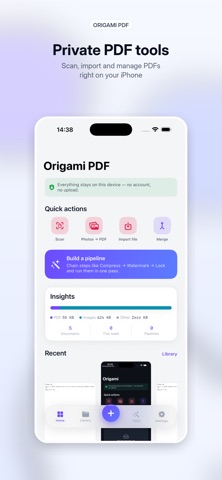



Description by Thu Trang Nguyen Written by the developer, not by AppBrain. Click to read.
Stack steps — Compress → Watermark → Page numbers → Grayscale → OCR → Encrypt — and run them in one tap on one PDF or a batch of them. Save your favourite chains as Pipeline Templates and re-use them. Three built-in templates (Share-ready, Archive, Professional) get you started; the rest you build yourself.
Everything is on-device. No account, no cloud upload, no third-party SDKs, no analytics, no ads, no subscription.
WHAT MAKES ORIGAMI DIFFERENT
■ PIPELINE — the headline feature
A visual builder that stacks PDF operations into a workflow. Run on one document or many. Save as a custom template. Re-run from Siri or Shortcuts with one phrase ("Run a Origami PDF pipeline"). This is what sets Origami apart from every other PDF utility on the store.
■ SEARCHABLE PDF — scans you can search
Add an invisible on-device OCR text layer to a scanned PDF so words become selectable, copyable, searchable. Powered by Apple's Vision framework — no upload.
■ SHORTCUTS & SIRI READY
Every key tool is exposed as an App Intent: "Scan a document with Origami PDF", "Merge PDFs with Origami PDF", "Compress a PDF with Origami PDF", "Photos to PDF in Origami PDF", "Open Pipeline in Origami PDF". Wire them into Siri, the Shortcuts app, Home Screen widgets, or Personal Automations.
■ A CALMER WAY TO WORK
A floating action dock with a single "+" puts document creation one tap away from anywhere. Clean light theme, document cards with live previews, smooth haptics — no clutter.
CAPTURE
- Scan — camera document scanner with auto edge detection and multi-page output
- Photos to PDF — combine images into a single PDF
- Import — bring in PDFs, images and text files from the Files app
- Text to PDF — type or paste text and export a clean PDF
ORGANIZE
- Merge several PDFs in your chosen order
- Split into smaller PDFs
- Rotate pages
- Organize pages — drag to reorder, rotate, delete or extract
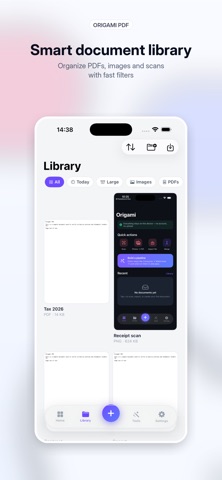
- Folders, tags & smart filters keep your library tidy
CONVERT
- PDF to Images (export pages as PNG)
- PDF to Text (extract plain text)
- PDF to Word — export editable RTF that opens in Word and Pages
- Compress — smart: keeps text pages crisp & selectable, shrinks scanned pages (Smallest / Balanced / Best quality)
- Grayscale — convert to black & white
SECURE
- Protect a PDF with a password
- Remove a known password
EDIT
- Sign — draw your signature with Apple Pencil or finger and stamp it on the page
- Annotate — highlight and draw freehand
- Watermark — stamp text across every page
- Page numbers — number every page
- Recognize text (OCR) — extract text from scans and PDFs with Apple's on-device Vision
- Searchable PDF — bake an invisible OCR text layer into a scan
- Fill forms — detect PDF form fields (text & checkboxes) and fill them in
- Stamp — APPROVED, DRAFT, CONFIDENTIAL, a date, or your own custom seal
PREVIEW EVERYTHING
Open PDFs, images and text right inside the app. Saved files also appear in the iOS Files app — nothing is locked away.
PRIVATE BY DESIGN — NO DATA COLLECTED
Every scan, OCR pass and conversion happens on your device. Origami makes no network requests for its features: no cloud, no analytics, no tracking, no third-party SDKs. Your documents never leave your iPhone.
17 LANGUAGES
English, Vietnamese, Spanish, French, German, Portuguese (Brazil & Portugal), Arabic, Hindi, Bengali, Indonesian, Japanese, Korean, Russian, Turkish, Chinese (Simplified & Traditional). Switch language instantly, no restart.
Origami PDF is completely free — every tool unlocked, no ads, no subscriptions, no in-app purchases.
Safety and technology
Found in the app by AppBrain- Price
- Free
- App size
- 7.33 MB
- Content rating
- Everyone
Technologies used by Origami PDF: Scan & Sign
Releases
Updates seen on the App Store- Version
- 1.0.0
- Launched
- June 2026
No changelog data
Alternatives
Similar apps and more from Thu Trang NguyenAlternatives to Origami PDF: Scan & Sign


Rankings
App Store top chartsApp Store Rankings for Origami PDF: Scan & Sign
About the app and developer
About Origami PDF: Scan & Sign
Origami PDF: Scan & Sign is a productivity app developed by Thu Trang Nguyen.
User Ratings
The app has no ratings yet.
App Information
Origami PDF: Scan & Sign is freely available from the App Store. The app size is 7.33 MB. The latest version available is 1.0.0. The last update was on June 9, 2026.
Technical Requirements
The app has a content rating of Everyone. The app has been available on the App Store since June 2026.
Developer information for Thu Trang Nguyen
Address: