




AppBrain's verdict
- Last updated
- September 27, 2026
- Size
- 35.2 MB
User feedback
Ratings and reviews on the App StoreComments on Oyoroi Jam for iOS
We don't have enough comments to show example comments. Please check back later.
Store listing
By John Vaughan, from the App StoreDescription by John Vaughan Written by the developer, not by AppBrain. Click to read.
START FROM A RECORDING
On iOS 27, pick an audio file and Oyoroi Jam listens for the song's key, tempo, and time signature, then hands you a draft to review. Chords are suggested from the key rather than named from the recording, so keep what the song uses and add what it borrows. Analysis runs on your iPhone and the file goes nowhere.
JAM IN A KEY
No song in mind? You don't need one. Pick a key and Oyoroi Jam lays out the eight chords it is built from, in the order a keyboard climbs and labelled by degree. Save turns anything you like into a song you can keep.
HOW IT WORKS
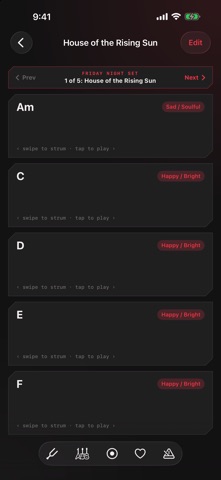
Add a song, pick the chords it uses, and you have an instrument for that song. Tap a pad for a clean chord. Swipe across it to strum: how far you swipe sets the note spread, how fast you swipe sets the attack, and which direction you swipe decides down-strum or up-strum. String Crossing, a third mode, sounds a chord one note at a time as your finger passes each one, so a slow drag arpeggiates and a fast one strums.
Where you tap a pad sets how hard that chord lands, so one pad can whisper or shout. Hold a chord and lift to damp it, or tap and let it ring. Change chord while you are still holding one and the notes both chords share carry through instead of restriking.
BRING YOUR OWN SONGS
Paste a chord chart, open a .cho, .crd, or .pro file, or AirDrop one from your Mac. Oyoroi Jam reads the chords out of a ChordPro chart and turns them into pads. Lyrics aren't imported.
PLAY
• Seven sampled instruments: acoustic guitar, grand piano, electric piano, synth pad, organ, bell, and bass
• Per-chord inversion control (root, first, second) when the default voicing sits wrong
• Transpose from -6 to +6 semitones on the fly to match a singer without re-editing
• Three acoustic spaces to play in: Studio Dry, Warm Hall, and Spacious Arena
• A separate six-pad drum kit (kick, snare, hi-hats, clap, tom), sampled from a real kit and drawn to answer every hit
• Record what you play and share the take to Messages, Voice Memos, or anywhere else you send files
PRACTICE
• Practice Mode works on any song. Set a tempo, time signature, and how many bars each chord lasts, and it walks you through in time, with a scrolling queue showing what comes next
• Nudge the tempo up or down while you play, so you find the speed by feel
• Build a real arrangement out of named sections (Verse, Chorus, Bridge) rather than looping one flat list, and duplicate a section when it repeats
• Quarter-note, eighth-note, or syncopated click patterns, in four click sounds
• Visual pulse and audible click toggle independently, so you can feel the beat, hear it, or both
ORGANIZE
• Setlists: ordered collections for a gig, with Prev and Next inside the player so you can move through a set
• Sort a song's pads into the order its key climbs, one song or the whole library at once, or drag them yourself
• Genre tags, color tags, favorites, and three sort orders
• Export a song or your whole library to share or back up
• Four themes: OYOROI Crimson, Classic Light, Cyberpunk Gold, and Stage Neon
TOGETHER
Start a Jam Session over the local network and nearby players join with their own instrument. The host leads, everyone else's pads follow, and each person hears their own sound. Host on a song, or just on a key, and everyone plays from the same set of chords.
ON YOUR WRIST
A watchOS companion comes with the app. Your library syncs to it automatically and the pads sound on the watch itself, so you can jam with the phone in another room.
YOUR LIBRARY STAYS YOURS
Songs sync across your own iPhones through your private iCloud database. There are no accounts, no ads, no analytics, and nothing is uploaded to anyone else's server.
Safety and technology
Found in the app by AppBrain- Price
- Free
- App size
- 35.2 MB
- Content rating
- Everyone
Technologies used by Oyoroi Jam
Releases
Updates seen on the App Store- Version
- 2.0
- Launched
- August 2026
No changelog data
Alternatives
Similar apps and more from John VaughanAlternatives to Oyoroi Jam


More from John Vaughan


Rankings
App Store top chartsApp Store Rankings for Oyoroi Jam
About the app and developer
About Oyoroi Jam
Oyoroi Jam is a music app developed by John Vaughan.
User Ratings
The app has no ratings yet.
App Information
Oyoroi Jam is freely available from the App Store. The app size is 35.16 MB. The latest version available is 2.0. The last update was on September 27, 2026.
Technical Requirements
The app has a content rating of Everyone. The app has been available on the App Store since August 2026.
Oyoroi Jam is made and published by John Vaughan. AppBrain is an independent app data site and isn't affiliated with John Vaughan. The app name, icon, screenshots and description belong to John Vaughan and are shown as published on the App Store.
Developer information for John Vaughan
Address: