

PadLinker: Trackpad & Keyboard
PadLinker: Trackpad & Keyboard is made and published by A&A GLOBAL INTERNATIONAL. AppBrain is an independent app data site and isn't affiliated with A&A GLOBAL INTERNATIONAL. The app name, icon, screenshots and description belong to A&A GLOBAL INTERNATIONAL and are shown as published on the App Store.
AppBrain's verdict
New- Rating on App Store
- 5.00
- 1 ratings
- Last updated
- September 22, 2026
PadLinker: Trackpad & Keyboard came out 39 days ago. It doesn't have enough ratings yet to judge what users think.
Rankings
App Store top chartsApp Store Rankings for PadLinker: Trackpad & Keyboard
Competitors
Similar apps and more from A&A GLOBAL INTERNATIONALAlternatives to PadLinker: Trackpad & Keyboard


More from A&A GLOBAL INTERNATIONAL


Releases
Updates seen on the App Store- Version
- 1.0.0
- Launched
- September 2026
No changelog data
User feedback
Ratings and reviews on the App StoreComments on PadLinker: Trackpad & Keyboard for iOS
We don't have enough comments to show example comments. Please check back later.
Technology
Found in the app by AppBrain- Price
- Free
- App size
- 4.76 MB
- Content rating
- Everyone
Technologies used by PadLinker: Trackpad & Keyboard
About the app and developer
About PadLinker: Trackpad & Keyboard
PadLinker: Trackpad & Keyboard is an utilities app developed by A&A GLOBAL INTERNATIONAL.
What is the rating of PadLinker: Trackpad & Keyboard?
PadLinker: Trackpad & Keyboard is rated 5.00 out of 5 stars, based on one rating ratings.
Is PadLinker: Trackpad & Keyboard free?
PadLinker: Trackpad & Keyboard is free. The app size is 4.76 MB. The latest version available is 1.0.0. The last update was on September 22, 2026.
What are the requirements for PadLinker: Trackpad & Keyboard?
The app has a content rating of Everyone. The app has been available on the App Store since September 2026.
Developer information for A&A GLOBAL INTERNATIONAL
Address:
Store listing
By A&A GLOBAL INTERNATIONAL, from the App Store
Description by A&A GLOBAL INTERNATIONAL Written by the developer, not by AppBrain. Click to read.
PadLinker connects it to your Mac over Wi‑Fi, or over Bluetooth when there's no network to share, and makes it feel like the one on your MacBook: gestures, right click, pinch, Spaces, keyboard.
PadLinker is the trackpad, not a TV remote.
Every touch is streamed to your Mac with low latency and turned into a real pointer, scroll or key event, so it works in every app and on every display, with nothing to configure.
FEELS LIKE A MAC TRACKPAD
One finger moves the pointer. Tap to click. Double-tap and hold to drag.
Two fingers scroll, in any direction, at the speed you expect.
If you have used a MacBook, your hands already know this.
THE GESTURES YOU ACTUALLY USE (PadLinker Pro)
Two-finger tap for right click.
Pinch to zoom in and out.
Swipe three fingers to switch desktops and Spaces, or tap the desktop buttons.
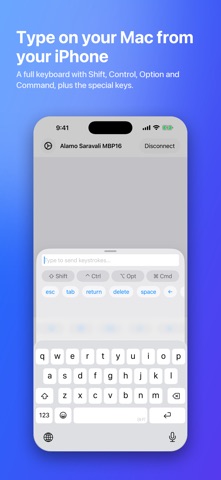
Type on your Mac from your device, with Command, Option, Control and Shift toggles, plus arrows, Escape, Tab, Return and Delete.
Set the pointer speed and swipe sensitivity to match your hands.
FINDS YOUR MAC ON ITS OWN
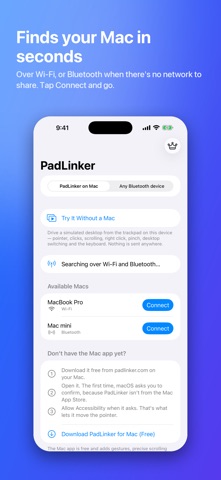
Open the app and your Mac appears.
No account, no cable.
Put the phone down and pick it up later; it reconnects by itself.
Everything stays between your two devices.
There are no servers, and no data is collected.
WI‑FI OR BLUETOOTH
On the same Wi‑Fi network, PadLinker connects over Wi‑Fi for the lowest latency.
On a train, in a café or a hotel where the network won't let devices talk, or with Wi‑Fi off, it connects over Bluetooth instead.
Both radios are searched at once, your Mac shows up once, and the app picks Wi‑Fi whenever it can.
If a Bluetooth pairing request appears the first time, confirm it on both devices.
EVERY DISPLAY, ONE POINTER
The pointer moves across all monitors connected to your Mac, exactly as the built-in trackpad would.
THE MAC SIDE IS FREE
Download the free Mac app at https://padlinker.com/download.
It lives in the menu bar, asks once for the standard macOS Accessibility permission, and needs nothing else.
PAY ONCE, OR NOT AT ALL
The pointer, clicking, dragging, scrolling, Bluetooth and multi-monitor support are free with no time limit.
PadLinker Pro is one purchase that unlocks right click, pinch to zoom, desktop switching, the keyboard and tuning. It is not a subscription.
It covers every iPhone and iPad on your Apple ID, supports Family Sharing, and never expires.
WHERE IT EARNS ITS PLACE
A Mac mini or Mac Studio with no trackpad on the desk.
A MacBook plugged into the TV, driven from the couch.
A laptop propped out of reach while you draw, read or cook.
A demo where you want to walk around the room.
A train seat with no Wi‑Fi.
The afternoon the mouse dies.
WHAT YOU NEED
iPhone or iPad on iOS 17 or iPadOS 17 or later.
A Mac on macOS 14 Sonoma or later running the free Mac app.
Both on the same Wi‑Fi network, or with Bluetooth on and within range.
PadLinker controls a Mac only, directly between your devices.
It does not work with Windows PCs, Apple TV or smart TVs.
Bluetooth is a fallback: Wi‑Fi is the faster path whenever both devices can use it.