

Palette Checker
Palette Checker is made and published by Clive Bryant. AppBrain is an independent app data site and isn't affiliated with Clive Bryant. The app name, icon, screenshots and description belong to Clive Bryant and are shown as published on the App Store.
AppBrain's verdict
- Last updated
- July 8, 2026
Rankings
App Store top chartsApp Store Rankings for Palette Checker
Competitors
Similar apps and more from Clive BryantAlternatives to Palette Checker






More from Clive Bryant


Releases
Updates seen on the App Store- Version
- 1.5
- Launched
- August 2022
No changelog data
User feedback
Ratings and reviews on the App StoreComments on Palette Checker for iOS
We don't have enough comments to show example comments. Please check back later.
Technology
Found in the app by AppBrain- Price
- Free
- App size
- 21.8 MB
- Content rating
- Everyone
Technologies used by Palette Checker
About the app and developer
About Palette Checker
Palette Checker is an utilities app developed by Clive Bryant.
User Ratings
The app has no ratings yet.
App Information
Palette Checker is freely available from the App Store. The app size is 21.81 MB. The latest version available is 1.5. The last update was on July 8, 2026.
Technical Requirements
The app has a content rating of Everyone. The app has been available on the App Store since August 2022.
Developer information for Clive Bryant
Address:
Store listing
By Clive Bryant, from the App Store




Description by Clive Bryant Written by the developer, not by AppBrain. Click to read.
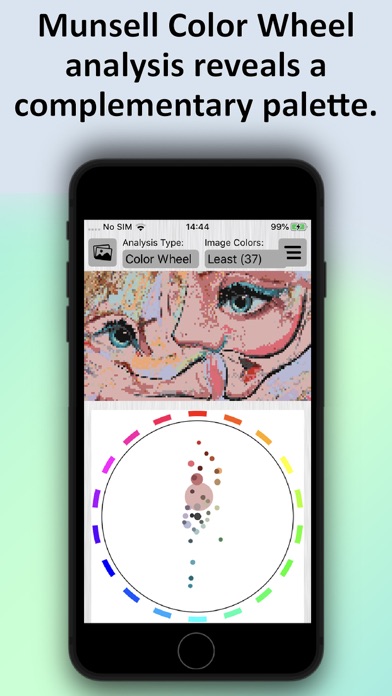
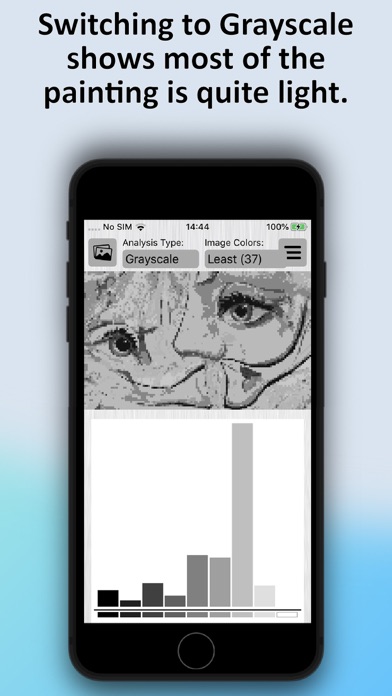
The app takes an image and groups the colors at three different levels of groupings, so you can choose between “most”, “middle” and “least” amount of colors to suit your image. Each level can be analyzed in any of ten ways.
As you know, an image is made up of a number of pixels - squares of color. The number of pixels in an image is referred to as its resolution.
In the Free version, you are limited to work in the lowest resolution (i.e. reduced magnification). That is usually enough to get a great understanding of your image, and many people stay at that level. Upgrading to the Professional version allows you to work with a greater number of pixels in your image (typically 2x and 4x that of the lowest resolution).
Gain insights into images like never before. Perfect for artists who are feeling a little "stuck" with their photo references or their own pieces of art.
Also helpful for abstract artists wanting to know how their art looks in terms of color profile. For instance, are there two colors competing for saturation? Is everything a mid-gray when it is reduced to black and white? What does the Notan design look like?
In Color Picker mode, you can look at individual pixels for its RGB (red, green, blue), HSV (hue, saturation, value) and color-family. RGB and HSV are used in computer graphics programs to describe a color. Color Picker mode gives you a color disk that you can use to mix your paint to when trying to color match your reference.
In the Professional version, you can export the image and any of the analysis graphs to your camera roll.
As an artist, you will find this app hugely useful in your practice as a pair of “fresh eyes” and to help you come up with ideas to move your art forwards. It’s also fascinating to analyze all sorts of images to give you artistic ideas.
Try it for free to start with. See how you get on.
If you like it, please consider upgrading to go Ad-free and to get the extra functionality of the Professional level.