

Palette Generator from Image
Palette Generator from Image is made and published by DMITRII ZAUSAEV. AppBrain is an independent app data site and isn't affiliated with DMITRII ZAUSAEV. The app name, icon, screenshots and description belong to DMITRII ZAUSAEV and are shown as published on the App Store.
AppBrain's verdict
- Last updated
- October 12, 2026
Rankings
App Store top chartsApp Store Rankings for Palette Generator from Image
Competitors
Similar apps and more from DMITRII ZAUSAEVAlternatives to Palette Generator from Image


More from DMITRII ZAUSAEV


Releases
Updates seen on the App Store- Version
- 1.0.5
- Launched
- March 2026
No changelog data
User feedback
Ratings and reviews on the App StoreComments on Palette Generator from Image for iOS
We don't have enough comments to show example comments. Please check back later.
Technology
Found in the app by AppBrain- Price
- Free
- App size
- 1.24 MB
- Content rating
- Everyone
Technologies used by Palette Generator from Image
About the app and developer
About Palette Generator from Image
Palette Generator from Image is an utilities app developed by DMITRII ZAUSAEV.
What is the rating of Palette Generator from Image?
Palette Generator from Image has no ratings yet.
Is Palette Generator from Image free?
Palette Generator from Image is free. The app size is 1.24 MB. The latest version available is 1.0.5. The last update was on October 12, 2026.
What are the requirements for Palette Generator from Image?
The app has a content rating of Everyone. The app has been available on the App Store since March 2026.
Developer information for DMITRII ZAUSAEV
Address:
Store listing
By DMITRII ZAUSAEV, from the App Store



Description by DMITRII ZAUSAEV Written by the developer, not by AppBrain. Click to read.
A CLEARER WAY TO BEGIN
You do not need a complicated system before the first useful result. The US edition leads with the complete product story: the problem, the core workflow, the controls you can rely on, and practical ways to make the tool part of an ordinary day.
HOW IT WORKS
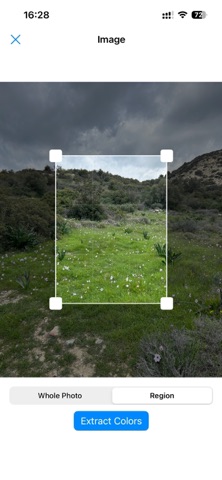
1. Take a photo or choose an image from your library
2. Crop the frame so the analysis focuses on the right subject
3. Generate a balanced set of colour swatches
4. Lock the tones you want to preserve and explore alternatives
5. Copy HEX codes, save the palette or export it for the next step
WHAT YOU CAN DO
Each control supports the central job of this photo palette generator. The app stays focused on features it actually provides, so the description matches the experience after download.
• Palette extraction from camera and photo-library images
• Cropping before analysis for more relevant results
• Regeneration when you want another interpretation
• Colour locking while the remaining swatches change
• One-tap copying of exact HEX values
• Saved palettes for projects, brands and references
• Image export for quick sharing
• PDF export for presentations and client hand-offs
• SVG export for scalable creative workflows
• A focused interface without a complicated editing suite
USE IT FOR
Different people will use the same tool in different ways. These are practical starting points rather than promises about a perfect result:
• UI and web design systems
• brand and campaign references
• illustration and character palettes
• photography and dominant-tone studies
• interior ideas and room colour matching
• presentation and social-post graphics
• developer hand-offs that need exact codes
• moodboards built from places, objects or clothing
BUILD A ROUTINE THAT LASTS
A useful tool should remain understandable after the first day. The following habits help keep the workflow deliberate and prevent the app itself from becoming another distraction:
• Crop tightly when only one object should influence the result.
• Keep a wider frame when the atmosphere of the entire photo matters.
• Lock a strong anchor colour before regenerating supporting tones.
• Copy the HEX value when accuracy matters instead of sampling by eye.
• Save useful combinations with the project so visual decisions remain consistent.
• Export the format that fits the next tool rather than rebuilding the palette elsewhere.
DESIGNED FOR PERSONAL USE
You decide which picture to use and which result to keep. The workflow is centred on the selected image and the palette you create from it.
MAKE THE RESULT REUSABLE
A palette should answer a real creative question. Start the palette from a photograph whose subject, lighting and atmosphere match the project.
Compare the palette with the screen, illustration or brand material where it will be used. Save the palette when the combination supports that context.
Export the palette in the format required by the next step. Keep the palette beside the project so the exact HEX choices remain easy to recover.
When a palette feels too broad, crop the source image and generate again. This is faster than trying to rebuild the palette from unrelated samples.
START TODAY
Choose a photograph, capture its strongest tones and move from inspiration to a reusable colour system in a few taps. Download Colors and make the next useful action clear.
Terms of Use (EULA): https://www.apple.com/legal/internet-services/itunes/dev/stdeula/
Privacy Policy: https://appsforlife.net/#privacy/colors