

Camera Teleprompter
Camera Teleprompter is made and published by DMITRII ZAUSAEV. AppBrain is an independent app data site and isn't affiliated with DMITRII ZAUSAEV. The app name, icon, screenshots and description belong to DMITRII ZAUSAEV and are shown as published on the App Store.
AppBrain's verdict
- Rating on App Store
- 5.00
- 2 ratings
- Last updated
- October 10, 2026
It doesn't have enough ratings yet to judge what users think.
Rankings
App Store top chartsApp Store Rankings for Camera Teleprompter
Competitors
Similar apps and more from DMITRII ZAUSAEVAlternatives to Camera Teleprompter


More from DMITRII ZAUSAEV


Releases
Updates seen on the App Store- Version
- 1.0.7
- Launched
- March 2026
No changelog data
User feedback
Ratings and reviews on the App StoreComments on Camera Teleprompter for iOS
We don't have enough comments to show example comments. Please check back later.
Technology
Found in the app by AppBrain- Price
- Free
- App size
- 2.58 MB
- Content rating
- Everyone
Technologies used by Camera Teleprompter
About the app and developer
About Camera Teleprompter
Camera Teleprompter is an utilities app developed by DMITRII ZAUSAEV.
What is the rating of Camera Teleprompter?
Camera Teleprompter is rated 5.00 out of 5 stars, based on 2 ratings.
Is Camera Teleprompter free?
Camera Teleprompter is free. The app size is 2.58 MB. The latest version available is 1.0.7. The last update was on October 10, 2026.
What are the requirements for Camera Teleprompter?
The app has a content rating of Everyone. The app has been available on the App Store since March 2026.
Developer information for DMITRII ZAUSAEV
Address:
Frequently asked questions about Camera Teleprompter
Is Camera Teleprompter free?
Yes. Camera Teleprompter is free on the App Store.
Is Camera Teleprompter still available?
Yes. Camera Teleprompter is on the App Store, and the last update we saw was on October 10, 2026.
How large is Camera Teleprompter?
Camera Teleprompter is 2.58 MB.
Is Camera Teleprompter suitable for children?
App Store rates the content of Camera Teleprompter as suitable for everyone.
How do people rate Camera Teleprompter?
Camera Teleprompter scores 5.00 out of 5 stars, from 2 ratings on the App Store.
Who made Camera Teleprompter?
Camera Teleprompter was developed by DMITRII ZAUSAEV. It is listed in the utilities category on the App Store.
What are the best alternatives to Camera Teleprompter?
People looking at Camera Teleprompter also look at these utilities apps: SmoothScroll Prompter, Video Teleprompter | script, Bot Creator Studio, FloatPrompt-Teleprompter, Teleprompter With Video Record.
Store listing
By DMITRII ZAUSAEV, from the App Store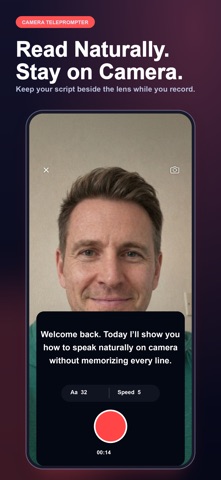



Description by DMITRII ZAUSAEV Written by the developer, not by AppBrain. Click to read.
A CLEARER WAY TO BEGIN
You do not need a complicated system before the first useful result. The US edition leads with the complete product story: the problem, the core workflow, the controls you can rely on, and practical ways to make the tool part of an ordinary day.
HOW IT WORKS
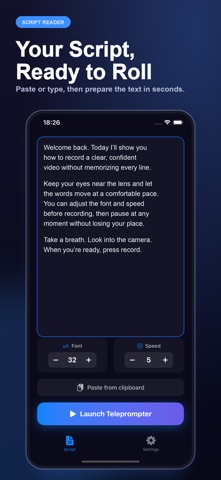
1. Paste or type the script you want to read
2. Choose the front or rear camera
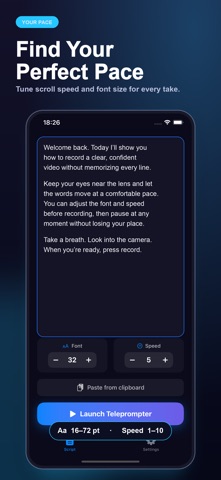
3. Set a comfortable font size and scrolling speed
4. Record in portrait or landscape and pause when needed
5. Save the finished video to Photos for editing or sharing
WHAT YOU CAN DO
Each control supports the central job of this camera teleprompter. The app stays focused on features it actually provides, so the description matches the experience after download.
• Scrolling text displayed over the live camera preview
• Front- and rear-camera support
• Adjustable text size for different distances
• Speed control that can match your speaking pace
• Tap-to-pause control during a take
• Portrait recording for short-form and mobile video
• Landscape recording for lessons, interviews and presentations
• Direct recording without moving between separate apps
• Saving to Photos so your existing editing workflow stays available
• A focused set of controls that is quick to prepare before recording
A READING WORKFLOW FOR REAL RECORDINGS
A teleprompter app helps you keep the next line near the lens without hiding the live camera view.
Use the script reader for an introduction, lesson, product demo, prepared answer, or direct-to-camera update.
The teleprompter app keeps speed and type size available before you begin a take.
A clear script reader lets you focus on meaning, pacing, and eye contact instead of memorizing every line.
Open the teleprompter app, paste the copy, choose a camera, and confirm the frame before recording.
The script reader can move slowly for careful instruction or faster for a short announcement.
During a difficult line, pause the teleprompter app, reset your delivery, and continue when ready.
The script reader remains visible over the live preview, so your words and framing stay in one place.
Choose portrait in the teleprompter app for mobile clips and landscape for a class, interview, or presentation.
Adjust the script reader font for the distance between you and the phone.
The teleprompter app records with the front or rear camera according to the shot you need.
Break long copy into short script reader paragraphs that are easier to speak naturally.
A teleprompter app cannot deliver the message for you, but it can make the prepared words easier to follow.
Test one script reader paragraph aloud before committing to the full recording.
The teleprompter app saves the completed take to Photos for the editing workflow you already use.
Keep punctuation conversational so the script reader supports pauses that sound intentional.
Return to the teleprompter app when a take needs a slower scroll, larger text, or a cleaner opening.
Concise scrolling text works well for Reels, Shorts, tutorials, course modules, and team messages.
The teleprompter app stays centered on reading and recording rather than adding unsupported writing claims.
When the script reader matches your speaking pace, your gaze can remain steadier near the camera.
Use this camera setup for prepared speech while keeping control of the words, framing, and final take.
Your script and recording remain part of the workflow you control.
Terms of Use: https://www.apple.com/legal/internet-services/itunes/dev/stdeula/