

Palmote is made and published by zehao li. AppBrain is an independent app data site and isn't affiliated with zehao li. The app name, icon, screenshots and description belong to zehao li and are shown as published on the App Store.
AppBrain's verdict
- Last updated
- September 25, 2026
- Size
- 2.21 MB
User feedback
Ratings and reviews on the App StoreComments on Palmote for iOS
We don't have enough comments to show example comments. Please check back later.
Store listing
By zehao li, from the App Store

Description by zehao li Written by the developer, not by AppBrain. Click to read.
TRACKPAD
Move the pointer, tap, scroll with two fingers and drag with a long press. Dedicated left, middle and right mouse buttons and common shortcuts stay within reach.
KEYBOARD
Send text and use modifier keys, arrow keys and shortcuts. Bluetooth typing uses a US keyboard layout: select the ABC input source on your Mac. Chinese, Japanese and other Unicode text are supported through the optional Mac receiver over your local network.
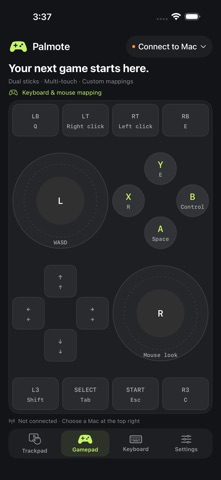
GAME CONTROLS
Use dual sticks, a directional pad, ABXY and shoulder buttons. Customize keyboard mappings, dead zone and sensitivity, and enable motion aiming on supported devices. Keyboard-and-mouse mapping works with games that accept those inputs. The controller interface sends keyboard and mouse input, including configurable mouse buttons. It does not register as a native gamepad or provide analog movement. Games continue to show keyboard and mouse prompts.
TWO CONNECTION OPTIONS
Bluetooth direct connection uses the Mac's built-in Bluetooth input support without a Mac receiver. Keep Palmote open in the foreground and your Mac awake. You can search for your Mac inside Palmote when the phone does not appear in macOS Bluetooth settings. Discovery and initial pairing depend on the devices and existing pairing state.
Local network mode requires the Palmote Mac receiver and a six-digit pairing code. It uses an encrypted connection on your trusted local network.
No account, advertising or cloud service is required. Available in English, Simplified Chinese and Japanese.
Safety and technology
Found in the app by AppBrain- Price
- Free
- App size
- 2.21 MB
- Content rating
- Everyone
Technologies used by Palmote
Releases
Updates seen on the App Store- Version
- 0.1.2
- Launched
- September 2026
No changelog data
Alternatives
Similar apps and more from zehao liAlternatives to Palmote


More from zehao li


Rankings
App Store top chartsApp Store Rankings for Palmote
About the app and developer
About Palmote
Palmote is an utilities app developed by zehao li.
What is the rating of Palmote?
Palmote has no ratings yet.
Is Palmote free?
Palmote is free. The app size is 2.21 MB. The latest version available is 0.1.2. The last update was on September 25, 2026.
What are the requirements for Palmote?
The app has a content rating of Everyone. The app has been available on the App Store since September 2026.
Developer information for zehao li
Address:
Frequently asked questions about Palmote
Is Palmote free?
Yes. Palmote is free on the App Store.
Is Palmote still available?
Yes. Palmote is on the App Store, and the last update we saw was on September 25, 2026.
How large is Palmote?
Palmote is 2.21 MB.
Is Palmote suitable for children?
App Store rates the content of Palmote as suitable for everyone.
Who made Palmote?
Palmote was developed by zehao li. It is listed in the utilities category on the App Store.
What are the best alternatives to Palmote?
People looking at Palmote also look at these utilities apps: BrookSniper2, TouchNow Remote, VPot VPN・Private& Secure Proxy, ShootingPlus, Cosmox Engine.