AppBrain
AppBrain
  • Apps
  • Apps being viewed right now Trending apps today Most popular apps All-time most installed apps Top rated apps iPhone and iPad apps
  • Intelligence ▾
    Intelligence overview → Track any Android app or your whole market
    Track & analyze
    Keyword Tracker & OptimizerTrack & improve Play rankings App Performance ReportOne-off PDF for any app StatisticsFree Android & Play market stats
    Promote your app
    Featured Apps App Links
  • Intelligence
  • Pricing
  • Dashboard
  • Sign up
  • Log in
App Store Apps > Productivity > Paper Scan: Scan to PDF
Paper Scan: Scan to PDF icon

Paper Scan: Scan to PDF

by Meng-Yi Hsu · Productivity · Free
On the App Store since August 2026 · Data updated 2026-11-03

Paper Scan: Scan to PDF is made and published by Meng-Yi Hsu. AppBrain is an independent app data site and isn't affiliated with Meng-Yi Hsu. The app name, icon, screenshots and description belong to Meng-Yi Hsu and are shown as published on the App Store.

AppBrain's verdict

New
Rating on App Store
1.00
1 ratings
Last updated
October 12, 2026
Size
44.9 MB

Paper Scan: Scan to PDF came out 76 days ago. It doesn't have enough ratings yet to judge what users think.

Official page on the App Store

User feedback

Ratings and reviews on the App Store

Comments on Paper Scan: Scan to PDF for iOS

We don't have enough comments to show example comments. Please check back later.

Store listing

By Meng-Yi Hsu, from the App Store
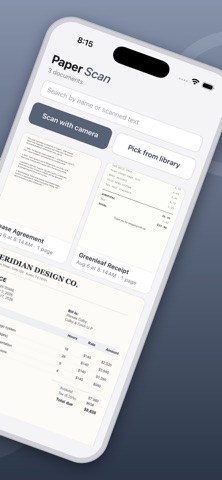
Paper Scan: Scan to PDF Screenshot 1 of 8
Paper Scan: Scan to PDF Screenshot 2 of 8
Paper Scan: Scan to PDF Screenshot 3 of 8
Paper Scan: Scan to PDF Screenshot 4 of 8
Paper Scan: Scan to PDF Screenshot 5 of 8
Paper Scan: Scan to PDF Screenshot 6 of 8
Paper Scan: Scan to PDF Screenshot 7 of 8
Paper Scan: Scan to PDF Screenshot 8 of 8
Screenshots by Meng-Yi Hsu, from the the App Store listing
Description by Meng-Yi Hsu Written by the developer, not by AppBrain. Click to read.
Paper Scan turns your iPhone into a fast, private document scanner. Every scan, every recognized word and every PDF you export stays on your device — none of it is ever uploaded or sold, and scanning and OCR both work with the phone in airplane mode.

No account. No sign-up. No email. No ads. Open it, point it at a page, and scan.

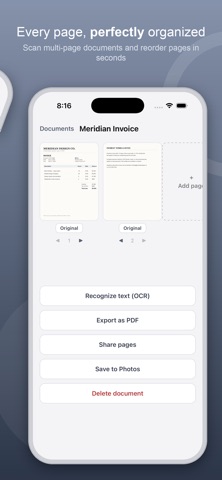
Point the camera at any document and Paper Scan automatically detects its edges and corrects the perspective — no manual cropping needed. Capture multi-page documents in one pass, then reorder, rename, or add more pages any time.

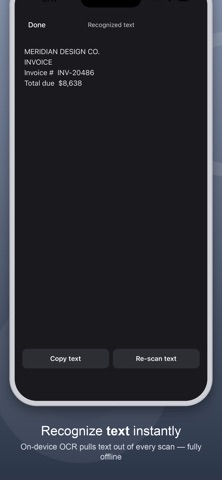
Enhance any scan with a tap: choose Original, Grayscale, Black & White, or Enhance for a clean, readable page. Recognize text right on your device with on-device OCR, then copy it or search your documents by what they say.

When you're ready to share, export any document straight to PDF, share individual pages, or save them to your Photos library.

FEATURES
• Automatic edge detection & perspective correction
• Multi-page documents with reordering
• On-device text recognition (OCR)
• Enhance, Grayscale, and Black & White filters
• Export to PDF
• Share pages or save to Photos
• Search documents by title or recognized text
• Scanning and OCR run entirely offline — your documents never leave your iPhone
• No tracking of you across other companies' apps or websites

BUILT BY ONE PERSON
I built Paper Scan for myself, in a year when AI finally made something like this achievable alone — then kept building whatever people asked for. No team, no investors, and no roadmap written by anyone but the people using it. And no subscription: scanning your own paperwork shouldn't cost a monthly fee.

TELL ME WHAT TO BUILD
See something in another scanner app that you wish this one had? Email mark@vibecode.review. I read every message and I build what people actually ask for — that is how most of this app got here.
Official page on the App Store

Safety and technology

Found in the app by AppBrain
Price
Free
App size
44.9 MB
Content rating
Everyone

Technologies used by Paper Scan: Scan to PDF

Releases

Updates seen on the App Store
Version
2.37
Launched
August 2026

No changelog data

Alternatives

Similar apps and more from Meng-Yi Hsu

Alternatives to Paper Scan: Scan to PDF

Network & System Admin Toolkit icon Network & System Admin Toolkit
luis reynaldo cedeno manzanilla
5.0
$8.99
1 ratings
PDFTape: PDF Scanner & Sign icon PDFTape: PDF Scanner & Sign
Phallinda Kong
0.0
Free
Subara: Subscription Manager icon Subara: Subscription Manager
Eren GUN
0.0
Free
Origami PDF: Scan & Sign icon Origami PDF: Scan & Sign
Thu Trang Nguyen
0.0
Free
WorkProof: Service Reports icon WorkProof: Service Reports
Hoa Bui Duy
0.0
Free
Bramble: Password Manager icon Bramble: Password Manager
Webvana Inc.
4.7
Free
6 ratings
Voice to Text: AI Transcribe icon Voice to Text: AI Transcribe
Afsha jahangeer
0.0
Free
Clipo - Clipboard & Keyboard icon Clipo - Clipboard & Keyboard
Adel Jodalah
0.0
Free

More from Meng-Yi Hsu

Copy History: Clipboard icon Copy History: Clipboard
Meng-Yi Hsu
5.0
Free
1 ratings
Gym Log: Lift & PR Tracker icon Gym Log: Lift & PR Tracker
Meng-Yi Hsu
0.0
Free
Water Sort: Pour Puzzle icon Water Sort: Pour Puzzle
Meng-Yi Hsu
0.0
Free
SleepTracker: Watch or Phone icon SleepTracker: Watch or Phone
Meng-Yi Hsu
0.0
Free
Focus Hour: To Do List Planner icon Focus Hour: To Do List Planner
Meng-Yi Hsu
0.0
Free

Rankings

App Store top charts

App Store Rankings for Paper Scan: Scan to PDF

This app is not ranked

About the app and developer

About Paper Scan: Scan to PDF

Paper Scan: Scan to PDF is a productivity app developed by Meng-Yi Hsu.

What is the rating of Paper Scan: Scan to PDF?

Paper Scan: Scan to PDF is rated 1.00 out of 5 stars, based on one rating ratings.

Is Paper Scan: Scan to PDF free?

Paper Scan: Scan to PDF is free. The app size is 44.91 MB. The latest version available is 2.37. The last update was on October 12, 2026.

What are the requirements for Paper Scan: Scan to PDF?

The app has a content rating of Everyone. The app has been available on the App Store since August 2026.

Developer information for Meng-Yi Hsu

Meng-Yi Hsu

Address:

Share Paper Scan: Scan to PDF

Today's trending apps Popular Productivity Apps Price drops on Google Play Apps other people are watching Top new apps
Network & System Admin Toolkit icon Network & System Admin Toolkit
PDFTape: PDF Scanner & Sign icon PDFTape: PDF Scanner & Sign
Subara: Subscription Manager icon Subara: Subscription Manager
Origami PDF: Scan & Sign icon Origami PDF: Scan & Sign
WorkProof: Service Reports icon WorkProof: Service Reports
Bramble: Password Manager icon Bramble: Password Manager
Voice to Text: AI Transcribe icon Voice to Text: AI Transcribe
Clipo - Clipboard & Keyboard icon Clipo - Clipboard & Keyboard
Overview Alternatives Reviews Rankings Technology
AppBrain Intelligence premium content

Subscribe now to get full and unlimited access to AppBrain Intelligence. You'll have access to:

  • App Intelligence dashboard (performance timeline, competitor comparison, country rankings, insight cards)
  • Detailed ranking data per app
  • Full timeline per developer
  • Device market shares data per country
  • Unlimited keyword tracking
1 Month

$75/mo
(billed every month)

SAVE 0%
Subscribe
3 Months

$65/mo
($195 billed every 3 months)

SAVE 13%
Subscribe
1 Year

$57.50/mo
($690 billed every year)

SAVE 23%
Subscribe
Each subscription will automatically renew 3 days before the expiration date for the same time period. Subscriptions can be cancelled at any time before the renewal.

AppBrain is an app data site, we track rankings, ratings, installs for all apps and games on Google Play and the App Store. AppBrain doesn't host app files or APKs, all install links go directly to the official store. All trademarks are owned by their respective owners.

More apps

  • Top Android apps being viewed
  • An Post: Track & Manage
  • Smart Counter + Widget
  • View Donna AI Song & Music Maker

App statistics

  • Android statistics
  • Google Play Developer stats
  • Trending Android Apps
  • Trending iOS apps
  • Top popular Apps
  • Buy the best Android phone
  • Buy & sell app businesses

About AppBrain

  • Contact
  • Privacy
  • Documentation
  • DMCA takedowns
  • Blog
  • Android Interstitial Ads: Best practices to optimize your app's earnings
© 2010-2026 - AppBrain