



AppBrain's verdict
- Last updated
- September 9, 2026
- Size
- 2.46 MB
User feedback
Ratings and reviews on the App StoreComments on PaperTrail: Document Organizer for iOS
We don't have enough comments to show example comments. Please check back later.
Store listing
By Christopher Kirkland, from the App StoreDescription by Christopher Kirkland Written by the developer, not by AppBrain. Click to read.
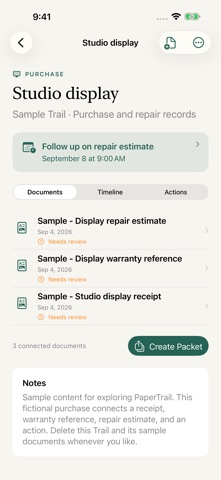
PaperTrail brings receipts, warranties, reference documents and the details behind them into a private workspace for iPhone and iPad. Build a Trail around a purchase, a project or a part of your life, then keep its documents, notes and next actions together.
CAPTURE AND FIND
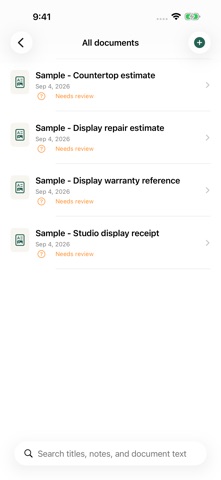
Scan multiple pages with your camera, choose photos, import files or use Save to PaperTrail from another app. Keep original PDFs and images intact, then search their text with on-device text recognition.
REVIEW THE DETAILS
Check suggested merchants, dates, totals and currencies against the original. Suggestions stay unconfirmed until you review them, and extracted dates never create reminders automatically.
CONNECT YOUR PAPERWORK
Organize Trails into collections, add tags and notes, and link one document to several Trails without duplicating its original. Use Inbox to find documents that need attention and Upcoming to see your next actions.
REMEMBER WHAT COMES NEXT
Add your own deadlines and enable optional local reminders. Notification details are private by default. Actions remain available in the app if you decline notification permission.
MAKE A USEFUL PDF PACKET
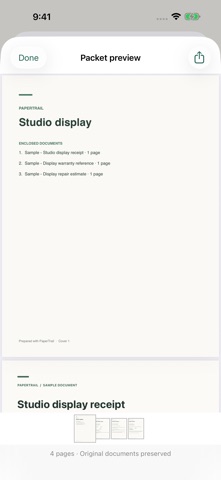
Select documents, arrange their order and add an optional cover and summary. Preview the finished PDF, then share it when you need to send a repair history, purchase record or project packet.
KEEP CONTROL OF YOUR LIBRARY
Use optional Face ID, Touch ID or device-passcode authentication. PaperTrail hides document content when inactive and preserves deleted documents in Trash until you choose permanent deletion.
Your library is stored on this device, with no PaperTrail account, advertising, analytics SDK or cloud AI. PaperTrail is free, with no subscriptions or in-app purchases.
BACK UP AND MOVE DELIBERATELY
Export a manual backup to keep a recovery copy or transfer your library to another device. Library files are excluded from automatic device backups, including iCloud Backup, so keep a manual backup somewhere safe. There is no automatic sync between iPhone and iPad.
Manual backups are not password-protected. Shared files and copies saved to cloud providers are outside PaperTrail's app lock. Restore validates a backup before replacing the current library; it does not merge libraries.
Start with your own documents or explore the optional, clearly labeled sample library in Settings.
Requires iOS or iPadOS 18 or later. Camera scanning requires a supported device. Supports PDF, JPEG, PNG, HEIC/HEIF and TIFF originals up to 100 MB each. Manual backups support libraries up to 1 GB.
Safety and technology
Found in the app by AppBrain- Price
- Free
- App size
- 2.46 MB
- Content rating
- Everyone
Technologies used by PaperTrail: Document Organizer
Releases
Updates seen on the App Store- Version
- 1.0.0
- Launched
- September 2026
No changelog data
Alternatives
Similar apps and more from Christopher KirklandAlternatives to PaperTrail: Document Organizer


More from Christopher Kirkland


Rankings
App Store top chartsApp Store Rankings for PaperTrail: Document Organizer
About the app and developer
About PaperTrail: Document Organizer
PaperTrail: Document Organizer is a productivity app developed by Christopher Kirkland.
User Ratings
The app has no ratings yet.
App Information
PaperTrail: Document Organizer is freely available from the App Store. The app size is 2.46 MB. The latest version available is 1.0.0. The last update was on September 9, 2026.
Technical Requirements
The app has a content rating of Everyone. The app has been available on the App Store since September 2026.
PaperTrail: Document Organizer is made and published by Christopher Kirkland. AppBrain is an independent app data site and isn't affiliated with Christopher Kirkland. The app name, icon, screenshots and description belong to Christopher Kirkland and are shown as published on the App Store.
Developer information for Christopher Kirkland
Address: