




AppBrain's verdict
- Last updated
- August 17, 2026
- Size
- 50.1 MB
User feedback
Ratings and reviews on the App StoreComments on Passe-Finder Authenticator for iOS
We don't have enough comments to show example comments. Please check back later.
Store listing
By Anacreon, from the App StoreDescription by Anacreon Written by the developer, not by AppBrain. Click to read.
Passe-Finder Authenticator est l'application qui vous accompagne pour gérer vos codes de sécurité à usage unique, ces codes à six chiffres demandés par de nombreux services lorsque vous vous connectez. Tout ce qui se passe dans l'application reste sous votre contrôle, en permanence.
CE QUE VOUS POUVEZ FAIRE :
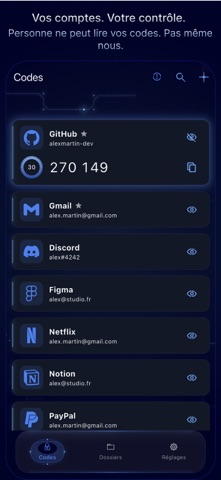
• Générer les codes 2FA pour tous vos comptes en ligne compatibles, en quelques secondes.
• Organiser vos comptes par dossiers, pour les retrouver rapidement même quand vous en avez beaucoup.
• Marquer vos comptes les plus utilisés en favoris, pour les afficher en haut de votre liste.
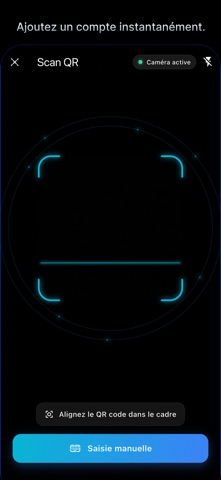
• Ajouter un compte de plusieurs façons : en scannant un QR code avec l'appareil photo, en important une image depuis votre galerie, en collant les informations depuis le presse-papier, ou en saisissant les données manuellement.
• Exporter une sauvegarde chiffrée de vos comptes, protégée par un mot de passe que vous choisissez, pour la restaurer plus tard ou changer d'appareil sans perdre vos accès.
VOTRE VIE PRIVÉE EST AU CENTRE DE NOTRE CONCEPTION :
Personne, pas même les personnes qui ont conçu l'application, ne peut accéder à votre liste de comptes ni à votre historique d'utilisation. Vos données sont chiffrées sur votre appareil avec des standards reconnus par les communautés de sécurité informatique.
Lorsque vous créez une sauvegarde, elle est protégée par un mot de passe que vous seul connaissez. Ce mot de passe ne quitte jamais votre appareil. L'application ne collecte aucune statistique d'utilisation, aucun identifiant publicitaire, aucune donnée de profilage.
UNE INTERFACE PENSÉE POUR TOUS :
• Compatible avec les lecteurs d'écran (VoiceOver, accessibilité native iOS).
• Tailles de texte adaptables aux préférences système.
• Navigation au clavier et au geste, sans dépendance à la couleur.
• Affichage cohérent en mode clair et en mode sombre.
POUR LES UTILISATEURS AVERTIS :
• Standards ouverts : RFC 6238 (TOTP) et RFC 4226 (HOTP).
• Cryptographie de sauvegarde : Argon2id pour la dérivation de clé, XChaCha20-Poly1305 pour le chiffrement authentifié.
• Format de sauvegarde documenté et interopérable, pour vous permettre de migrer vers un autre outil compatible si vous le souhaitez un jour.
• Import direct depuis les formats Aegis et compatibles.
CE QUE NOUS NE FAISONS PAS :
• Pas de profilage publicitaire.
• Pas de partage de vos données avec des tiers.
• Pas de récupération automatique du mot de passe que vous avez choisi pour vos sauvegardes : c'est votre responsabilité de le conserver en lieu sûr.
TÉLÉCHARGEZ ET COMMENCEZ :
L'application est gratuite. Vous pouvez ajouter votre premier compte en quelques secondes après l'installation, et exporter une sauvegarde dès que vous avez plusieurs comptes à protéger.
Pour en savoir plus, consultez notre site officiel : passe-finder.app
Safety and technology
Found in the app by AppBrain- Price
- Free
- App size
- 50.1 MB
- Content rating
- Everyone
Technologies used by Passe-Finder Authenticator
Releases
Updates seen on the App Store- Version
- 1.1.0
- Launched
- June 2026
No changelog data
Alternatives
Similar apps and more from AnacreonAlternatives to Passe-Finder Authenticator




Rankings
App Store top chartsApp Store Rankings for Passe-Finder Authenticator
About the app and developer
About Passe-Finder Authenticator
Passe-Finder Authenticator is an utilities app developed by Anacreon.
User Ratings
The app has no ratings yet.
App Information
Passe-Finder Authenticator is freely available from the App Store. The app size is 50.08 MB. The latest version available is 1.1.0. The last update was on August 17, 2026.
Technical Requirements
The app has a content rating of Everyone. The app has been available on the App Store since June 2026.
Passe-Finder Authenticator is made and published by Anacreon. AppBrain is an independent app data site and isn't affiliated with Anacreon. The app name, icon, screenshots and description belong to Anacreon and are shown as published on the App Store.
Developer information for Anacreon
Address: