AppBrain
AppBrain
  • Apps
  • Apps being viewed right now Trending apps today Most popular apps All-time most installed apps Top rated apps iPhone and iPad apps
  • Intelligence ▾
    Intelligence overview → Track any Android app or your whole market
    Track & analyze
    Keyword Tracker & OptimizerTrack & improve Play rankings App Performance ReportOne-off PDF for any app StatisticsFree Android & Play market stats
    Promote your app
    Featured Apps App Links
  • Intelligence
  • Pricing
  • Dashboard
  • Sign up
  • Log in
App Store Apps > Utilities > PC Controller: Remote Mouse
App profile & analytics · Utilities · Data updated 2026-10-19
PC Controller: Remote Mouse icon

PC Controller: Remote Mouse

by Malkane · Free · Version 2.3.1
Availability On the App Store since September 2026 ↗
Rating on App Store
–
Rating
–
0 reviews
Best rank
–
not in the top lists
Last updated
October 13, 2026
2.3.1

PC Controller: Remote Mouse is made and published by Malkane. AppBrain is an independent app data site and isn't affiliated with Malkane. The app name, icon, screenshots and description belong to Malkane and are shown as published on the App Store.

About PC Controller: Remote Mouse

PC Controller: Remote Mouse is an utilities app developed by Malkane.

What is the rating of PC Controller: Remote Mouse?

PC Controller: Remote Mouse has no ratings yet.

Is PC Controller: Remote Mouse free?

PC Controller: Remote Mouse is free. The app size is 18.06 MB. The latest version available is 2.3.1. The last update was on October 13, 2026.

What are the requirements for PC Controller: Remote Mouse?

The app has a content rating of Everyone. The app has been available on the App Store since September 2026.

Description by Malkane (from the App Store)
PC Controller turns your iPhone, iPad and Apple Watch into a remote control for your Windows PC or Mac. Move the mouse, type, change the volume, switch monitors, move files and put the computer to sleep, all over your own Wi-Fi, with no cloud, no account and nothing to sign up for.

Install the free agent on your computer, scan the QR code it shows, and you're paired. The app also lists the computers it finds on your network, so there's nothing to type.

TRACKPAD AND KEYBOARD
• A full-screen trackpad: move, tap, two-finger right-click, scroll, drag and pinch to zoom
• Type with the iPhone keyboard, emoji and dictation included
• An extended keypad with the keys a phone doesn't have: arrows, Esc, Tab, Home, End, Delete, Ctrl, Alt and Win
• Build your own shortcuts and fire any key combination with one tap
• On Windows it all works on the login screen too, before anyone has signed in

POWER
• Lock, sleep, wake, shut down, restart or log off
• Wake a sleeping PC over Wake-on-LAN, and let the app set up the PC so it wakes from a full shutdown too
• Schedule it: "Sleep in 30 minutes" keeps counting down on the computer after you've left, with a live countdown on your Lock Screen and in the Dynamic Island
• Set your home once and the phone can wake the PC as you arrive and lock it as you leave, decided entirely on the device

SOUND AND MEDIA
• Master volume and mute, plus a mixer with its own slider for every app and every output device
• Switch the default speaker, and mute the microphone for every app at once
• See what's playing, with album art, a scrubber and transport controls that drive Spotify, browsers and any other player

SCREENS
• Turn each monitor on or off, choose the primary, and set brightness, resolution and refresh rate
• Save a display arrangement and bring it back with one tap
• Grab a screenshot of any display and save it to Photos or share it

FILES AND CLIPBOARD
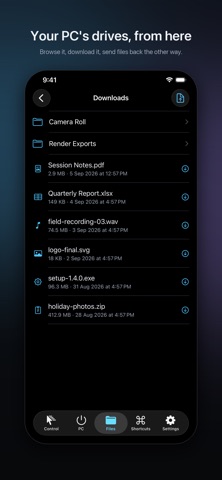
• Browse the computer's folders and drives, download files with live progress, then preview, share or save them
• Send photos, videos and files to the computer, from the app or straight from the share sheet in any other app
• Push the phone's clipboard to the PC or pull the PC's to the phone, text or image
• Send a link and it opens in the computer's browser

AND MORE
• Bluetooth: see what's paired and connected, then connect, disconnect, scan and pair
• Vitals: CPU, memory, disk, battery, uptime and the processes using the most memory, with a swipe to end one
• Apps: see what's open on the computer, bring one forward, minimize or close it
• Siri: "Hey Siri, lock my PC", plus Home Screen, Lock Screen and Control Center buttons for Lock, Wake, Mute and Mute Mic
• Apple Watch: trackpad, media, power, monitors, mixer, shortcuts and clipboard on your wrist, and it finds the PC on its own when the phone isn't around
• iPad: a dashboard that puts the whole machine on one screen
• Available in 15 languages

PRIVATE BY DESIGN
There is no server. The phone and watch talk directly to the agent on your computer over your Wi-Fi, VPN or Bluetooth, and the pairing token lives in your Keychain. PC Controller collects nothing: no analytics, no telemetry, no account.

WHAT YOU NEED
The free PC Controller agent, for Windows 11 or macOS 13 and later, from https://pccontroller.rymanit.com. The phone and the computer must be on the same network, or connected through a VPN or Bluetooth.

PRICING
Every feature is free for 7 days, with no card up front. After that, choose PC Controller Pro — Monthly (USD 0.99 per month), PC Controller Pro — Yearly (USD 8.99 per year) or PC Controller Pro — Lifetime, a one-time purchase (USD 19.99). Subscriptions renew automatically unless cancelled at least 24 hours before the end of the current period, and can be managed in your App Store account settings.

Privacy policy: https://pccontroller.rymanit.com/privacy.html
Terms of use: https://www.apple.com/legal/internet-services/itunes/dev/stdeula/
Show more Show less

Screenshots

PC Controller: Remote Mouse Screenshot 1 of 10
PC Controller: Remote Mouse Screenshot 2 of 10
PC Controller: Remote Mouse Screenshot 3 of 10
PC Controller: Remote Mouse Screenshot 4 of 10
PC Controller: Remote Mouse Screenshot 5 of 10
PC Controller: Remote Mouse Screenshot 6 of 10
PC Controller: Remote Mouse Screenshot 7 of 10
PC Controller: Remote Mouse Screenshot 8 of 10
PC Controller: Remote Mouse Screenshot 9 of 10
PC Controller: Remote Mouse Screenshot 10 of 10
Screenshots by Malkane, from the the App Store listing
Official page on the App Store

Alternatives to PC Controller: Remote Mouse

Tappio: Computer Remote icon Tappio: Computer Remote
Maaya Labs LLC
5.0
Free
2 ratings
GridBar: Tile Shelf & Macros icon GridBar: Tile Shelf & Macros
Jonas Hoettler
0.0
Free
Airnest: Remote for Mac icon Airnest: Remote for Mac
Erwan Querval
5.0
Free
1 ratings
RPad – Remote Trackpad icon RPad – Remote Trackpad
Nurhak Altin
0.0
Free
SOTF Map | MetaForge icon SOTF Map | MetaForge
Metaforge Gaming Ltd
0.0
Free
Magnetic Meter: Field Scan icon Magnetic Meter: Field Scan
Kevser Bozdag
0.0
Free
TPickup Assistant icon TPickup Assistant
志威 陈
0.0
Free
Remotiq PC Remote icon Remotiq PC Remote
Umit Cagdas
0.0
Free

Changelog of PC Controller: Remote Mouse

No changelog data

Developer information for Malkane

Malkane

Address:

Share PC Controller: Remote Mouse

Comments on PC Controller: Remote Mouse for iOS

We don't have enough comments to show example comments. Please check back later.

App Store Rankings for PC Controller: Remote Mouse

This app is not ranked

Technologies used by PC Controller: Remote Mouse

Apps other people are watching Price drops on Google Play Today's trending apps Popular Utilities Apps Top new apps
Tappio: Computer Remote icon Tappio: Computer Remote
GridBar: Tile Shelf & Macros icon GridBar: Tile Shelf & Macros
Airnest: Remote for Mac icon Airnest: Remote for Mac
RPad – Remote Trackpad icon RPad – Remote Trackpad
SOTF Map | MetaForge icon SOTF Map | MetaForge
Magnetic Meter: Field Scan icon Magnetic Meter: Field Scan
TPickup Assistant icon TPickup Assistant
Remotiq PC Remote icon Remotiq PC Remote
Overview Alternatives Reviews Rankings Technology
AppBrain Intelligence premium content

Subscribe now to get full and unlimited access to AppBrain Intelligence. You'll have access to:

  • App Intelligence dashboard (performance timeline, competitor comparison, country rankings, insight cards)
  • Detailed ranking data per app
  • Full timeline per developer
  • Device market shares data per country
  • Unlimited keyword tracking
1 Month

$75/mo
(billed every month)

SAVE 0%
Subscribe
3 Months

$65/mo
($195 billed every 3 months)

SAVE 13%
Subscribe
1 Year

$57.50/mo
($690 billed every year)

SAVE 23%
Subscribe
Each subscription will automatically renew 3 days before the expiration date for the same time period. Subscriptions can be cancelled at any time before the renewal.

AppBrain is an app data site, we track rankings, ratings, installs for all apps and games on Google Play and the App Store. AppBrain doesn't host app files or APKs, all install links go directly to the official store. All trademarks are owned by their respective owners. As an Amazon Associate AppBrain earns from qualifying purchases.

More apps

  • Top Android apps being viewed
  • PC Builder: AI Analysis & FPS
  • Bottle Shooter Expert 3D
  • JuJuBit: AI Custom 3D Figures

App statistics

  • Android statistics
  • Google Play Developer stats
  • Trending Android Apps
  • Trending iOS apps
  • Top popular Apps
  • Buy the best Android phone
  • Buy & sell app businesses

About AppBrain

  • Contact
  • Privacy
  • Documentation
  • DMCA takedowns
  • Articles
  • Blog
  • How to improve the earnings of your ad units
© 2010-2026 - AppBrain