AppBrain
AppBrain
  • Apps
  • Apps being viewed right now Trending apps today Most popular apps All-time most installed apps Top rated apps iPhone and iPad apps
  • Intelligence ▾
    Intelligence overview → Track any Android app or your whole market
    Track & analyze
    Keyword Tracker & OptimizerTrack & improve Play rankings App Performance ReportOne-off PDF for any app StatisticsFree Android & Play market stats
    Promote your app
    Featured Apps App Links
  • Intelligence
  • Pricing
  • Dashboard
  • Sign up
  • Log in
App Store Apps > Utilities > PDF AI - Edit, Scan & Sign
App profile & analytics · Utilities · Data updated 2026-10-02
PDF AI - Edit, Scan & Sign icon

PDF AI - Edit, Scan & Sign

by Thao Dang · Free · Version 1.5
Availability On the App Store since March 2026 ↗
Rating on App Store
3.67/5
3 ratings
Rating
3.67
3 reviews
Best rank
–
not in the top lists
Last updated
April 13, 2026
1.5
AppBrain's verdict

It doesn't have enough ratings yet to judge what users think.

PDF AI - Edit, Scan & Sign is made and published by Thao Dang. AppBrain is an independent app data site and isn't affiliated with Thao Dang. The app name, icon, screenshots and description belong to Thao Dang and are shown as published on the App Store.

About PDF AI - Edit, Scan & Sign

PDF AI - Edit, Scan & Sign is an utilities app developed by Thao Dang.

User Ratings

PDF AI - Edit, Scan & Sign is rated 3.67 out of 5 stars. The rating is based on 3 ratings.

App Information

PDF AI - Edit, Scan & Sign is freely available from the App Store. The app size is 44.24 MB. The latest version available is 1.5. The last update was on April 13, 2026.

Technical Requirements

The app has a content rating of Everyone. The app has been available on the App Store since March 2026.

Description by Thao Dang (from the App Store)
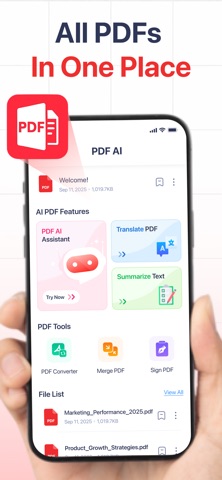
PDF AI: Edit, Scan & Sign is designed for people who work with documents every day. Whether you need to scan paperwork into PDF, translate a document you received, summarize long pages, sign a form, or combine multiple files before sending, this app helps you complete the full PDF workflow on your iPhone.

1. AI PDF ASSISTANT & TOOLS*
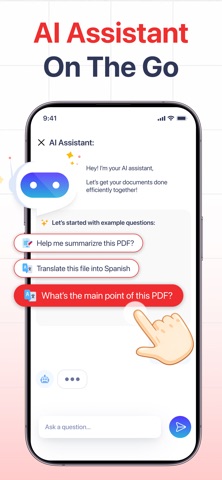
When you don’t have time to read everything, AI helps you understand PDF content faster and more clearly:
• Chat with AI: Ask questions, explain difficult sections, and extract key points based on your document.
• Translate PDF: Translate documents into multiple languages instantly for quick review.
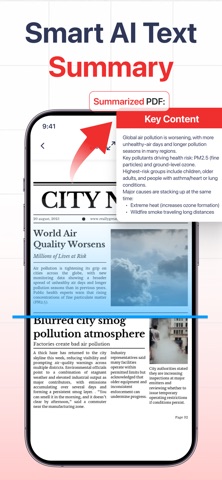
• Summarize Text: Generate structured summaries to capture main ideas without reading every page.

2. ESSENTIAL PDF TOOLS
• Merge & Split: Combine multiple PDFs into one or split them into smaller files.
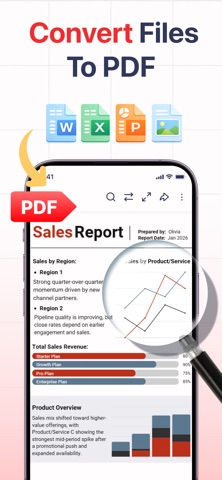
• PDF Converter:* Convert Image, Word, and Excel files into high-quality PDFs.
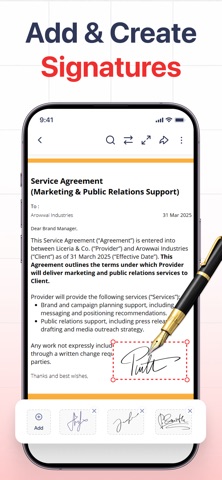
• Protect & Sign: Add passwords for privacy and easily insert your signature on any page.
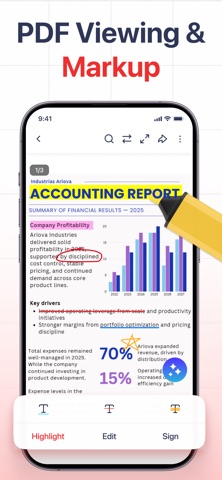
• Edit & Highlight: Mark key lines and add text or quick notes directly on your phone.

3. BUILT FOR DAILY WORKFLOWS
Perfect for students summarizing study materials, office workers signing approvals, and freelancers preparing client documents on the go.

(*) SUBSCRIPTION & LIMITS
• PDF AI and advanced tools have a weekly free usage limit. To unlock unlimited access to AI Features (Chat, Translate, Summarize), the PDF Converter, and enjoy a completely Ad-Free experience, we offer flexible Weekly and Monthly Premium Subscriptions.
• You can manage and cancel your subscriptions by going to your App Store Account Settings after purchase.

Privacy Policy: https://pdf-document-editor.netlify.app/policy/
Terms of Use: https://pdf-document-editor.netlify.app/term/

Download PDF AI: Edit, Scan & Sign to handle documents faster with fewer steps!
Show more Show less

Screenshots

PDF AI - Edit, Scan & Sign Screenshot 1 of 6
PDF AI - Edit, Scan & Sign Screenshot 2 of 6
PDF AI - Edit, Scan & Sign Screenshot 3 of 6
PDF AI - Edit, Scan & Sign Screenshot 4 of 6
PDF AI - Edit, Scan & Sign Screenshot 5 of 6
PDF AI - Edit, Scan & Sign Screenshot 6 of 6
Screenshots by Thao Dang, from the the App Store listing
Official page on the App Store

Alternatives to PDF AI - Edit, Scan & Sign

PDFly - PDF Editor & Scanner icon PDFly - PDF Editor & Scanner
野 徐
5.0
Free
2 ratings
PDF Editor & Scanner: DocKit icon PDF Editor & Scanner: DocKit
Nadezhda Belozerova
5.0
Free
5 ratings
Ai Phone Cleaner - Cleanify icon Ai Phone Cleaner - Cleanify
Terafort US LLC
5.0
Free
1 ratings
Document Scanner - PDF Convert icon Document Scanner - PDF Convert
DUY KY TRADING PRODUCTION ONE MEMBER COMPANY LIMITED
4.4
Free
7 ratings
PDF Reader - EZ Read PDF icon PDF Reader - EZ Read PDF
欣 翁
3.7
Free
15 ratings
Scanner PDF:  Scan Docs & PDF icon Scanner PDF: Scan Docs & PDF
UMLIMITED BURST
5.0
Free
1 ratings
Superpdf:smartpdf icon Superpdf:smartpdf
Shaanxi Saiwangdao Network Technology Co., Ltd
0.0
Free
Phone Cleaner - Space Cleaner icon Phone Cleaner - Space Cleaner
EXTRA MART LLC
4.3
Free
22 ratings

More from Thao Dang

Step Counter - Daily Pedometer icon Step Counter - Daily Pedometer
Thao Dang
4.3
Free
95 ratings
SmartNote - AI Note Taker icon SmartNote - AI Note Taker
Thao Dang
4.2
Free
10 ratings

Changelog of PDF AI - Edit, Scan & Sign

No changelog data

Developer information for Thao Dang

Thao Dang

Address:

Share PDF AI - Edit, Scan & Sign

Comments on PDF AI - Edit, Scan & Sign for iOS

We don't have enough comments to show example comments. Please check back later.

App Store Rankings for PDF AI - Edit, Scan & Sign

This app is not ranked

Technologies used by PDF AI - Edit, Scan & Sign

Frequently asked questions about PDF AI - Edit, Scan & Sign

Is PDF AI - Edit, Scan & Sign free?

Yes. PDF AI - Edit, Scan & Sign is free on the App Store.

Is PDF AI - Edit, Scan & Sign still available?

Yes. PDF AI - Edit, Scan & Sign is on the App Store, and the last update we saw was on April 13, 2026.

How large is PDF AI - Edit, Scan & Sign?

PDF AI - Edit, Scan & Sign is 44.24 MB.

Is PDF AI - Edit, Scan & Sign suitable for children?

App Store rates the content of PDF AI - Edit, Scan & Sign as suitable for everyone.

How do people rate PDF AI - Edit, Scan & Sign?

PDF AI - Edit, Scan & Sign scores 3.67 out of 5 stars, from 3 ratings on the App Store.

Who made PDF AI - Edit, Scan & Sign?

PDF AI - Edit, Scan & Sign was developed by Thao Dang. It is listed in the utilities category on the App Store.

What are the best alternatives to PDF AI - Edit, Scan & Sign?

People looking at PDF AI - Edit, Scan & Sign also look at these utilities apps: PDFly - PDF Editor & Scanner, PDF Editor & Scanner: DocKit, Ai Phone Cleaner - Cleanify, Document Scanner - PDF Convert, PDF Reader - EZ Read PDF.

Top new apps Price drops on Google Play Apps other people are watching Today's trending apps Popular Utilities Apps
PDFly - PDF Editor & Scanner icon PDFly - PDF Editor & Scanner
PDF Editor & Scanner: DocKit icon PDF Editor & Scanner: DocKit
Ai Phone Cleaner - Cleanify icon Ai Phone Cleaner - Cleanify
Document Scanner - PDF Convert icon Document Scanner - PDF Convert
PDF Reader - EZ Read PDF icon PDF Reader - EZ Read PDF
Scanner PDF:  Scan Docs & PDF icon Scanner PDF: Scan Docs & PDF
Superpdf:smartpdf icon Superpdf:smartpdf
Phone Cleaner - Space Cleaner icon Phone Cleaner - Space Cleaner
Overview Alternatives Reviews Rankings Technology
AppBrain Intelligence premium content

Subscribe now to get full and unlimited access to AppBrain Intelligence. You'll have access to:

  • App Intelligence dashboard (performance timeline, competitor comparison, country rankings, insight cards)
  • Detailed ranking data per app
  • Full timeline per developer
  • Device market shares data per country
  • Unlimited keyword tracking
1 Month

$75/mo
(billed every month)

SAVE 0%
Subscribe
3 Months

$65/mo
($195 billed every 3 months)

SAVE 13%
Subscribe
1 Year

$57.50/mo
($690 billed every year)

SAVE 23%
Subscribe
Each subscription will automatically renew 3 days before the expiration date for the same time period. Subscriptions can be cancelled at any time before the renewal.

AppBrain is an app data site, we track rankings, ratings, installs for all apps and games on Google Play and the App Store. AppBrain doesn't host app files or APKs, all install links go directly to the official store. All trademarks are owned by their respective owners.

More apps

  • Top Android apps being viewed
  • Poppit Relaxation Fidget Games
  • Bulldozer Demolition Simulator
  • View Drama Shorts: Reels & TV

App statistics

  • Android statistics
  • Google Play Developer stats
  • Trending Android Apps
  • Trending iOS apps
  • Top popular Apps
  • Buy the best Android phone
  • Buy & sell app businesses

About AppBrain

  • Contact
  • Privacy
  • Documentation
  • DMCA takedowns
  • Articles
  • Blog
  • Free App-Ads.Txt Validation
© 2010-2026 - AppBrain