PDF Compressor ・ PDF Converter
PDF Compressor ・ PDF Converter is made and published by RIJIPUPS OU. AppBrain is an independent app data site and isn't affiliated with RIJIPUPS OU. The app name, icon, screenshots and description belong to RIJIPUPS OU and are shown as published on the App Store.
AppBrain's verdict
- Rating on App Store
- 4.82
- 71 ratings
- Last updated
- May 18, 2026
It doesn't have enough ratings yet to judge what users think.
Rankings
App Store top chartsApp Store Rankings for PDF Compressor ・ PDF Converter
Competitors
Similar apps and more from RIJIPUPS OUMore from RIJIPUPS OU
Releases
Updates seen on the App Store- Version
- 1.0.18
- Launched
- July 2025
No changelog data
User feedback
Ratings and reviews on the App StoreComments on PDF Compressor ・ PDF Converter for iOS
We don't have enough comments to show example comments. Please check back later.
Technology
Found in the app by AppBrain- Price
- Free
- App size
- 41.3 MB
- Content rating
- Everyone
Technologies used by PDF Compressor ・ PDF Converter
About the app and developer
About PDF Compressor ・ PDF Converter
PDF Compressor ・ PDF Converter is a productivity app developed by RIJIPUPS OU.
What is the rating of PDF Compressor ・ PDF Converter?
PDF Compressor ・ PDF Converter is rated 4.82 out of 5 stars, based on 71 ratings.
Is PDF Compressor ・ PDF Converter free?
PDF Compressor ・ PDF Converter is free. The app size is 41.28 MB. The latest version available is 1.0.18. The last update was on May 18, 2026.
What are the requirements for PDF Compressor ・ PDF Converter?
The app has a content rating of Everyone. The app has been available on the App Store since July 2025.
Developer information for RIJIPUPS OU
Address:
Store listing
By RIJIPUPS OU, from the App StoreDescription by RIJIPUPS OU Written by the developer, not by AppBrain. Click to read.
Here’s what you can do:
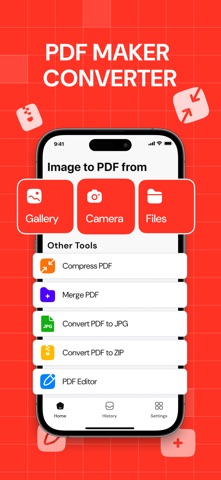
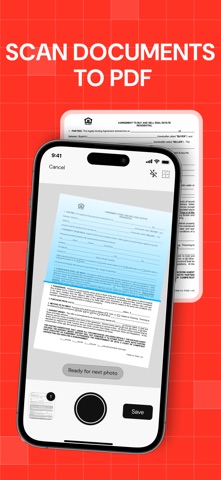
・ Convert photos, files, or camera scans into PDFs in seconds
・ Use the smart camera (Apple Vision-powered) to auto-detect document edges, auto-shoot, crop, and apply filters
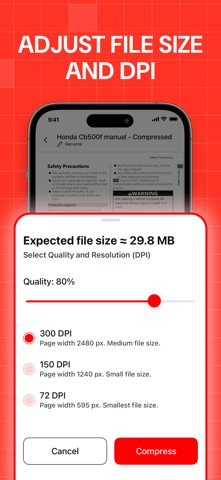
・ Compress PDFs with flexible quality settings — save space without losing clarity
・ Merge multiple PDFs into one clean file
・ Convert PDFs to JPG (with quality options) or ZIP archives
・ Keep your conversion history neatly organized — search and sort your files easily
・ Lock sensitive documents with a password
・ Reorder or delete pages
・ Edit, adjust and enhance PDF pages
Super optimized processing will help you process hundreds of pages without delays and errors
Students scanning notes. Office workers tidying paperwork. Freelancers sending contracts. Anyone who wants full control over their PDFs — right from their phone.
If you want your PDFs exactly the way you want them — with no fuss — PDF Converter is for you.
Download it today and see how easy PDF can be.
Privacy Policy: http://rjpups.com/converter/privacypolicy
Terms of Use: https://rjpups.com/converter/terms
Support: https://rjpups.com/pdfconverter/support