
Scan to PDF・Document Scanner
Scan to PDF・Document Scanner is made and published by RIJIPUPS OU. AppBrain is an independent app data site and isn't affiliated with RIJIPUPS OU. The app name, icon, screenshots and description belong to RIJIPUPS OU and are shown as published on the App Store.
AppBrain's verdict
Loved by users- Best rank
- #77
- Top Grossing, Portugal
- Rating on App Store
- 4.80
- 133 ratings
- Last updated
- November 14, 2025
Users love it: 4.8 stars from 133 ratings. Its best ranking is #77 in Top Grossing, Business in Portugal.
Rankings
App Store top charts- Highest rank
- #77
- Chart
- Top Grossing
- Business
- Country
- Portugal
App Store Rankings for Scan to PDF・Document Scanner
Top rankings
| Rank | Country | Category | List |
|---|---|---|---|
| 77 | Portugal | Business | Top Grossing |
| 88 | Czech Republic | Business | Top Grossing |
| 94 | Finland | Business | Top Grossing |
Ranking history in Portugal
Competitors
Similar apps and more from RIJIPUPS OUAlternatives to Scan to PDF・Document Scanner



More from RIJIPUPS OU


Releases
Updates seen on the App Store- Version
- 1.1.21
- Launched
- January 2023
No changelog data
User feedback
Ratings and reviews on the App StoreComments on Scan to PDF・Document Scanner for iOS
We don't have enough comments to show example comments. Please check back later.
Technology
Found in the app by AppBrain- Price
- Free
- App size
- 74.8 MB
- Content rating
- Everyone
Technologies used by Scan to PDF・Document Scanner
About the app and developer
About Scan to PDF・Document Scanner
Scan to PDF・Document Scanner is a business app developed by RIJIPUPS OU.
User Ratings
Scan to PDF・Document Scanner is rated 4.80 out of 5 stars. The rating is based on 130 ratings.
App Information
Scan to PDF・Document Scanner is freely available from the App Store. The app size is 74.82 MB. The latest version available is 1.1.21. The last update was on November 14, 2025.
Technical Requirements
The app has a content rating of Everyone. The app has been available on the App Store since January 2023.
Developer information for RIJIPUPS OU
Address:
Frequently asked questions about Scan to PDF・Document Scanner
Is Scan to PDF・Document Scanner free?
Yes. Scan to PDF・Document Scanner is free on the App Store.
Is Scan to PDF・Document Scanner still available?
Yes. Scan to PDF・Document Scanner is on the App Store, and the last update we saw was on November 14, 2025.
How large is Scan to PDF・Document Scanner?
Scan to PDF・Document Scanner is 74.82 MB.
Is Scan to PDF・Document Scanner suitable for children?
App Store rates the content of Scan to PDF・Document Scanner as suitable for everyone.
How do people rate Scan to PDF・Document Scanner?
Scan to PDF・Document Scanner scores 4.80 out of 5 stars, from 133 ratings on the App Store.
Who made Scan to PDF・Document Scanner?
Scan to PDF・Document Scanner was developed by RIJIPUPS OU. It is listed in the business category on the App Store.
What are the best alternatives to Scan to PDF・Document Scanner?
People looking at Scan to PDF・Document Scanner also look at these business apps: PDF Scanner Editor Translator, PDF Scanner- Scan Docs & Photo, PDF Converter - PDF Scanner 24, Privat24 for business, Scanner Doc: Scan PDF Document.
Store listing
By RIJIPUPS OU, from the App Store


Description by RIJIPUPS OU Written by the developer, not by AppBrain. Click to read.
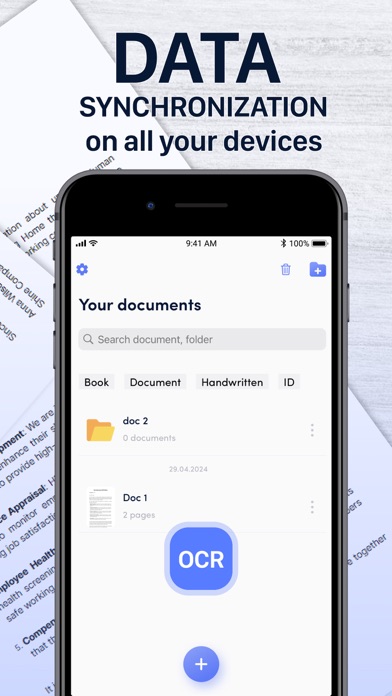
This app turns your phone into a powerful PDF scanner and documents manager. We help you run your business in the digital world.
Scan a document to PDF and edit it using our powerful editor. The PDF Scanner supports PDF, JPEG or ZIP formats. Works offline - all files are stored locally on your device.
This scanner is a must have for students and educators, and anyone involved in a small business: managers, lawyers, realtors, etc.
Advanced camera:
– Automatic document border detection.
– Ability to scan multiple pages in sequence.
– Option to apply filters.
– Crop image to refine borders.
PDF Editor & File manager:
– Crop: the ability to crop unnecessary areas.
– Rotation: make the document straight.
– Filters: change the look of your document.
– Contrast: adjust brightness and contrast.
– Merge several documents into one.
– Add tags for fast file search.
– OCR: recognize and copy text from your scans.
– Sign documents: create an unlimited number of signatures and add them to a document in 1 click.
– Add watermark: create a custom watermark, adjust the fill, color and transparency.
Sharing:
– Save to gallery.
– Export document in PDF, JPG, ZIP formats.
– Export to messengers or email.
Simple pdf scanner, comfortable catalog, powerful editor, easy sharing - transfer document management to your phone.
Privacy Policy: https://rjpups.com/scanner/privacy
Terms of Use: https://rjpups.com/scanner/terms
Support: https://rjpups.com/scanner/support