

PDF Converter, Image to PDF
PDF Converter, Image to PDF is made and published by Asad Ahsan. AppBrain is an independent app data site and isn't affiliated with Asad Ahsan. The app name, icon, screenshots and description belong to Asad Ahsan and are shown as published on the App Store.
AppBrain's verdict
Well rated- Rating on App Store
- 4.43
- 515 ratings
- Last updated
- October 23, 2026
- Size
- 63.1 MB
Users rate it well: 4.4 stars from 515 ratings. Its best ranking is #43 in Top Grossing, Business in Indonesia.
User feedback
Ratings and reviews on the App StoreComments on PDF Converter, Image to PDF for iOS
We don't have enough comments to show example comments. Please check back later.
Store listing
By Asad Ahsan, from the App Store


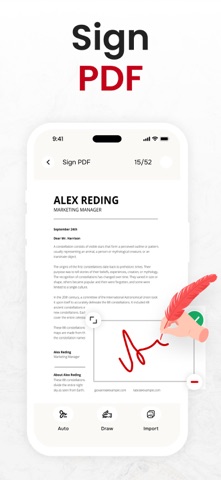


Description by Asad Ahsan Written by the developer, not by AppBrain. Click to read.
Why is image to PDF conversion & PDF maker app important?
This pdf file converter, pdf creator & picture to pdf converter assists you in carrying out the following conversions:
Picture to pdf converter Converts image to pdf:
You can convert any photo to pdf in a span of seconds with few simple clicks. This image to pdf converter will preserve your image quality so that you get original pictures in respective pdf files. As well, this image converter allows an instant conversion of PDF to jpeg images.
Pdf to word converter converts DOCx to PDF:
When you require an edition in your document, this doc converter, pdf creator and pdf to word converter is always here to do that for you instantly. After you make any change in it, you can convert to pdf again by selecting the respective option from the home screen.
Converts PPT To PDF:
You can use this pdf document converter and pdf to word converter to immediately convert pdf to powerpoint slides without disturbing the layout of your document. Also, you can perform powerpoint (PPTX or PPT) to pdf conversion with the assistance of this ppt to pdf converter.
Converts Excel to PDF:
Make use of this excel to pdf that helps in converting MS excel spreadsheet (xls or xlsx) to a pdf document file.
How to use this PDF Maker and pdf to word converter app?
This image to pdf converter lets you perform PDF file conversions within couple of steps that we mentioned-below:
First, select the conversion option from the homepage you wish to choose.
By doing so, options for selecting files will appear on your screen.
Just click on the desired file and it will be opened.
Finally, the PDF file converter will quickly convert the file of your choice to the desired format.
Supported conversion formats of image to pdf converter app:
Convert Image to pdf
Convert PPT to pdf
Convert PDF to doc
Convert PDF to Image
Convert Excel to Pdf
Convert PDF to ppt
Convert Doc to pdf
Convert PDF to ZIP
Convert PDF to HTML
Features of PDF Converter & PDF Maker:
Saves history
User friendly interface
File renaming
Remove file
Share file with others
Preserves original quality
Sort files by date and name
Save files as starred files
Starred Files:
PDF file converter and pdf to word converter gives latest feature of starred files. You can star files for easy access. Stared files allows you to quickly locate important and frequently used files in picture to pdf converter and pdf creator app. Locating a file in stared helps to track important files.
If you have any questions or suggestions, please reach us at eclix.suport@gmail.com. Your feedback is very important to us.
Disclaimer:
All file processing is handled within the app, and no documents are stored, accessed, or shared. Users are solely responsible for ensuring they have the legal rights to convert the selected files.
Privacy Policy:
https://theonlineconverter.com/privacy-policy
Terms of Service:
https://theonlineconverter.com/terms
Safety and technology
Found in the app by AppBrain- Price
- Free
- App size
- 63.1 MB
- Content rating
- Everyone
Technologies used by PDF Converter, Image to PDF
Releases
Updates seen on the App Store- Version
- 1.0.81
- Launched
- November 2021
No changelog data
Alternatives
Similar apps and more from Asad Ahsan


Rankings
App Store top charts- Highest rank
- #43
- Chart
- Top Grossing
- Business
- Country
- Indonesia
App Store Rankings for PDF Converter, Image to PDF
About the app and developer
About PDF Converter, Image to PDF
PDF Converter, Image to PDF is a business app developed by Asad Ahsan.
What is the rating of PDF Converter, Image to PDF?
PDF Converter, Image to PDF is rated 4.43 out of 5 stars, based on 520 ratings.
Is PDF Converter, Image to PDF free?
PDF Converter, Image to PDF is free. The app size is 63.15 MB. The latest version available is 1.0.81. The last update was on October 23, 2026.
What are the requirements for PDF Converter, Image to PDF?
The app has a content rating of Everyone. The app has been available on the App Store since November 2021.
Developer information for Asad Ahsan
Address:
Frequently asked questions about PDF Converter, Image to PDF
Is PDF Converter, Image to PDF free?
Yes. PDF Converter, Image to PDF is free on the App Store.
Is PDF Converter, Image to PDF still available?
Yes. PDF Converter, Image to PDF is on the App Store, and the last update we saw was on October 23, 2026.
How large is PDF Converter, Image to PDF?
PDF Converter, Image to PDF is 63.15 MB.
Is PDF Converter, Image to PDF suitable for children?
App Store rates the content of PDF Converter, Image to PDF as suitable for everyone.
How do people rate PDF Converter, Image to PDF?
PDF Converter, Image to PDF scores 4.43 out of 5 stars, from 515 ratings on the App Store.
Who made PDF Converter, Image to PDF?
PDF Converter, Image to PDF was developed by Asad Ahsan. It is listed in the business category on the App Store.
What are the best alternatives to PDF Converter, Image to PDF?
People looking at PDF Converter, Image to PDF also look at these business apps: Convert Image To PDF tools, Image to PDF - Convert to PDF, Image to PDF Converter · Edit, PDF to Word, PDF Converter ©.