It doesn't have enough ratings yet to judge what users think.
PDF Converter, Scanner is made and published by
Murat Kul.
AppBrain is an independent app data site and isn't affiliated with Murat Kul.
The app name, icon, screenshots and description belong to Murat Kul and are shown as
published on the App Store.
About PDF Converter, Scanner
PDF Converter, Scanner is a productivity app developed by Murat Kul.
User Ratings
PDF Converter, Scanner is rated 5.00 out of 5 stars. The rating is based on one rating ratings.
App Information
PDF Converter, Scanner is freely available from the App Store. The app size is 5.42 MB. The latest version available is 1.0.4. The last update was on August 29, 2026.
Technical Requirements
The app has a content rating of Everyone. The app has been available on the App Store since June 2026.
Description by Murat Kul(from the App Store)
PDF Converter is built to handle your PDF tasks quickly and simply. Every screen focuses on one job — no clutter, easy to learn.
FEATURES
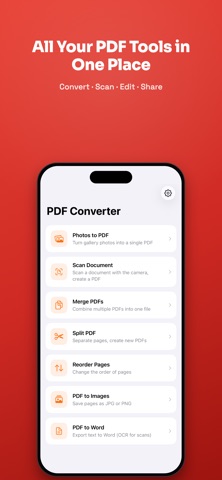
• Photos to PDF Pick one or more photos from your gallery and create a single PDF. Choose the page size (original, A4, Letter).
• Scan Document Scan a document with your camera, or pick a photo from your gallery; edges are detected automatically (adjust them by hand if you like), and the perspective is corrected into a clean PDF. Photo-based scanning works even on devices without a camera.
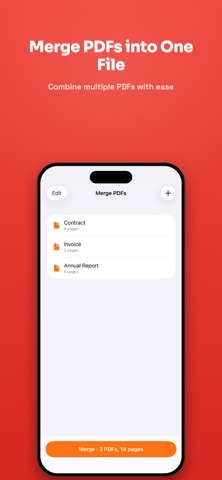
• Merge PDFs Drag to reorder multiple PDFs and combine them into one file.
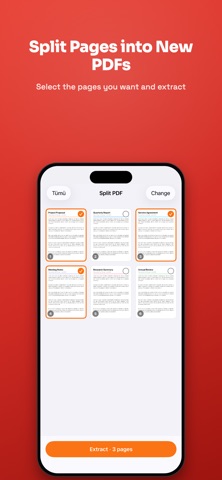
• Split PDF View a PDF's pages, select the ones you want, and extract them as a new PDF.
• Reorder Pages Rearrange pages with drag and drop, then save as a new PDF.
• Save & Share Save your PDFs to the Files app or iCloud Drive, and share them with any app.
• Share Extension Convert images straight to PDF from other apps using "Convert to PDF".
• Personalization Light and dark themes, Turkish and English — set it your way in Settings. Love it? Share the app and leave a rating with a single tap.
• PDF to Images Save each page of a PDF as a JPG or PNG image.
• PDF to Word Export a PDF's text to a Word document (.docx). For scanned documents, text is extracted with OCR.
PRIVACY FIRST
PDF Converter works entirely on your device. No servers, no accounts, no tracking. Your documents never leave your iPhone.
PREMIUM
Photos to PDF and Scan Document are free. Unlock merging, splitting, page reordering, PDF to images, and PDF to Word with a single one-time purchase — no subscription.
Each subscription will automatically renew 3 days before the expiration date for
the same time period. Subscriptions can be cancelled at any time before the renewal.