

PDF Scanner & Editor: Privio
PDF Scanner & Editor: Privio is made and published by Mustafa Salim Erek. AppBrain is an independent app data site and isn't affiliated with Mustafa Salim Erek. The app name, icon, screenshots and description belong to Mustafa Salim Erek and are shown as published on the App Store.
AppBrain's verdict
- Last updated
- August 16, 2026
Rankings
App Store top chartsApp Store Rankings for PDF Scanner & Editor: Privio
Competitors
Similar apps and more from Mustafa Salim ErekAlternatives to PDF Scanner & Editor: Privio


More from Mustafa Salim Erek


Also available on Google Play

Releases
Updates seen on the App Store- Version
- 1.1.2
- Launched
- May 2026
No changelog data
User feedback
Ratings and reviews on the App StoreComments on PDF Scanner & Editor: Privio for iOS
We don't have enough comments to show example comments. Please check back later.
Technology
Found in the app by AppBrain- Price
- Free
- App size
- 111.2 MB
- Content rating
- Everyone
Technologies used by PDF Scanner & Editor: Privio
About the app and developer
About PDF Scanner & Editor: Privio
PDF Scanner & Editor: Privio is a productivity app developed by Mustafa Salim Erek.
What is the rating of PDF Scanner & Editor: Privio?
PDF Scanner & Editor: Privio has no ratings yet.
Is PDF Scanner & Editor: Privio free?
PDF Scanner & Editor: Privio is free. The app size is 111.23 MB. The latest version available is 1.1.2. The last update was on August 16, 2026.
What are the requirements for PDF Scanner & Editor: Privio?
The app has a content rating of Everyone. The app has been available on the App Store since May 2026.
Developer information for Mustafa Salim Erek
Address:
Store listing
By Mustafa Salim Erek, from the App Store



Description by Mustafa Salim Erek Written by the developer, not by AppBrain. Click to read.
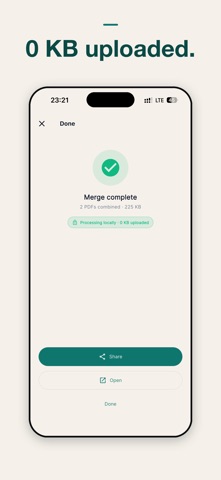
Every operation — scan, OCR, redact, sign, summarise with Apple Intelligence, capture receipts — runs locally on your iPhone. Your PDFs never leave this device. The App Privacy Report shows zero outbound traffic for your files.
THE 23 TOOLS
Document intake
• Scan to PDF — Apple VisionKit edge detection, multi-page capture
• OCR PDF — Apple Vision recognizes text on scanned PDFs and adds a searchable text layer
• Image to PDF — photos, receipts, screenshots into one PDF
• Merge PDFs — combine document-level or hand-pick pages
• Compress PDF — shrink for email without visible quality loss
• Split PDF — extract page ranges, every Nth page, or N equal parts
Editing
• Rotate pages — fix sideways scans
• Delete pages — drop what you don't need
• Sign PDF — finger or stylus signature with SHA-256 audit footer
• Fill form — IRS, USCIS, court motion forms with flatten-on-save
• Page numbers — four formats, five positions, custom start
• Bates numbering — legal discovery standard
• Password protect — AES-256 encrypt or unlock
Review
• Watermark — CONFIDENTIAL, DRAFT, custom text in three layouts
• Extract text — pull clean text out of any born-digital PDF
• Compare PDFs — redline two versions, added and removed text
• Bookmarks / TOC — jump to any chapter in long briefs and depositions
• Find sensitive data — auto-detect SSN, EIN, credit cards (Luhn validated), IBANs, emails, phone numbers
• Redact — search words, render-and-flatten removes them from the data stream
AI + receipts + batch
• Summarize PDF — Apple Intelligence on-device summary (iOS 26+)
• Live Text view — Apple Live Text + Visual Look Up + Markup
• Batch operations — compress, watermark, or rotate a stack of PDFs in one pass
• Receipt scanner — auto-extract date / vendor / total / tax → QuickBooks-friendly CSV
iOS INTEGRATION
Home Screen widget (Small + Medium) plus three Lock Screen accessory families. iOS 18 Control Center / Lock Screen scan control. Action Button binding for iPhone 15 Pro and later. Siri, Shortcuts, Files Provider, Share Sheet, Action Extension. iPad Stage Manager + Split View.
PRIVACY POSITIONING
Other PDF apps upload your file to "process" it in the cloud — meaning their staff, their server logs, and their attackers could all see your documents. Privio was built so the lawyer-client privilege, the accountant-client confidentiality, and your personal data stay where they belong: on your phone.
Privio is built with Apple's own frameworks — VisionKit for scanning, Apple Vision for OCR, Apple Intelligence for summarisation, PDFKit for assembly. Your documents are processed on your device and are never uploaded. There is no account. Free use is supported by ads served by Google AdMob, which never receive your documents; Pro removes ads entirely.
PRICING
Try the tools free: open any tool and run it on your own document. Pro is what releases the result — save, share, or export it. (Batch and the receipt scanner are Pro from the start.)
• Yearly — the best value
• Lifetime — pay once; no subscription, no renewal
• Monthly — month to month
You'll see your local price in the app. The free tier shows one short ad per released result; Pro removes ads and unlocks every tool.
MADE BY EREK STUDIO
Built by an independent developer in Istanbul. No VC, no growth team, no dark patterns. If a feature is missing or a bug bites you, email mustafasalimerek@gmail.com and you'll hear back from a human within a day.
Designed for iPad: native sidebar navigation, 19 tools at a glance on a 5×4 grid, landscape support for Magic Keyboard, and centered reading layouts.
Privacy Policy: https://mustafasalimerek-bit.github.io/pdfprivio/privacy/
Terms of Use: https://mustafasalimerek-bit.github.io/pdfprivio/terms/