AppBrain
AppBrain
  • Apps
  • Apps being viewed right now Trending apps today Most popular apps All-time most installed apps Top rated apps iPhone and iPad apps
  • Intelligence ▾
    Intelligence overview → Track any Android app or your whole market
    Track & analyze
    Keyword Tracker & OptimizerTrack & improve Play rankings App Performance ReportOne-off PDF for any app StatisticsFree Android & Play market stats
    Promote your app
    Featured Apps App Links
  • Intelligence
  • Pricing
  • Dashboard
  • Sign up
  • Log in
App Store Apps > Utilities > PDF Cropper: Auto Crop & Split
PDF Cropper: Auto Crop & Split icon

PDF Cropper: Auto Crop & Split

3.0.3
实 许
3.06
18 reviews
Free

PDF Cropper: Auto Crop & Split Screenshot 1 of 8
PDF Cropper: Auto Crop & Split Screenshot 2 of 8
PDF Cropper: Auto Crop & Split Screenshot 3 of 8
PDF Cropper: Auto Crop & Split Screenshot 4 of 8
PDF Cropper: Auto Crop & Split Screenshot 5 of 8
PDF Cropper: Auto Crop & Split Screenshot 6 of 8
PDF Cropper: Auto Crop & Split Screenshot 7 of 8
PDF Cropper: Auto Crop & Split Screenshot 8 of 8
Screenshots by 实 许, from the the App Store listing
View on the App Store

AppBrain's verdict on PDF Cropper: Auto Crop & Split

Established
Rating on App Store
3.06
18 ratings
Last updated
November 25, 2026
Size
8.26 MB

It doesn't have enough ratings yet to judge what users think.

Official page on the App Store

About PDF Cropper: Auto Crop & Split

PDF Cropper: Auto Crop & Split is an utilities app developed by 实 许.

User Ratings

PDF Cropper: Auto Crop & Split is rated 3.06 out of 5 stars. The rating is based on 18 ratings.

App Information

PDF Cropper: Auto Crop & Split is freely available from the App Store. The app size is 8.26 MB. The latest version available is 3.0.3. The last update was on November 25, 2026.

Technical Requirements

The app has a content rating of Everyone. The app has been available on the App Store since October 2013.

PDF Cropper: Auto Crop & Split is made and published by 实 许. AppBrain is an independent app data site and isn't affiliated with 实 许. The app name, icon, screenshots and description belong to 实 许 and are shown as published on the App Store.

Description by 实 许 (from the App Store)
Professional-grade PDF cropping. Remarkably simple.

Get scanned books and PDFs ready for your e-reader, tablet or phone.

PDF Cropper trims the blank margins around every page and splits two-page spreads into single pages, so the text fills your screen. You can also fix the title and author, so each book shows up with the right name in your library.

NEW: SMART CROP
• Finds the text on each page, even in scanned books with no text layer
• Often leaves out stray page numbers in the margins
• Crop each page on its own, use one box for the whole book, or mirror the box for odd and even pages
• Covers, full-page pictures and blank pages can stay as they are or be cropped separately
• Choose the margin around the text: none, small, medium or large

MANUAL CROP
• Drag the corners and edges of the crop box, with everything outside it dimmed
• Use one box for every page, or adjust just the current page
• Mirror the box for odd and even pages, or give each page range its own box
• Aspect presets for iPhone, iPad and e-readers (3:4), the original page shape, or a ratio of your own
• Presets widen the box to fit the shape, so no text gets cut off

NEW: SPLIT PAGES
• Split each page into two side by side, two top and bottom, or four
• Drag the split line exactly where you want it
• Pick the reading order, including right to left for manga and right-to-left books
• Pages are cropped first and split after, so every half comes out trimmed

NEW: EDIT METADATA
• View and edit the title, author, subject, keywords, creator, producer and dates
• Your book shows the right title and author on your e-reader and in other apps

KIND TO YOUR FILES
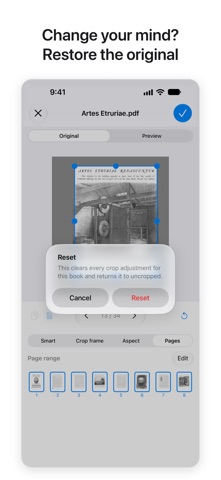
• Your original PDF is never changed, and you can go back to it at any time
• Exported PDFs keep their text, links and table of contents
• Cropped files open the way you expect in your e-reader and other PDF apps. If a reader still shows the old margins, turn on Compatible mode

ON IPHONE, IPAD AND MAC
Import from Files, open PDFs from other apps, or drag them in. On iPad and Mac, your library and the open book sit side by side.

FREE AND PRO
PDF Cropper is free to download. Manual cropping with one box for all pages or the current page, every aspect preset, and unlimited exports are free, with no watermark.

PDF Cropper Pro adds smart crop, odd and even pages, page ranges, split pages and metadata editing. Before you buy, you can preview each Pro feature on your own PDF. Pro is a one-time purchase with no subscription, and it works on iPhone, iPad and Mac with the same Apple Account.

If you bought PDF Cropper when it was a paid app, you get Pro automatically; if you don’t see it, tap Restore Purchases in Settings.

Terms of Use: https://www.apple.com/legal/internet-services/itunes/dev/stdeula/
Privacy Policy: https://is.gd/6HqQHm
Show more Show less

Share PDF Cropper: Auto Crop & Split

User feedback
Ratings and reviews on the App Store

Comments on PDF Cropper: Auto Crop & Split for iOS

We don't have enough comments to show example comments. Please check back later.

Safety and technology
Found in the app by AppBrain
Price
Free
App size
8.26 MB
Content rating
Everyone

Technologies used by PDF Cropper: Auto Crop & Split

Changelog of PDF Cropper: Auto Crop & Split

Updates seen on the App Store
Version
3.0.3
Launched
October 2013

No changelog data

Alternatives
Similar apps and more from 实 许

Alternatives to PDF Cropper: Auto Crop & Split

easySearch - File Search Tool icon easySearch - File Search Tool
Gregory Hayrapetian
4.2
Free
12 ratings
WinDat Opener icon WinDat Opener
Alexander McGuffog
2.3
$5.99
3 ratings
Home Theater SPL icon Home Theater SPL
J.S. Technology Ltd.
1.0
$0.99
1 ratings
Textcraft icon Textcraft
Pixelfolio Inc.
4.2
$4.99
20 ratings
Crack A Card icon Crack A Card
Andrew Litteken
5.0
Free
3 ratings
SpaceWalker by VITURE icon SpaceWalker by VITURE
VITURE Inc.
4.1
Free
1.6K ratings
AR Assistant (ARA) icon AR Assistant (ARA)
HealTech Electronics Ltd.
5.0
Free
1 ratings
ChefsTemp icon ChefsTemp
Leadtek Inc
4.2
Free
78 ratings

More from 实 许

Once 2 - Immersive Diary Book icon Once 2 - Immersive Diary Book
实 许
4.6
Free
60 ratings
PDF Combiner - file merger icon PDF Combiner - file merger
实 许
4.8
$1.99
8 ratings
ReadFlow: EPUB & PDF Reader icon ReadFlow: EPUB & PDF Reader
实 许
4.8
Free
5 ratings
PDF Ripper icon PDF Ripper
实 许
2.7
$1.99
3 ratings
PDF Scissor icon PDF Scissor
实 许
1.0
$1.99
2 ratings
DCA Income Calculator icon DCA Income Calculator
实 许
1.0
$0.99
1 ratings
QR Maker for Safari(extension) icon QR Maker for Safari(extension)
实 许
1.0
$1.99
1 ratings
GIFKit icon GIFKit
实 许
0.0
Free
Rankings
App Store top charts

App Store Rankings for PDF Cropper: Auto Crop & Split

This app is not ranked
About the app and developer

Developer information for 实 许

实 许

Address:

Frequently asked questions about PDF Cropper: Auto Crop & Split

Is PDF Cropper: Auto Crop & Split free?

Yes. PDF Cropper: Auto Crop & Split is free on the App Store.

Is PDF Cropper: Auto Crop & Split still available?

Yes. PDF Cropper: Auto Crop & Split is on the App Store, and the last update we saw was on November 25, 2026.

How large is PDF Cropper: Auto Crop & Split?

PDF Cropper: Auto Crop & Split is 8.26 MB.

Is PDF Cropper: Auto Crop & Split suitable for children?

App Store rates the content of PDF Cropper: Auto Crop & Split as suitable for everyone.

How do people rate PDF Cropper: Auto Crop & Split?

PDF Cropper: Auto Crop & Split scores 3.06 out of 5 stars, from 18 ratings on the App Store.

Who made PDF Cropper: Auto Crop & Split?

PDF Cropper: Auto Crop & Split was developed by 实 许. It is listed in the utilities category on the App Store.

What are the best alternatives to PDF Cropper: Auto Crop & Split?

People looking at PDF Cropper: Auto Crop & Split also look at these utilities apps: easySearch - File Search Tool, WinDat Opener, Home Theater SPL, Textcraft, Crack A Card.

Top new apps Apps other people are watching Price drops on Google Play Popular Utilities Apps Today's trending apps
easySearch - File Search Tool icon easySearch - File Search Tool
WinDat Opener icon WinDat Opener
Home Theater SPL icon Home Theater SPL
Textcraft icon Textcraft
Crack A Card icon Crack A Card
SpaceWalker by VITURE icon SpaceWalker by VITURE
AR Assistant (ARA) icon AR Assistant (ARA)
ChefsTemp icon ChefsTemp
Overview Alternatives Reviews Rankings Technology
AppBrain Intelligence premium content

Subscribe now to get full and unlimited access to AppBrain Intelligence. You'll have access to:

  • App Intelligence dashboard (performance timeline, competitor comparison, country rankings, insight cards)
  • Detailed ranking data per app
  • Full timeline per developer
  • Device market shares data per country
  • Unlimited keyword tracking
  • AI assistant access via MCP (Claude, Cursor or any MCP client)
1 Month

$75/mo
(billed every month)

SAVE 0%
Subscribe
3 Months

$65/mo
($195 billed every 3 months)

SAVE 13%
Subscribe
1 Year

$57.50/mo
($690 billed every year)

SAVE 23%
Subscribe
Each subscription will automatically renew 3 days before the expiration date for the same time period. Subscriptions can be cancelled at any time before the renewal.

AppBrain is an app data site, we track rankings, ratings, installs for all apps and games on Google Play and the App Store. AppBrain doesn't host app files or APKs, all install links go directly to the official store. All trademarks are owned by their respective owners.

More apps

  • Top Android apps being viewed
  • LAVA+
  • TapCook: Budget Meal Plans
  • View Pocket Paws: Dogs & Puppies

App statistics

  • Android statistics
  • Google Play Developer stats
  • Trending Android Apps
  • Trending iOS apps
  • Top popular Apps
  • Buy the best Android phone
  • Buy & sell app businesses

About AppBrain

  • Contact
  • Privacy
  • Documentation
  • DMCA takedowns
  • Blog
  • How to improve the earnings of your ad units
© 2010-2026 - AppBrain