

PDF & Document Scanner
PDF & Document Scanner is made and published by Boris Spiro. AppBrain is an independent app data site and isn't affiliated with Boris Spiro. The app name, icon, screenshots and description belong to Boris Spiro and are shown as published on the App Store.
AppBrain's verdict
- Last updated
- July 1, 2026
Rankings
App Store top chartsApp Store Rankings for PDF & Document Scanner
Competitors
Similar apps and more from Boris SpiroAlternatives to PDF & Document Scanner


More from Boris Spiro





Releases
Updates seen on the App Store- Version
- 9.0
- Launched
- July 2025
No changelog data
User feedback
Ratings and reviews on the App StoreComments on PDF & Document Scanner for iOS
We don't have enough comments to show example comments. Please check back later.
Technology
Found in the app by AppBrain- Price
- Free
- App size
- 8.06 MB
- Content rating
- Everyone
Technologies used by PDF & Document Scanner
About the app and developer
About PDF & Document Scanner
PDF & Document Scanner is an utilities app developed by Boris Spiro.
What is the rating of PDF & Document Scanner?
PDF & Document Scanner has no ratings yet.
Is PDF & Document Scanner free?
PDF & Document Scanner is free. The app size is 8.06 MB. The latest version available is 9.0. The last update was on July 1, 2026.
What are the requirements for PDF & Document Scanner?
The app has a content rating of Everyone. The app has been available on the App Store since July 2025.
Developer information for Boris Spiro
Address:
Frequently asked questions about PDF & Document Scanner
Is PDF & Document Scanner free?
Yes. PDF & Document Scanner is free on the App Store.
Is PDF & Document Scanner still available?
Yes. PDF & Document Scanner is on the App Store, and the last update we saw was on July 1, 2026.
How large is PDF & Document Scanner?
PDF & Document Scanner is 8.06 MB.
Is PDF & Document Scanner suitable for children?
App Store rates the content of PDF & Document Scanner as suitable for everyone.
Who made PDF & Document Scanner?
PDF & Document Scanner was developed by Boris Spiro. It is listed in the utilities category on the App Store.
What are the best alternatives to PDF & Document Scanner?
People looking at PDF & Document Scanner also look at these utilities apps: Scanner - Document & Photo, PDF Scanner & Sign Documents, ScanMe - Document scanner, ScanFlow: PDF Scanner App, SCAN AI - PDF & Document Scan.
Store listing
By Boris Spiro, from the App Store


Description by Boris Spiro Written by the developer, not by AppBrain. Click to read.
Trusted by millions of users worldwide, ScanMe is the fastest way to scan, sign, and share documents — right from your pocket.
SMART DOCUMENT SCANNING
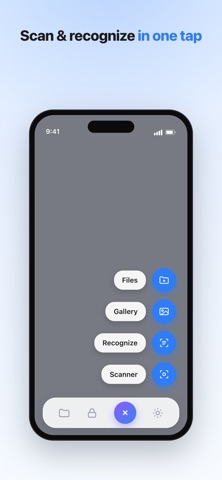
• Instant automatic edge detection and perspective correction
• Multi-page batch scanning for long documents
• High-resolution capture with AI-enhanced smart filters
• Scan receipts, contracts, notes, books, whiteboards, and ID cards
ADVANCED OCR TEXT RECOGNITION
• Accurate text recognition powered by AI in 40+ languages
• Extract and copy text from any scanned document instantly
• Search within all your scanned files with full-text search
• Convert paper documents into editable digital text
PDF CREATION & FILE MANAGEMENT
• Create multi-page PDF files with one tap
• Compress PDFs without losing quality
• Merge, split, and reorder pages effortlessly
• Organize documents in smart folders with tags
DIGITAL SIGNATURES & FORMS
• Sign documents directly on your device — no printing needed
• Save multiple signature styles for quick access
• Place signatures precisely on any page of a PDF
• Fill out forms and annotations with ease
SECURE VAULT & PRIVACY
• Protect sensitive documents with Face ID or Touch ID
• End-to-end encrypted storage for confidential files
• Access your secure vault from anywhere
CLOUD SYNC & BACKUP
• Automatic iCloud synchronization across all your Apple devices
• Never lose your important documents with smart backup
• Seamless integration with your existing workflow
EXPORT & SHARE ANYWHERE
• Share via email, Messages, WhatsApp, or AirDrop
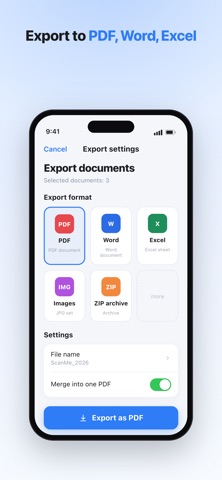
• Export as PDF, JPG, PNG, or TXT
• Print directly from the app to any AirPrint printer
• Save to Files, Google Drive, Dropbox, and more
WHY CHOOSE SCANME?
→ Lightning-fast scanning in under 2 seconds
→ AI-powered edge detection and image enhancement
→ The only scanner with built-in digital signatures
→ No watermarks on your scanned documents
→ Regular updates with new features every month
SUBSCRIPTION OPTIONS
ScanMe offers a free version with essential scanning features. ScanMe Premium unlocks unlimited scans, advanced OCR, cloud backup, digital signatures, and an ad-free experience.
• Payment will be charged to your Apple ID account at confirmation of purchase
• Subscription automatically renews unless auto-renew is turned off at least 24 hours before the end of the current period
• Your account will be charged for renewal within 24 hours prior to the end of the current period
Privacy Policy: https://preview--dark-sphere-portfolio.lovable.app/scanme-ios-privacy
Terms of Use: https://www.apple.com/legal/internet-services/itunes/dev/stdeula/