

PDF Document Scanner
PDF Document Scanner is made and published by Brandon Stecklein. AppBrain is an independent app data site and isn't affiliated with Brandon Stecklein. The app name, icon, screenshots and description belong to Brandon Stecklein and are shown as published on the App Store.
AppBrain's verdict
Established- Rating on App Store
- 3.80
- 5 ratings
- Last updated
- October 6, 2026
It doesn't have enough ratings yet to judge what users think.
Rankings
App Store top chartsApp Store Rankings for PDF Document Scanner
Competitors
Similar apps and more from Brandon SteckleinAlternatives to PDF Document Scanner





More from Brandon Stecklein


Releases
Updates seen on the App Store- Version
- 5.17.1
- Launched
- January 2015
No changelog data
User feedback
Ratings and reviews on the App StoreComments on PDF Document Scanner for iOS
We don't have enough comments to show example comments. Please check back later.
Technology
Found in the app by AppBrain- Price
- Free
- App size
- 13.9 MB
- Content rating
- Everyone
Technologies used by PDF Document Scanner
About the app and developer
About PDF Document Scanner
PDF Document Scanner is an utilities app developed by Brandon Stecklein.
User Ratings
PDF Document Scanner is rated 3.80 out of 5 stars. The rating is based on 5 ratings.
App Information
PDF Document Scanner is freely available from the App Store. The app size is 13.91 MB. The latest version available is 5.17.1. The last update was on October 6, 2026.
Technical Requirements
The app has a content rating of Everyone. The app has been available on the App Store since January 2015.
Developer information for Brandon Stecklein
Address:
Frequently asked questions about PDF Document Scanner
Is PDF Document Scanner free?
Yes. PDF Document Scanner is free on the App Store.
Is PDF Document Scanner still available?
Yes. PDF Document Scanner is on the App Store, and the last update we saw was on October 6, 2026.
How large is PDF Document Scanner?
PDF Document Scanner is 13.91 MB.
Is PDF Document Scanner suitable for children?
App Store rates the content of PDF Document Scanner as suitable for everyone.
How do people rate PDF Document Scanner?
PDF Document Scanner scores 3.80 out of 5 stars, from 5 ratings on the App Store.
Who made PDF Document Scanner?
PDF Document Scanner was developed by Brandon Stecklein. It is listed in the utilities category on the App Store.
What are the best alternatives to PDF Document Scanner?
People looking at PDF Document Scanner also look at these utilities apps: EasyToUse ! PasswordManagerApp, Docs Scanner, Scanner-PDF&Text Editing Tools, instalook-collect,read later, AiChat - LLM.
Store listing
By Brandon Stecklein, from the App Store


Description by Brandon Stecklein Written by the developer, not by AppBrain. Click to read.
Capture Your Way
- Device Camera: Quickly photograph documents and convert them into sharp, readable PDFs.
Powerful Editing Tools
- Built‑in image editor for cropping, rotating, color adjustments, and cleanup
- Automatic or manual page ordering
- Title page creation for polished, professional documents
Flexible PDF Creation
- Create single‑page or multi‑page PDFs
- Import text files and convert them into PDF format
- Merge multiple projects into one unified document
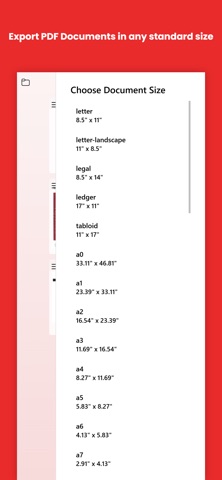
- Export high‑quality, compact PDFs optimized for sharing
Designed for Real‑World Use
Whether you’re scanning receipts, digitizing old photos, submitting homework, archiving paperwork, or assembling a full report, PDF Document Scanner gives you a fast, reliable, and flexible workflow.
Why keep filing cabinets full of old documents and paperwork? It's the 21st century after all. Sure, those tax returns from 1976 are fun to dig out and look at from time to time, but do you really still need the paper copy after all these years? Fear not, now there is an easy way to create digital copies of your old documents with PDF Document Scanner!