




AppBrain's verdict
- Last updated
- August 9, 2026
- Size
- 54.5 MB
User feedback
Ratings and reviews on the App StoreComments on PDF EasyFlow: PDF Edit Merge for iOS
We don't have enough comments to show example comments. Please check back later.
Store listing
By JUNWOONG BANG, from the App StoreDescription by JUNWOONG BANG Written by the developer, not by AppBrain. Click to read.
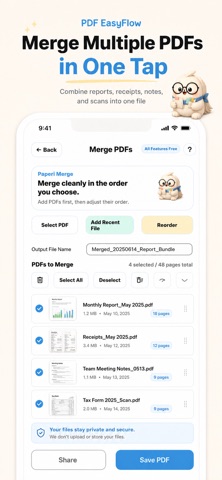
It also helps you create PDFs from book-scan photos, merge multiple PDF files, convert PDF pages into photos, and quickly organize page order.
PDF EasyFlow is not just a PDF merge app. It is designed to help you quickly and easily organize the page order of large PDFs and documents with many pages. You can tap a start page and an end page to quickly select multiple pages, move selected pages to your preferred position, or save only important pages as a separate PDF.
You can use it in many situations, such as turning book page photos taken with a book-scanning app into a PDF, combining multiple PDF files such as college lecture materials into one file, saving selected PDF pages as JPG or PNG images, or organizing PDF page order before importing the document into a note-taking app.
You can duplicate mistake-review pages, key summary pages, or important reference pages and move them to the front or back. You can also save only selected pages as a separate PDF to create a new document. PDF pages can be reordered, rotated, and converted into photos before being saved to your photo library. PDF EasyFlow is designed to help you finish common PDF organizing tasks quickly without complicated editing tools.
Main Features
* Quickly select many pages and move them to your preferred position
* Save Selected Pages Only: Select only the pages you need, such as important pages or mistake-review pages, and save them as a new separate PDF
* Photo Organizing and Editing: Reorder photos, reverse order, rotate, crop, apply basic filters, and delete photos
* PDF Page Organizer: Reorder pages, move pages, reverse order, duplicate, delete, and rotate pages
* PDF Merge: Combine multiple PDF files into one PDF in your preferred order
* Photos → PDF: Select multiple photos and save them as one PDF. Reorder, reverse order, rotate, crop, apply basic filters, and delete photos.
* PDF → Photos: Convert all PDF pages or selected pages into JPG or PNG images and save them to your photo library. Reorder, move, reverse, duplicate, delete, and rotate pages before saving
* My Library: Reopen and manage PDFs saved in the app
* Save and Share: Export completed PDFs to the Files app or share them with other apps
Great for
* Using Reverse Order when book-scan photos or scanned PDF books are arranged backwards
* Quickly organizing selected pages in large PDFs with hundreds of pages or more
* Combining multiple class handout PDFs into one file before using them in a note-taking app
* Using Duplicate and Move to Front to collect mistake-review pages, key summary pages, or important materials
* Rotating individual PDF pages or reorganizing page order
* Saving selected PDF pages as photos in your photo library
* Organizing photo documents, scanned images, receipts, and work documents as PDFs in My Library
PDF EasyFlow does not require login.
Use PDF EasyFlow when you want to organize study materials, work documents, photo documents, scanned images, book-scan PDFs, and multiple PDF files quickly and easily.
Safety and technology
Found in the app by AppBrain- Price
- Free
- App size
- 54.5 MB
- Content rating
- Everyone
Technologies used by PDF EasyFlow: PDF Edit Merge
Releases
Updates seen on the App Store- Version
- 1.0.6
- Launched
- June 2026
No changelog data
Rankings
App Store top chartsApp Store Rankings for PDF EasyFlow: PDF Edit Merge
About the app and developer
About PDF EasyFlow: PDF Edit Merge
PDF EasyFlow: PDF Edit Merge is a productivity app developed by JUNWOONG BANG.
User Ratings
The app has no ratings yet.
App Information
PDF EasyFlow: PDF Edit Merge is freely available from the App Store. The app size is 54.46 MB. The latest version available is 1.0.6. The last update was on August 9, 2026.
Technical Requirements
The app has a content rating of Everyone. The app has been available on the App Store since June 2026.
PDF EasyFlow: PDF Edit Merge is made and published by JUNWOONG BANG. AppBrain is an independent app data site and isn't affiliated with JUNWOONG BANG. The app name, icon, screenshots and description belong to JUNWOONG BANG and are shown as published on the App Store.
Developer information for JUNWOONG BANG
Address:
Frequently asked questions about PDF EasyFlow: PDF Edit Merge
Is PDF EasyFlow: PDF Edit Merge free?
Yes. PDF EasyFlow: PDF Edit Merge is free on the App Store.
Is PDF EasyFlow: PDF Edit Merge still available?
Yes. PDF EasyFlow: PDF Edit Merge is on the App Store, and the last update we saw was on August 9, 2026.
How large is PDF EasyFlow: PDF Edit Merge?
PDF EasyFlow: PDF Edit Merge is 54.46 MB.
Is PDF EasyFlow: PDF Edit Merge suitable for children?
App Store rates the content of PDF EasyFlow: PDF Edit Merge as suitable for everyone.
Who made PDF EasyFlow: PDF Edit Merge?
PDF EasyFlow: PDF Edit Merge was developed by JUNWOONG BANG. It is listed in the productivity category on the App Store.
Share PDF EasyFlow: PDF Edit Merge
Subscribe now to get full and unlimited access to AppBrain Intelligence. You'll have access to:
- App Intelligence dashboard (performance timeline, competitor comparison, country rankings, insight cards)
- Detailed ranking data per app
- Full timeline per developer
- Device market shares data per country
- Unlimited keyword tracking
- AI assistant access via MCP (Claude, Cursor or any MCP client)
AppBrain is an app data site, we track rankings, ratings, installs for all apps and games on Google Play and the App Store. AppBrain doesn't host app files or APKs, all install links go directly to the official store. All trademarks are owned by their respective owners.
More apps
App statistics