

PDF Editor: Scan & Sign Doc
PDF Editor: Scan & Sign Doc is made and published by Mustafa Toptas. AppBrain is an independent app data site and isn't affiliated with Mustafa Toptas. The app name, icon, screenshots and description belong to Mustafa Toptas and are shown as published on the App Store.
AppBrain's verdict
- Rating on App Store
- 5.00
- 7 ratings
- Last updated
- March 12, 2026
It doesn't have enough ratings yet to judge what users think.
Rankings
App Store top chartsApp Store Rankings for PDF Editor: Scan & Sign Doc
Competitors
Similar apps and more from Mustafa ToptasAlternatives to PDF Editor: Scan & Sign Doc


More from Mustafa Toptas


Releases
Updates seen on the App Store- Version
- 1.1
- Launched
- March 2026
No changelog data
User feedback
Ratings and reviews on the App StoreComments on PDF Editor: Scan & Sign Doc for iOS
We don't have enough comments to show example comments. Please check back later.
Technology
Found in the app by AppBrain- Price
- Free
- App size
- 15.4 MB
- Content rating
- Everyone
Technologies used by PDF Editor: Scan & Sign Doc
About the app and developer
About PDF Editor: Scan & Sign Doc
PDF Editor: Scan & Sign Doc is a productivity app developed by Mustafa Toptas.
User Ratings
PDF Editor: Scan & Sign Doc is rated 5.00 out of 5 stars. The rating is based on 7 ratings.
App Information
PDF Editor: Scan & Sign Doc is freely available from the App Store. The app size is 15.39 MB. The latest version available is 1.1. The last update was on March 12, 2026.
Technical Requirements
The app has a content rating of Everyone. The app has been available on the App Store since March 2026.
Developer information for Mustafa Toptas
Address:
Store listing
By Mustafa Toptas, from the App Store

Description by Mustafa Toptas Written by the developer, not by AppBrain. Click to read.
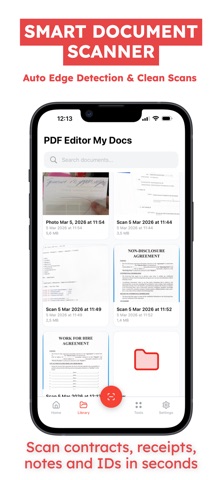
Scan Documents
— Scan documents with your camera using a smart document scanner
— Automatic edge detection and page adjustment
— Create clear scans of contracts, receipts, notes, IDs, or forms
— Scan single or multi-page documents easily
— Professional scan to PDF results in seconds
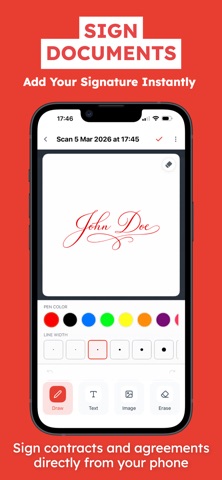
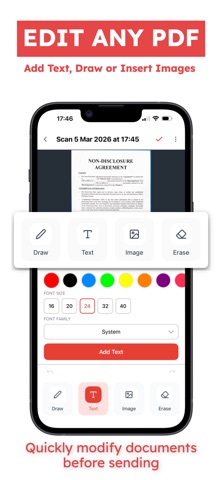
Sign & Edit Files
— Add your signature to any document
— Sign documents directly on your phone
— Draw, add text, or insert images into PDF pages
— Quickly prepare signed documents for sending
— Perfect for contracts, agreements, and forms
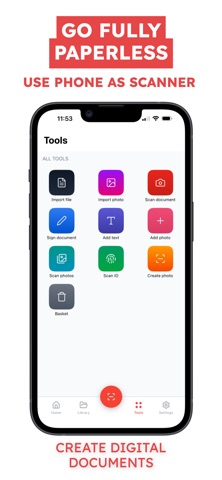
Convert to PDF
— Convert photos to PDF using a built-in PDF converter
— Create digital documents from images
— Combine multiple scans into one PDF file
— Clean and optimized export for sharing
— Fast PDF scanner and document converter workflow
Organize & Manage
— Keep your files organized in folders
— Store and manage scanned documents in one place
— Rename and manage PDF files easily
— Simple document manager for everyday productivity
Share Anywhere
— Instant PDF sharing via email, messages, or apps
— Send documents to work, school, or clients
— Export clean digital copies anytime
PDF Editor: Scan & Sign Doc helps you go paperless with a simple document scanner, fast PDF converter, and easy document signing — all in one app.
Subscription Plans:
You can purchase an auto-renewing subscription for full access to all features. Payment will be charged to your iTunes account at confirmation. The subscription automatically renews unless canceled at least 24 hours before the end of the current period. You can manage or cancel your subscription anytime in your account settings. Prices may vary by region.
Privacy Policy: https://telegra.ph/Privacy-Policy--PDF-Scanner-Scan--Sign-Doc-03-05
Terms of Use: https://www.apple.com/legal/internet-services/itunes/dev/stdeula/