

PDF it All Document Converter
PDF it All Document Converter is made and published by DIGISET LLC. AppBrain is an independent app data site and isn't affiliated with DIGISET LLC. The app name, icon, screenshots and description belong to DIGISET LLC and are shown as published on the App Store.
AppBrain's verdict
EstablishedLoved by users- Rating on App Store
- 4.82
- 8,142 ratings
- Last updated
- October 3, 2026
- Size
- 63.0 MB
Users love it: 4.8 stars from 8,142 ratings.
User feedback
Ratings and reviews on the App StoreComments on PDF it All Document Converter for iOS
We don't have enough comments to show example comments. Please check back later.
Store listing
By DIGISET LLC, from the App Store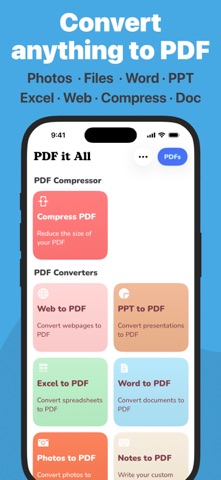


Description by DIGISET LLC Written by the developer, not by AppBrain. Click to read.
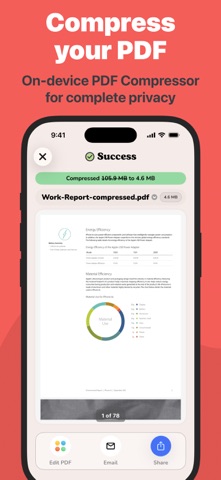
PDF it All is an advanced yet user-friendly tool designed for seamless PDF file editing and conversion. With this application, you can effortlessly compress large PDF files, making file sharing more convenient. Convert a variety of formats, including Word, Excel, PowerPoint, web pages, and photos into PDF with ease.
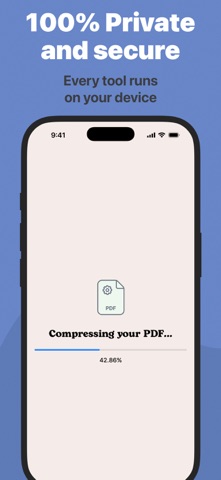
Whether you need to edit a PDF by removing or rotating pages, PDF it All has you covered. Merge multiple PDFs into a single file or split a PDF into multiple files effortlessly. The best part? Our app operates solely on your device, ensuring that all your PDF tasks are performed securely without relying on external servers. Your files remain 100% secure throughout the process.
Experience the convenience of multiple apps neatly bundled into one with PDF it All:
+ PDF Compress
Reduce PDF file sizes by up to 90%, perfect for streamlined file sharing and storage efficiency.
+ Office to PDF
Transform Word, Excel, or PowerPoint documents into PDF format within seconds. Simply select the office file, and let our app handle the rest.
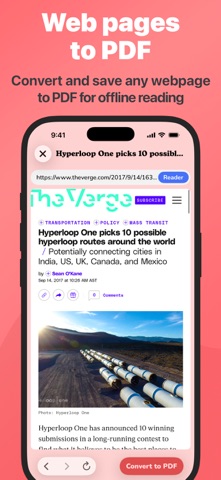
+ Web to PDF
Capture your favorite web pages offline by converting them into PDFs using our built-in browser – a seamless process in just three steps.
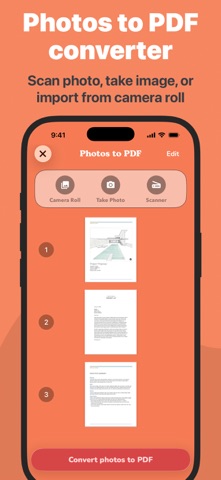
+ Photos to PDF
Digitize your photos from your camera roll or snap a picture on the spot. Create PDFs from your photos in a matter of seconds.
+ Notes to PDF
Craft your own PDFs with our rich text editor, enabling you to create complete PDF documents directly from your device.
+ PDF Editing
Unlock powerful PDF editing capabilities with our app, allowing you to:
• PDF Page Removal
Easily remove one or more pages from your PDF by importing the file and selecting the pages for removal.
• PDF Page Rotation
Correct rotated PDFs swiftly by rotating the entire document or specific pages with ease.
• Merge PDF
Combine multiple PDFs into a unified document effortlessly.
• Split PDF
Divide a PDF into multiple files by importing, selecting the split points, and letting our app handle the rest.
• Sign PDF
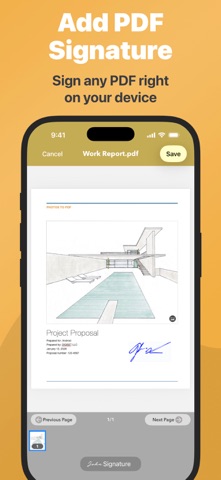
Sign documents quickly by opening your PDF, selecting "Sign," adding your signature, and you're done.
• Protect PDF
Enhance security by encrypting your PDFs with password protection, ideal for safeguarding private documents.
• Unlock PDFs
Remove known passwords from PDFs effortlessly, enabling you to share password-free files.
• PDF Share
Seamlessly share your PDFs via email or any other installed app on your device. Export to Dropbox, Evernote, Google Drive, Box, SkyDrive, and more.
• PDF Print
Print your PDF files directly within the application, ensuring compatibility with Air Print printers.
Security is our paramount concern. Rest assured, none of our tools rely on external servers, making PDF it All one of the most secure PDF tools/creators available.
PDF it All is free to use and you have 2 free daily conversions/tasks per day. If you choose to purchase PDF it All Pro+ to enjoy unlimited conversions and PDF editing, payment will be charged to your iTunes account, and your account will be charged for renewal 24 hours prior to the end of the current period. Auto-renewal may be turned off at any time by going to your settings in the iTunes Store after purchase. Prices may vary from country to country.
Privacy policy: https://pdfitall.app/privacy
Terms of use: https://pdfitall.app/terms/
For feedback/support, contact us at support@pdfitall.app
Safety and technology
Found in the app by AppBrain- Price
- Free
- App size
- 63.0 MB
- Content rating
- High
Technologies used by PDF it All Document Converter
Releases
Updates seen on the App Store- Version
- 6.2.3
- Launched
- April 2013
No changelog data
Alternatives
Similar apps and more from DIGISET LLCAlternatives to PDF it All Document Converter


 PDFMaker: JPG to PDF converter





More from DIGISET LLC


Rankings
App Store top chartsApp Store Rankings for PDF it All Document Converter
About the app and developer
About PDF it All Document Converter
PDF it All Document Converter is a productivity app developed by DIGISET LLC.
What is the rating of PDF it All Document Converter?
PDF it All Document Converter is rated 4.82 out of 5 stars, based on 8.1 thousand ratings.
Is PDF it All Document Converter free?
PDF it All Document Converter is free. The app size is 63.04 MB. The latest version available is 6.2.3. The last update was on October 3, 2026.
What are the requirements for PDF it All Document Converter?
The app has a content rating of High Maturity. The app has been available on the App Store since April 2013.
Developer information for DIGISET LLC
Address:
Frequently asked questions about PDF it All Document Converter
Is PDF it All Document Converter free?
Yes. PDF it All Document Converter is free on the App Store.
Is PDF it All Document Converter still available?
Yes. PDF it All Document Converter is on the App Store, and the last update we saw was on October 3, 2026.
How large is PDF it All Document Converter?
PDF it All Document Converter is 63.04 MB.
Is PDF it All Document Converter suitable for children?
App Store gives PDF it All Document Converter a high maturity rating. It is meant for adults.
How do people rate PDF it All Document Converter?
PDF it All Document Converter scores 4.82 out of 5 stars, from 8,142 ratings on the App Store.
Who made PDF it All Document Converter?
PDF it All Document Converter was developed by DIGISET LLC. It is listed in the productivity category on the App Store.
What are the best alternatives to PDF it All Document Converter?
People looking at PDF it All Document Converter also look at these productivity apps: Smallpdf: Scanner & PDF Editor, PDF Editor - Edit Everything!, PDFMaker: JPG to PDF converter, PDF Converter• Convert to Word, PDF Viewer by Nutrient.