

PDF Reader – PDFelement
PDF Reader – PDFelement is made and published by Wondershare Technology (Hunan) Co.,Ltd. AppBrain is an independent app data site and isn't affiliated with Wondershare Technology (Hunan) Co.,Ltd. The app name, icon, screenshots and description belong to Wondershare Technology (Hunan) Co.,Ltd. and are shown as published on the App Store.
AppBrain's verdict
EstablishedWell rated- Rating on App Store
- 4.34
- 3,924 ratings
- Last updated
- January 8, 2024
Users rate it well: 4.3 stars from 3,924 ratings.
Rankings
App Store top chartsApp Store Rankings for PDF Reader – PDFelement
Competitors
Similar apps and more from Wondershare Technology (Hunan) Co.,Ltd.Alternatives to PDF Reader – PDFelement


More from Wondershare Technology (Hunan) Co.,Ltd.


Releases
Updates seen on the App Store- Version
- 6.0.6
- Launched
- October 2016
No changelog data
User feedback
Ratings and reviews on the App StoreComments on PDF Reader – PDFelement for iOS
We don't have enough comments to show example comments. Please check back later.
Technology
Found in the app by AppBrain- Price
- Free
- App size
- 172.5 MB
- Content rating
- Everyone
Technologies used by PDF Reader – PDFelement
About the app and developer
About PDF Reader – PDFelement
PDF Reader – PDFelement is a productivity app developed by Wondershare Technology (Hunan) Co.,Ltd.
What is the rating of PDF Reader – PDFelement?
PDF Reader – PDFelement is rated 4.34 out of 5 stars, based on 3.9 thousand ratings.
Is PDF Reader – PDFelement free?
PDF Reader – PDFelement is free. The app size is 172.53 MB. The latest version available is 6.0.6. The last update was on January 8, 2024.
What are the requirements for PDF Reader – PDFelement?
The app has a content rating of Everyone. The app has been available on the App Store since October 2016.
Developer information for Wondershare Technology (Hunan) Co.,Ltd.
Store listing
By Wondershare Technology (Hunan) Co.,Ltd., from the App Store



Description by Wondershare Technology (Hunan) Co.,Ltd. Written by the developer, not by AppBrain. Click to read.
PDF VIEWER
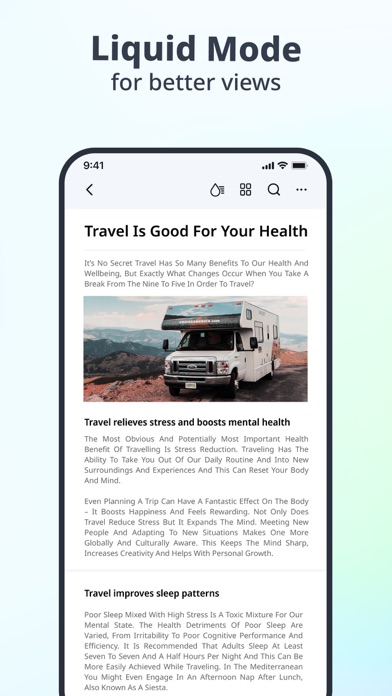
• Liquid Mode gives you the best PDF reading experience
• Star files to find them quickly
• Easily locate recently accessed files in the "Recent" list.
• Enter the page number to navigate to the desired page for viewing
LIQUID MODE
• Get the best PDF Reading experience with Liquid Mode
• PDF document fully fits the mobile phone screen, no need to zoom in and out repeatedly.
• Easily adjust brightness, font size,style, and spacing.
ANNOTATE
• Using Pencil to annotate like writing on the paper
• Add text annotations, freely modify the text and background, border colors, choose the appropriate font and font size.
• Supports many annotating tools like highlighting, underlining, squiggly lines, or strikethroughs.
MANAGE
• Move, merge, copy or delete files
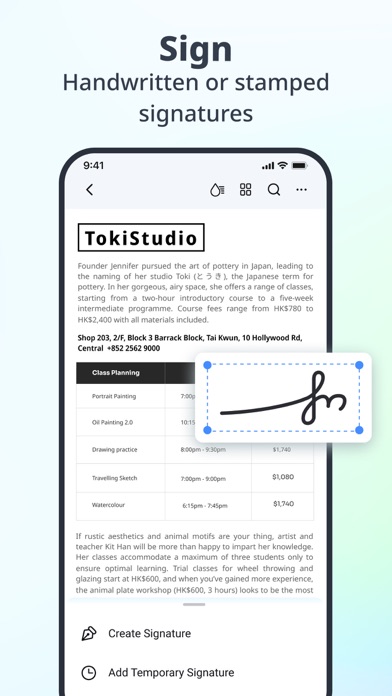
SIGNATURE
• Enables handwritten signatures to be inserted anywhere within the document, while also offering the ability to zoom in and out for greater flexibility.
• Built-in commonly used stamps
CREATE
• Quickly create completely blank PDF documents
• Creat blank folders.
SHARE
• Sharing document content with others is just a click away with capture feature.
• Select sentence(s) or pragraph(s) to share
CLOUD SERVICE
• PDF Reader supports uploading or downloading docs via computer, Wondershare document cloud and iCloud.
Please note that this app only supports editing native PDF files. It does not support editing scanned or raster PDF. If you find you cannot edit text in PDF, please check if it is scanned PDF. Thank you!
----------------------------------------------------------------------------------------
Need HELP? Please contact us! We'll feedback to you ASAP.
Email: pdfelement@wondershare.com
Support Center: http://support.wondershare.com
Forum: http://forum.pdf.wondershare.com
Official Website: https://pdf.wondershare.com
If you think this App helps you, your positive review in the App Store would be much appreciated.