

LiquidText
LiquidText is made and published by LiquidText, Inc. AppBrain is an independent app data site and isn't affiliated with LiquidText, Inc. The app name, icon, screenshots and description belong to LiquidText, Inc. and are shown as published on the App Store.
AppBrain's verdict
EstablishedLoved by users- Best rank
- #34
- Top Grossing, India
- Rating on App Store
- 4.62
- 6,381 ratings
- Last updated
- September 24, 2026
Users love it: 4.6 stars from 6,381 ratings. Its best ranking is #34 in Top Grossing, Productivity in India.
Rankings
App Store top charts- Highest rank
- #34
- Chart
- Top Grossing
- Productivity
- Country
- India
App Store Rankings for LiquidText
Top rankings
| Rank | Country | Category | List |
|---|---|---|---|
| 34 | India | Productivity | Top Grossing |
Ranking history in India
Competitors
Similar apps and more from LiquidText, Inc.Alternatives to LiquidText


More from LiquidText, Inc.

Releases
Updates seen on the App Store- Version
- 7.3.16
- Launched
- September 2015
No changelog data
User feedback
Ratings and reviews on the App StoreComments on LiquidText for iOS
We don't have enough comments to show example comments. Please check back later.
Technology
Found in the app by AppBrain- Price
- Free
- App size
- 316.9 MB
- Content rating
- High
Technologies used by LiquidText
About the app and developer
About LiquidText
LiquidText is a productivity app developed by LiquidText, Inc.
User Ratings
LiquidText is rated 4.62 out of 5 stars. The rating is based on 6.4 thousand ratings.
App Information
LiquidText is freely available from the App Store. The app size is 316.85 MB. The latest version available is 7.3.16. The last update was on September 24, 2026.
Technical Requirements
The app has a content rating of High Maturity. The app has been available on the App Store since September 2015.
Developer information for LiquidText, Inc.
Address:
Frequently asked questions about LiquidText
Is LiquidText free?
Yes. LiquidText is free on the App Store.
Is LiquidText still available?
Yes. LiquidText is on the App Store, and the last update we saw was on September 24, 2026.
How large is LiquidText?
LiquidText is 316.85 MB.
Is LiquidText suitable for children?
App Store gives LiquidText a high maturity rating. It is meant for adults.
How do people rate LiquidText?
LiquidText scores 4.62 out of 5 stars, from 6,381 ratings on the App Store.
Who made LiquidText?
LiquidText was developed by LiquidText, Inc. It is listed in the productivity category on the App Store.
What are the best alternatives to LiquidText?
People looking at LiquidText also look at these productivity apps: MarginNote 3, MyScript Notes: AI Handwriting, Notes Writer: PDF, Voice, AI, QuickNotes X: Notes, AI & PDF, Zotero.
Store listing
By LiquidText, Inc., from the App Store



Description by LiquidText, Inc. Written by the developer, not by AppBrain. Click to read.
LiquidText offers a fast, natural way to review, gather, and organize information across all your documents and webpages—then apply the results to writing reports, meeting prep, or simply studying. Pull out key facts and connect them together, squeeze a document to compare sections, draw a line to connect ideas in different documents, comment on multiple pages at once, build upon your thoughts, and much more.
► WHAT PEOPLE ARE SAYING:
* "If you want to experience the power of going beyond paper, you can download LiquidText" – Cult of Mac
* One of Macworld’s Top 24 Apps for iPad Pro
* One of Time Magazine's Ten Best apps for iPad Pro *
* "There's a better way to organize your research, and the app is it." – iMore, Serenity Caldwell
* “All you need for deep research projects.” – Macworld, Jackie Dove
* "The world changed with...LiquidText" – Law360, Paul Kiesel
* "LiquidText may just be *the* app for reviewing and annotating PDFs using Apple's tablet and stylus." – CIO Magazine, James Martin
* “One of the most powerful, original iPad apps I've tried in years” – Federico Viticci, MacStories.net
► LIQUIDTEXT’S COMPLETE FEATURE SET INCLUDES:
(Features with * require a paid upgrade.)
Import
• Create a workspace and import all the documents and web pages you need
• Compatible with PDF, Word, and PowerPoint document types
• Import from Dropbox, iCloud Drive, Box, email, and more
• Import content from webpage or send to LiquidText directly from Safari
• Instant OCR to select text in scanned documents; do a full document-OCR to search as well!*
• Import documents & metadata directly from reference managers (supports Zotero and Mendeley)*
Interact
• Pull excerpts from all the documents in your project into the Workspace area
• Add your own notes (typed or written) to the Workspace area
• Freely draw on your notes, or on the workspace itself*
• Organize excerpts and notes into groups
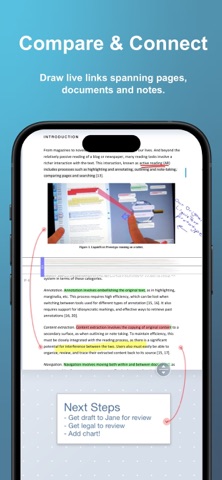
• Connect anything - draw live “ink links” that span pages, documents, notes, and more*
• Create mind-maps by drawing “ink links” connecting your excerpts/notes to one another *
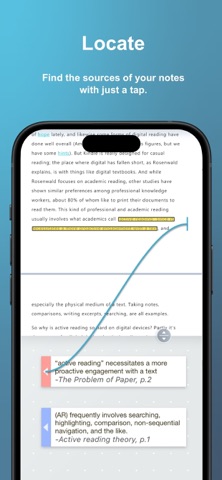
• Get context - tap notes and excerpts to find original source
Compare
• Pinch a document to compare different distant pages side by side
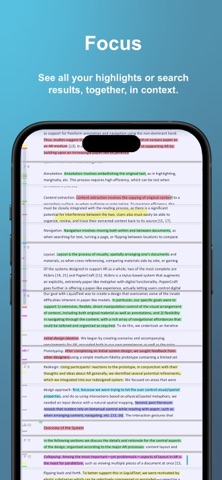
• Collapse text to see annotated parts side-by-side
• Collapse text to view search results(s) side-by-side
• Import unlimited number of documents into a project, view up to 3 at once*
Annotate
• Freely draw* or highlight on your document, notes, or the workspace itself
• Add margin notes/comments to text, images, notes, and excerpts
• Comment on two or more selections simultaneously
• Replace document with a newer version (and annotations are brought to new doc)*
Search
• Search for keywords across all your LiquidText documents
• Find keywords in title or text of your documents*
• Bulk highlight, tag, or link to your search results*
Realtime Collaboration
• Invite colleagues into your shared projects and work together in near realtime*
• Leave comments and notifications for your collaborators*
• Privacy controls: set whether each workspace & document in your project is shared or private*
Easy Export
• Export your project as a PDF (includes your Workspace and documents)
• Export your project as a Word file (converts your notes/excerpts into a linear document)
• Send a full LiquidText file for those with the app.
• Send files by email or to Dropbox, iCloud Drive, Zotero, and more*
Sync & Backup*
• Real-time, cross-platform sync
• Continuous cloud backup
• Multi-device display:
• Use your desktop or tablet as additional display for your other device
• Use your tablet for freehand inking while viewing and keyboarding on your desktop
See our terms of use at https://www.liquidtext.net/terms-of-use
Learn more at LiquidText.net | Better Than Paper