

PDF Maker - Document Scanner
PDF Maker - Document Scanner is made and published by XCell. AppBrain is an independent app data site and isn't affiliated with XCell. The app name, icon, screenshots and description belong to XCell and are shown as published on the App Store.
AppBrain's verdict
- Rating on App Store
- 4.00
- 4 ratings
- Last updated
- August 19, 2026
- Size
- 38.1 MB
It doesn't have enough ratings yet to judge what users think.
User feedback
Ratings and reviews on the App StoreComments on PDF Maker - Document Scanner for iOS
We don't have enough comments to show example comments. Please check back later.
Store listing
By XCell, from the App Store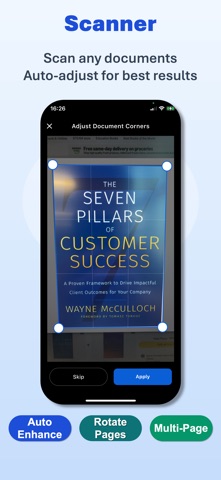




Description by XCell Written by the developer, not by AppBrain. Click to read.
Have you ever needed to turn a stack of paper into a professional PDF instantly, or combine multiple documents into one organized file on the go?
PDF Maker is the ultimate document management tool designed to handle every PDF task with precision and speed — all on your device, all in one place.
PDF Maker simplifies the way you create, edit, and organize documents. Whether you’re a student, a business professional, or an entrepreneur — PDF Maker is your perfect companion for a paperless lifestyle.
■ Main Features
• High-Quality Document Scanner
Turn your camera into a powerful scanner. Capture documents, receipts, or notes and instantly convert them into clean, professional PDF files with high clarity.
• Convert Files to PDF
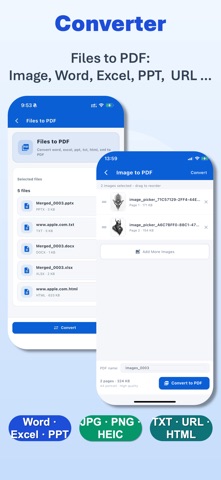
Quickly convert images, photos, Office files (Word, Excel, PPT), HTML, TXT, and web pages into high-quality PDFs.
• Export PDF to Other Formats
Easily export PDFs to common formats such as Word, Excel, PPT, HTML, and TXT for editing and sharing.
• Merge & Organize
Combine multiple PDF files into a single document in any order you choose. Streamline your workflow by keeping all related information in one place.
• Precise PDF Splitter
Extract specific pages or sections from any PDF to create a new file. Flexibility at your fingertips for sharing only what’s necessary.
• Professional Compressor
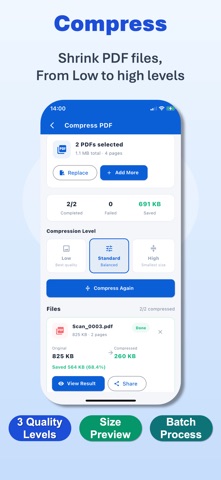
Reduce file sizes without compromising readability. Choose from three optimization levels — Low, Standard, or High — to save storage and make sharing faster.
• Advanced Annotation Tools
Mark up your documents with ease. Use the pen tool, add text boxes, or use selection frames to highlight, comment, and collaborate on your PDF files.
■ Privacy First
Your security is our absolute priority.
PDF Maker operates with a strict local-only processing policy. We do not store, upload, or collect any of your documents or personal information on our servers. Your data stays where it belongs: on your device.
■ Why Choose PDF Maker?
• Powerful Processing Engine for high-quality document creation and conversion.
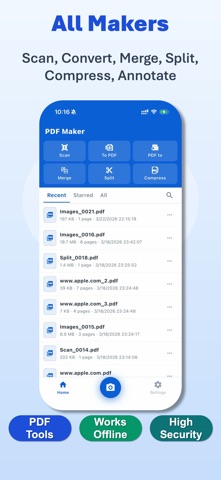
• Complete Toolkit for scanning, converting, merging, and editing in one app.
• Offline Efficiency — work anywhere, anytime without needing an internet connection.
• 100% Secure & Private — zero server-side data storage.
• Clean, Intuitive Interface designed for maximum productivity and ease of use.
■ Disclaimer
PDF Maker is an independent document management tool designed to help users process and organize their personal files.
It is not affiliated with or endorsed by any third-party document platforms.
The use of this application complies with “fair use” guidelines.
• Terms of Service: https://www.oxcellion.com/pdf-converter/assets/terms/user_agreement.html
• Privacy Policy: https://www.oxcellion.com/pdf-converter/assets/terms/privacy_policy.html
• Contact: service@oxcellion.com
PDF Maker — Scan, Convert, Edit, and Secure with Ease.
Download now and experience the next generation of smart document management!
Safety and technology
Found in the app by AppBrain- Price
- Free
- App size
- 38.1 MB
- Content rating
- Everyone
Technologies used by PDF Maker - Document Scanner
Releases
Updates seen on the App Store- Version
- 1.1.2
- Launched
- March 2026
No changelog data
Alternatives
Similar apps and more from XCellMore from XCell


Also available on Google Play

Rankings
App Store top chartsApp Store Rankings for PDF Maker - Document Scanner
About the app and developer
About PDF Maker - Document Scanner
PDF Maker - Document Scanner is a business app developed by XCell.
User Ratings
PDF Maker - Document Scanner is rated 4.00 out of 5 stars. The rating is based on 4 ratings.
App Information
PDF Maker - Document Scanner is freely available from the App Store. The app size is 38.13 MB. The latest version available is 1.1.2. The last update was on August 19, 2026.
Technical Requirements
The app has a content rating of Everyone. The app has been available on the App Store since March 2026.
Developer information for XCell
Address: