Download Android Apps and Games
AppBrain
  • Apps
  • Apps being viewed right now Trending apps today Most popular apps All-time most downloaded apps Top rated apps iPhone and iPad apps
  • Intelligence ▾
    Intelligence overview → Track any Android app or your whole market
    Track & analyze
    Keyword Tracker & OptimizerTrack & improve Play rankings App Performance ReportOne-off PDF for any app StatisticsFree Android & Play market stats
    Promote your app
    Featured Apps App Links
  • Intelligence
  • Pricing
  • Dashboard
  • Sign up
  • Log in
Last updated on: 2026-09-15
App Store Apps > Productivity > PDF Max - Edit, Sign PDFs
PDF Max - Edit, Sign PDFs icon

PDF Max - Edit, Sign PDFs

27.2.0
Mobeera
4.48
1,177 reviews
Free

PDF Max - Edit, Sign PDFs Screenshot 1 of 10
PDF Max - Edit, Sign PDFs Screenshot 2 of 10
PDF Max - Edit, Sign PDFs Screenshot 3 of 10
PDF Max - Edit, Sign PDFs Screenshot 4 of 10
PDF Max - Edit, Sign PDFs Screenshot 5 of 10
PDF Max - Edit, Sign PDFs Screenshot 6 of 10
PDF Max - Edit, Sign PDFs Screenshot 7 of 10
PDF Max - Edit, Sign PDFs Screenshot 8 of 10
PDF Max - Edit, Sign PDFs Screenshot 9 of 10
PDF Max - Edit, Sign PDFs Screenshot 10 of 10
4.48 · 1,177 reviews
Download from the App Store

About PDF Max - Edit, Sign PDFs

PDF Max - Edit, Sign PDFs is an overall app developed by Mobeera.

Download Statistics

User Ratings

PDF Max - Edit, Sign PDFs is rated 4.48 out of 5 stars. The rating is based on 1.2 thousand ratings.

App Information

PDF Max - Edit, Sign PDFs is FREE to download. The APK download size is 247.03 MB. The latest version available is 27.2.0. The last update was on September 3, 2026.

Technical Requirements

The app has a content rating of Everyone. The app has been available on Google Play August 2012.

Description
PDF Max is a complete PDF editor for iPhone, iPad, and Mac, trusted by millions of people since 2012.

From signing a form to building research you can verify, PDF Max helps you edit, annotate, organize, understand, study, protect, and deliver PDFs—all in one app.

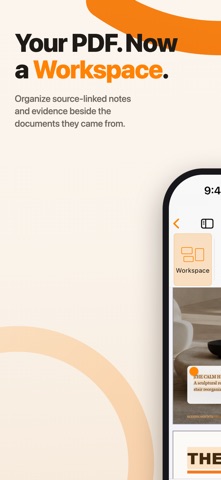
YOUR PDF. NOW A WORKSPACE.

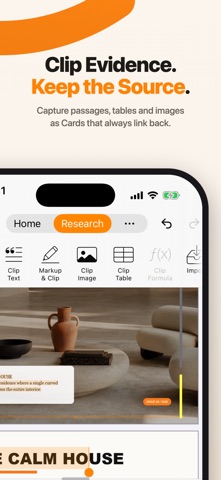
Collect important passages, highlights, images, tables, formulas, and notes as Cards beside your PDFs. Every Card remembers where it came from, so you can return to the original page whenever you need the full context.

• Search, tag, connect, and arrange your Cards
• Gather related Cards into named groups called Frames
• Organize evidence from several PDFs without merging them
• Compare passages side by side or view your evidence as an Outline or table
• Present Frames or export your work to Markdown, PDF, or Word

STUDY WHAT MATTERS

Turn trusted Cards into Questions, practice a focused topic, or use scheduled Study for long-term review. Track your Progress, study text and visual material, and return to the supporting PDF whenever an answer needs more context.

On supported devices, Apple Intelligence can draft Questions for you to review before saving.

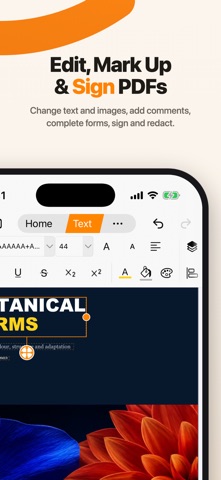
EDIT, ANNOTATE, FILL, AND SIGN
• Edit existing text, typography, images, links, shapes, and tables
• Add, replace, crop, align, rotate, and arrange content
• Remove image backgrounds and automatically crop subjects
• Highlight, underline, strike through, draw, stamp, and comment
• Add text boxes, callouts, notes, shapes, and threaded comments
• Complete forms, find missing required fields, and add reusable signatures
• Create and edit text, checkbox, radio, dropdown, signature, date, and image fields
• Permanently redact text, areas, pages, or search results

SCAN, READ, AND UNDERSTAND
• Scan paper with automatic capture, edge detection, cleanup, crop, filters, and page reordering
• Make scans searchable with optional OCR
• Turn selected images into polished PDFs
• Reflow fixed or scanned pages into a comfortable reading column
• Keep figures beside the text they explain
• Customize reading theme, typography, spacing, margins, and alignment
• Translate supported languages and listen with on-device Read Aloud
• Keep selected passages and useful context with Focus View

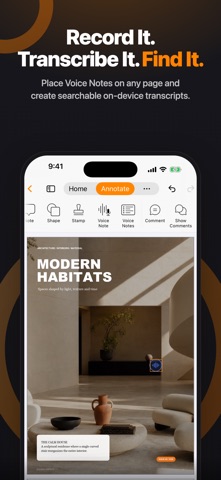
VOICE NOTES THAT STAY ON THE PAGE
• Place and play audio notes anywhere in a PDF
• Create searchable on-device transcripts when the required speech model is available

MAKE FLAT FORMS FILLABLE
• Detect likely text, checkbox, and signature fields in flat or printed forms
• Review every detected field before applying it
• Use Form Assist to review suggested answers from your encrypted profile

EVERY PDF TOOL IN ONE PLACE
• Reorder, rotate, insert, duplicate, replace, extract, merge, split, or delete pages
• Compress PDFs while preserving selectable text and vector graphics
• Resize mixed pages to standard paper sizes
• Add page numbers, N of M, Roman numerals, letters, or Bates numbering
• Add or remove an open password
• Create and edit PDF outlines and bookmarks
• Recognize text with OCR and convert Word documents to PDF
• Create PDFs from paper, journal, planner, graph, and project templates
• Present PDF pages or Workspace Frames full screen
• Save, print, flatten, share, or export the finished result

Join more than 25 million downloads worldwide and move from document to outcome with PDF Max.

Some advanced features require PDF Max PREMIUM.
PDF MAX PREMIUM SUBSCRIPTION
Payment will be charged to your Apple Account when the purchase is confirmed. Subscriptions renew automatically unless canceled at least 24 hours before the end of the current subscription period. You can manage or cancel your subscription in your Apple Account settings. Any unused portion of a free trial will be forfeited when a subscription is purchased, where applicable.
Privacy Policy: https://mobeera.ai/privacy
Terms: https://mobeera.ai/terms
Show more Show less

More data about PDF Max - Edit, Sign PDFs

Price Free to download
Rating 4.48 based on 1.2 thousand ratings
Ranking Not ranked
Version 27.2.0
App download size 247.0 MB
Suitable for Everyone

Alternative downloads for the PDF Max - Edit, Sign PDFs app

PDF Cabinet icon PDF Cabinet
MOTECH LTD
3.8
Free
55 ratings
PDF Editor – PDF Whip icon PDF Editor – PDF Whip
Desygner Pty Ltd
4.6
Free
330 ratings
PDF Pro - Reader Editor Forms icon PDF Pro - Reader Editor Forms
Dominic Rodemer
4.7
Free
6.9K ratings
Markup – Highlight & Annotate icon Markup – Highlight & Annotate
Kdan Mobile Software LTD
4.3
Free
436 ratings
PDF Viewer by Nutrient icon PDF Viewer by Nutrient
PSPDFKit GmbH
4.6
Free
9.1K ratings
MaxiPDF PDF editor icon MaxiPDF PDF editor
SSA
1.0
Free
3 ratings
PDF Reader – PDFelement icon PDF Reader – PDFelement
Wondershare Technology (Hunan) Co.,Ltd.
4.3
Free
3.9K ratings
pdf-notes for iPad (ads) icon pdf-notes for iPad (ads)
AMuseTec Co., Ltd.
3.3
Free
22 ratings

More from Mobeera

PDF Max Pro icon PDF Max Pro
Mobeera
4.5
$4.99
1.4K ratings
CoinScreener - Powered by AI icon CoinScreener - Powered by AI
Mobeera
1.8
Free
5 ratings
PDF Max Premium icon PDF Max Premium
Mobeera
0.0
$69.99
Recapify - AI Note Taker icon Recapify - AI Note Taker
Mobeera
0.0
Free

Changelog of PDF Max - Edit, Sign PDFs

No changelog data

Developer information for Mobeera

Mobeera

Address:

Share PDF Max - Edit, Sign PDFs

Comments on PDF Max - Edit, Sign PDFs for iOS

We don't have enough comments to show example comments. Please check back later.

App Store Rankings for PDF Max - Edit, Sign PDFs

This app is not ranked

Technologies used by PDF Max - Edit, Sign PDFs

Popular Overall Apps on sale Top new apps Today's trending apps Apps other people are watching
PDF Cabinet icon PDF Cabinet
PDF Editor – PDF Whip icon PDF Editor – PDF Whip
PDF Pro - Reader Editor Forms icon PDF Pro - Reader Editor Forms
Markup – Highlight & Annotate icon Markup – Highlight & Annotate
PDF Viewer by Nutrient icon PDF Viewer by Nutrient
MaxiPDF PDF editor icon MaxiPDF PDF editor
PDF Reader – PDFelement icon PDF Reader – PDFelement
pdf-notes for iPad (ads) icon pdf-notes for iPad (ads)

Back to top
AppBrain Intelligence premium content

Subscribe now to get full and unlimited access to AppBrain Intelligence. You'll have access to:

  • App Intelligence dashboard (performance timeline, competitor comparison, country rankings, insight cards)
  • Detailed ranking data per app
  • Full timeline per developer
  • Device market shares data per country
  • Unlimited keyword tracking
1 Month

$75/mo
(billed every month)

SAVE 0%
Subscribe
3 Months

$65/mo
($195 billed every 3 months)

SAVE 13%
Subscribe
1 Year

$57.50/mo
($690 billed every year)

SAVE 23%
Subscribe
Each subscription will automatically renew 3 days before the expiration date for the same time period. Subscriptions can be cancelled at any time before the renewal.

AppBrain is a directory focused on discovering great apps and games. We give statistics, rankings and search options that Google Play and the App Store don't have. All trademarks are owned by their respective owners. AppBrain doesn't offer APKs or binaries, and always lets users install the official version from Google Play or the App Store.

More apps

  • Top Android apps being viewed
  • Automate location permissions
  • Quran Tahfiz For Menshawy stats
  • The Prince Family Fake Call

App statistics

  • Android statistics
  • Google Play Developer stats
  • Trending Android Apps
  • Trending iOS apps
  • Top popular Apps
  • Buy the best Android phone

About AppBrain

  • Contact
  • Privacy
  • Documentation
  • DMCA takedowns
  • Articles
  • Blog
  • Android App Marketing: Learn how to better market your Android app
© 2010-2026 - AppBrain