Download Android Apps and Games
AppBrain
  • Apps
  • Apps being viewed right now Trending apps today Most popular apps All-time most downloaded apps Top rated apps
  • Intelligence ▾
    Intelligence overview → Track any Android app or your whole market
    Track & analyze
    Keyword Tracker & OptimizerTrack & improve Play rankings App Performance ReportOne-off PDF for any app StatisticsFree Android & Play market stats
    Promote your app
    Featured Apps App Links
  • Intelligence
  • Pricing
  • Dashboard
  • Sign up
  • Log in
Last updated on: 2026-07-21
App Store Apps > Productivity > PDF Max
PDF Max icon

PDF Max

8.1.0
Mobeera
4.48
1,176 reviews
Free

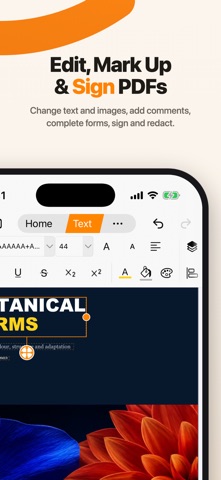
PDF Max Screenshot 1 of 5
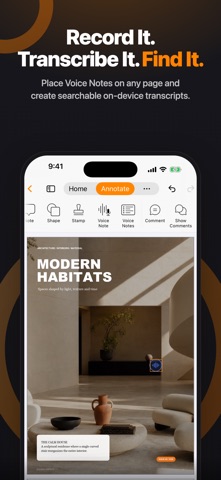
PDF Max Screenshot 2 of 5
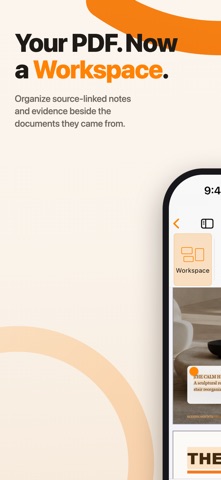
PDF Max Screenshot 3 of 5
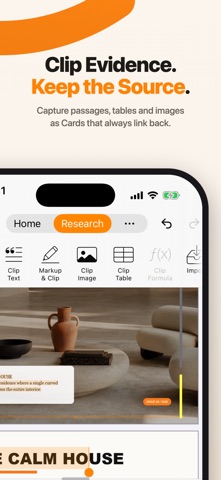
PDF Max Screenshot 4 of 5
PDF Max Screenshot 5 of 5
4.48 · 1,176 reviews
Download from the App Store

About PDF Max

PDF Max is an overall app developed by Mobeera.

How many times has PDF Max been downloaded?

What is the rating of PDF Max?

PDF Max is rated 4.48 out of 5 stars, based on 1.2 thousand ratings.

Is PDF Max free?

PDF Max is free to download. The APK download size is 43.13 MB. The latest version available is 8.1.0. The last update was on October 3, 2022.

What are the requirements for PDF Max?

The app has a content rating of Everyone. The app has been available on Google Play August 2012.

Description
PDF Max is a desktop class PDF app for reading, annotating or signing PDF documents on your iPhone/iPad. Mark up documents with highlights and handwriting, insert texts and stamps, fill out, sign PDFs and even manipulate PDF pages. With over 3 million downloads across platforms, PDF Max helps hundred thousands of people over the world to go paperless everyday.

PDF Max Features:

* READING FEATURES
- Smooth and responsive even with large PDF documents
- Smooth vertical scrolling - allow you to scroll through your entire PDF document smoothly and efficiency.
- Open documents in multiple tabs.
- Multi-purpose SideBar includes everything you need to skim through your documents like never before: Page Thumbnails, PDF Outlines/Bookmarks, Annotation List & Search Panel.
- Smart Zoom: Double-tap on text blocks and PDF Max will zoom the touched text block to fit the screen. Simple & efficient reading.
- Friendly & Easy to use User Interface

* ANNOTATING FEATURES
- Text markup: Highlight, Underline, Strike out & Squiggle
- Unlimited threaded comments (notes) attached to any annotation.
- Create VOICE ANNOTATIONS: Record and embed voice annotations within the PDF document.
- HANDWRITING with Advanced Zoom-In Writing feature
- Eraser tools to manipulate your handwriting
- Shape tools to draw Line, Arrow, Rectangle & Oval with intelligent snapping
- Rich format Freetext tool to type over PDF pages
- Stamp tool to insert Predefined, Standard Business Stamps & Custom Stamps
- Signature tool to manage and insert your signatures
- Undo/Redo function to correct your mistake
- Save and organize your favorite tools and access them quickly when needed.
- Easy to scroll document while annotating with one finger or stylus pen with optional Horizontal and Vertical ScrollBars
- Smart caching mechanism to avoid data loss.

* EDITING FEATURES
- Manage PDF Pages (Insert, Copy/Cut/Paste, Reorder & Delete PDF Pages)
- Manage PDF Outlines (Table of Contents) , PDF Embedded Links

* FORM-FILLING FEATURES:
- Support Text field, checkboxes, radio buttons, dropdown list, buttons & date-time fields
- Support JavaScripted-powered PDF forms
- Support AcroForms & Static XFA Forms
- Zoom-in writing to fill out scanned/non-interactive PDF forms
- Manage your signature plus one-time signature for customer

* PDF OUTLINE, PDF LINK & BOOKMARK MANAGEMENT FEATURES
- Create and manipulate PDF Outlines
- Create and manage PDF Bookmarks
- Create and edit PDF Embedded Links

* FILE MANAGEMENT FEATURES:
- The all-new file manager with Thumbnail View, List View modes. Sort by Name, Modified Date or Size.
- Categorize files or folder by Color Tags or Favorites (Starred)
- Seamless, desktop-like integration with Dropbox or Google Drive. Work both with or without an Internet connection.
- Rename, Copy or Move remote files/folders.
- Local Library for organizing files from different sources.
- Copy/Move files or folders between online cloud storage services.
iCloud Drive support.

* OTHER FEATURES
- Bookmarks management with ability to export as PDF Outlines
- Email or Print PDF in editable or flattened format
- PDF documents/forms modified by PDF Max are compatible with Adobe Acrobat standard

Let's go paperless! More at https://pdfmax.app

PREMIUM SUBSCRIPTION:
- Payment will be charged to iTunes Account at confirmation of purchase
- Subscription automatically renews unless auto-renew is turned off at least 24-hours before the end of the current period
- Account will be charged for renewal within 24-hours prior to the end of the current period, and identify the cost of the renewal
- Subscriptions may be managed by the user and auto-renewal may be turned off by going to the user's Account Settings after purchase
- Any unused portion of a free trial period, if offered, will be forfeited when the user purchases a subscription to that publication, where applicable.

Our privacy policy https://pdfmax.app/privacy
Our End-user License Agreement https://pdfmax.app/eula
Show more Show less

More data about PDF Max

Price Free to download
Rating 4.48 based on 1.2 thousand ratings
Ranking Not ranked
Version 8.1.0
App download size 43.1 MB
Suitable for Everyone

Alternative downloads for the PDF Max app

PDF Cabinet icon PDF Cabinet
MOTECH LTD
3.8
Free
55 ratings
More active
PDF Editor – PDF Whip icon PDF Editor – PDF Whip
Desygner Pty Ltd
4.6
Free
330 ratings
PDF Pro - Reader Editor Forms icon PDF Pro - Reader Editor Forms
Dominic Rodemer
4.7
Free
6.9K ratings
Markup – Highlight & Annotate icon Markup – Highlight & Annotate
Kdan Mobile Software LTD
4.3
Free
436 ratings
More active
PDF Viewer by Nutrient icon PDF Viewer by Nutrient
PSPDFKit GmbH
4.6
Free
9.1K ratings
MaxiPDF PDF editor icon MaxiPDF PDF editor
SSA
1.0
Free
3 ratings
PDF Reader – PDFelement icon PDF Reader – PDFelement
Wondershare Technology (Hunan) Co.,Ltd.
4.3
Free
3.9K ratings
pdf-notes for iPad (ads) icon pdf-notes for iPad (ads)
AMuseTec Co., Ltd.
3.3
Free
22 ratings

More from Mobeera

PDF Max Pro icon PDF Max Pro
Mobeera
4.5
$4.99
1.4K ratings
CoinScreener - Powered by AI icon CoinScreener - Powered by AI
Mobeera
1.8
Free
5 ratings
PDF Max Premium icon PDF Max Premium
Mobeera
0.0
$69.99
Recapify - AI Note Taker icon Recapify - AI Note Taker
Mobeera
0.0
Free

Changelog of PDF Max

No changelog data

Developer information for Mobeera

Mobeera

Address:

Share PDF Max

Comments on PDF Max for iOS

We don't have enough comments to show example comments. Please check back later.

App Store Rankings for PDF Max

This app is not ranked

Technologies used by PDF Max

PDF Cabinet icon PDF Cabinet
PDF Editor – PDF Whip icon PDF Editor – PDF Whip
PDF Pro - Reader Editor Forms icon PDF Pro - Reader Editor Forms
Markup – Highlight & Annotate icon Markup – Highlight & Annotate
PDF Viewer by Nutrient icon PDF Viewer by Nutrient
MaxiPDF PDF editor icon MaxiPDF PDF editor
PDF Reader – PDFelement icon PDF Reader – PDFelement
pdf-notes for iPad (ads) icon pdf-notes for iPad (ads)

Back to top
AppBrain Intelligence premium content

Subscribe now to get full and unlimited access to AppBrain Intelligence. You'll have access to:

  • App Intelligence dashboard (performance timeline, competitor comparison, country rankings, insight cards)
  • Detailed ranking data per app
  • Full timeline per developer
  • Device market shares data per country
  • Unlimited keyword tracking
1 Month

$75/mo
(billed every month)

SAVE 0%
Subscribe
3 Months

$65/mo
($195 billed every 3 months)

SAVE 13%
Subscribe
1 Year

$57.50/mo
($690 billed every year)

SAVE 23%
Subscribe
Each subscription will automatically renew 3 days before the expiration date for the same time period. Subscriptions can be cancelled at any time before the renewal.

AppBrain is a directory focused on discovering great apps and games. We give statistics, rankings and search options that Google Play and the App Store don't have. All trademarks are owned by their respective owners. AppBrain doesn't offer APKs or binaries, and always lets users install the official version from Google Play or the App Store.

More apps

  • Top Android apps being viewed
  • View PianoMeter – Piano Tuner
  • View Kash Box
  • Ants ?!

Android Statistics

  • Android statistics
  • Google Play Developer stats
  • Trending Android Apps
  • Top popular Apps
  • Buy the best Android phone

About AppBrain

  • Contact
  • Privacy
  • Documentation
  • DMCA takedowns
  • Articles
  • Blog
  • Monetization tips: Understanding your eCPM
© 2010-2026 - AppBrain