

PDF Office: Scan & Sign
PDF Office: Scan & Sign is made and published by StudyBridge LLC. AppBrain is an independent app data site and isn't affiliated with StudyBridge LLC. The app name, icon, screenshots and description belong to StudyBridge LLC and are shown as published on the App Store.
AppBrain's verdict
- Last updated
- June 27, 2026
- Size
- 37.9 MB
User feedback
Ratings and reviews on the App StoreComments on PDF Office: Scan & Sign for iOS
We don't have enough comments to show example comments. Please check back later.
Store listing
By StudyBridge LLC, from the App Store
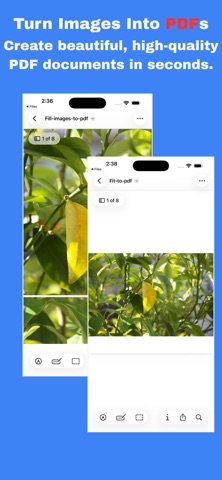

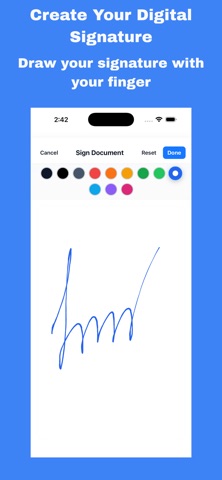


Description by StudyBridge LLC Written by the developer, not by AppBrain. Click to read.
Key Features:
• Sign Documents – Add your signature to PDFs and forms quickly.
• Scan to PDF – Turn paper into high-quality digital documents.
• Edit and Fill Forms – Write text, fill out forms, and make notes.
• Convert Files – Convert documents to PDF and share instantly.
• Share and Save – Export your signed or scanned files via email, cloud, or messaging apps.
Whether you are a student, professional, or small business owner, PDF Office makes paperwork simple and secure.
Why Choose PDF Office?
• Easy to use design
• Works offline, no internet required
• Keeps your documents private and secure
• Saves time with instant scan and sign
Perfect for contracts, forms, ID scans, school assignments, receipts, and more.
Download PDF Office: Scan & Sign today and take control of your documents from anywhere.
Safety and technology
Found in the app by AppBrain- Price
- Free
- App size
- 37.9 MB
- Content rating
- Everyone
Technologies used by PDF Office: Scan & Sign
Releases
Updates seen on the App Store- Version
- 1.3.9
- Launched
- October 2025
No changelog data
Alternatives
Similar apps and more from StudyBridge LLCAlternatives to PDF Office: Scan & Sign


More from StudyBridge LLC




Rankings
App Store top chartsApp Store Rankings for PDF Office: Scan & Sign
About the app and developer
About PDF Office: Scan & Sign
PDF Office: Scan & Sign is an utilities app developed by StudyBridge LLC.
What is the rating of PDF Office: Scan & Sign?
PDF Office: Scan & Sign has no ratings yet.
Is PDF Office: Scan & Sign free?
PDF Office: Scan & Sign is free. The app size is 37.94 MB. The latest version available is 1.3.9. The last update was on June 27, 2026.
What are the requirements for PDF Office: Scan & Sign?
The app has a content rating of Everyone. The app has been available on the App Store since October 2025.
Developer information for StudyBridge LLC
Address:
Frequently asked questions about PDF Office: Scan & Sign
Is PDF Office: Scan & Sign free?
Yes. PDF Office: Scan & Sign is free on the App Store.
Is PDF Office: Scan & Sign still available?
Yes. PDF Office: Scan & Sign is on the App Store, and the last update we saw was on June 27, 2026.
How large is PDF Office: Scan & Sign?
PDF Office: Scan & Sign is 37.94 MB.
Is PDF Office: Scan & Sign suitable for children?
App Store rates the content of PDF Office: Scan & Sign as suitable for everyone.
Who made PDF Office: Scan & Sign?
PDF Office: Scan & Sign was developed by StudyBridge LLC. It is listed in the utilities category on the App Store.
What are the best alternatives to PDF Office: Scan & Sign?
People looking at PDF Office: Scan & Sign also look at these utilities apps: Admob Reporter, LocalShare:FileShare AnyDevice, Hushy - Baby Sleep Sounds, TeaTeaAvatar - Group Avatar, Je Mérite Ma Maison.