PDF Pro turns your iPhone into a scanner, a converter and a PDF editor — and keeps the work on your device.
SCAN ANYTHING
Point the camera at a page. PDF Pro finds the edges, straightens the paper, cleans it up and shoots when your hand settles. Multiple pages, one document, ready to send.
CONVERT WITHOUT UPLOADING
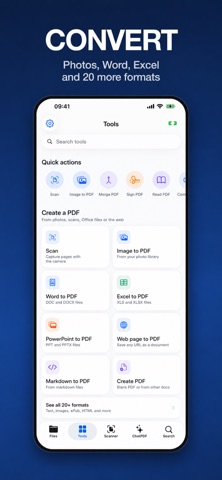
Photos, Word, Pages, PowerPoint, Keynote, Excel, Numbers, PNG, JPEG, HEIF and HEIC become PDFs on your phone. No upload, no waiting.
EDIT THE DOCUMENT, NOT A COPY
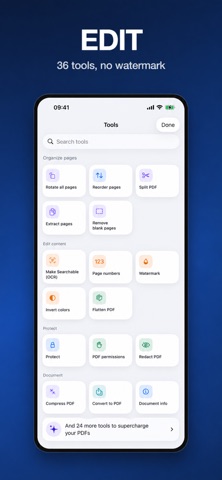
Add or delete pages, reorder them, rotate the whole file, fill in form fields, place your signature. Long documents open straight away and stay smooth while you scroll.
PASSPORT PHOTOS, IN YOUR COUNTRY'S MEASUREMENTS
Passport, ID card or driving licence: the app finds the face, measures the head and crops to the rules of the country you pick — 35 × 45 mm in Europe, square in the United States. It tells you what is wrong before you go and print, and lays out a 10 × 15 cm sheet with six copies. There is a tool that removes the background from a photo too. Both are included in the subscription. And if a photo is too heavy to send, you can make it smaller — many at once, and that one is free.
FIND ANY DOCUMENT AGAIN
Organize the archive with folders and tags, and search inside the text of your PDFs — not just their file names. Everything syncs across your devices through your own iCloud account.
ASK YOUR DOCUMENT
Get the short version of a long report, or the one answer you were looking for, without reading forty pages.
A TOOLBOX, NOT A MENU
Merge, split, compress with a preset that says what it costs, protect with a password, redact what should not be read, compare two versions, read a document aloud.
ON IPAD AND ON MAC, TOO
A layout made for the larger screen, and on the Mac a real window: sidebar, document list and page side by side, a File menu with keyboard shortcuts, and drag and drop. It is a Universal Purchase, so one subscription covers your iPhone, your iPad and your Mac. Plus a Home Screen widget and Shortcuts support, so scanning or converting can be one tap or one phrase to Siri.
PRIVACY BY DEFAULT
Scanning, conversion and editing happen on your device: your documents are not uploaded to do them. Two features do use a secure online service, and only when you ask for them — asking questions about a document, and the few conversions an iPhone cannot do on its own.
Available in English, Dutch, French, German, Italian and Spanish.
PDF PRO SUBSCRIPTION
A subscription unlocks sharing, exporting and printing your documents, with no limit on how many. Weekly and yearly plans are available; the yearly plan starts with a free trial. There is also a 24-hour pass: a one-time purchase that does not renew.
Payment is charged to your Apple Account at confirmation of purchase. The subscription renews automatically at the same price unless it is cancelled at least 24 hours before the end of the current period. Manage your subscription or turn off auto-renewal in your account settings after purchase. Any unused part of a free trial is forfeited when a subscription is purchased.
Terms of use: https://www.balzo.eu/terms-conditions
Privacy policy: https://www.balzo.eu/privacy-policy
Show more
Show less