

PDF Scanner: Smart Doc Tools
PDF Scanner: Smart Doc Tools is made and published by Asmitaben Viradiya. AppBrain is an independent app data site and isn't affiliated with Asmitaben Viradiya. The app name, icon, screenshots and description belong to Asmitaben Viradiya and are shown as published on the App Store.
AppBrain's verdict
- Rating on App Store
- 1.00
- 1 ratings
- Last updated
- February 10, 2026
- Size
- 35.7 MB
It doesn't have enough ratings yet to judge what users think.
User feedback
Ratings and reviews on the App StoreComments on PDF Scanner: Smart Doc Tools for iOS
We don't have enough comments to show example comments. Please check back later.
Store listing
By Asmitaben Viradiya, from the App Store


Description by Asmitaben Viradiya Written by the developer, not by AppBrain. Click to read.
The app is built for students, professionals, and personal users who need a fast and secure way to create, edit, and organize digital documents without relying on cloud services.
Core Features
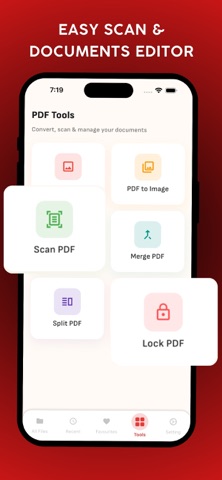
Scan Documents to PDF: Use your phone camera to scan documents such as notes, receipts, forms, invoices, and IDs. The app creates clear, high-quality PDF files suitable for printing or sharing.
Image to PDF Converter: Convert images from your gallery into PDF files. Combine multiple images into a single PDF document with proper page order and layout.
PDF to Image: Extract pages from PDF files and save them as images. This is useful for sharing individual pages or using them in other applications.
Merge PDF Files: Combine multiple PDF files into one document. Reorder files before merging to create a clean, organized PDF.
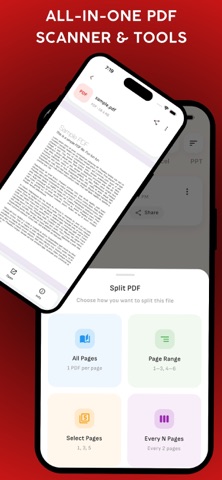
Split PDF Files: Split PDF documents by page range, selected pages, or fixed intervals. Easily extract only the pages you need.
Lock and Protect PDFs: Secure your PDF files by adding password protection. Keep sensitive documents private and protected on your device.
Document Management:
Built-in PDF reader for easy viewing
Organize files in one place
Quick access to recent and favorite documents
Manage multiple file types including PDF, Word, Excel, and PPT
Privacy and Security:
All document processing is done offline
No cloud uploads or external servers
Your files remain on your device at all times
Designed with privacy and data security in mind
Fast, Offline and Easy to Use:
Clean and intuitive user interface
Optimized for fast performance
Works without an internet connection
Lightweight and efficient document tools
Who Is This App For?
Students scanning notes and assignments
Professionals handling office documents
Businesses managing invoices and contracts
Anyone needing simple and secure PDF tools
Why Choose PDF Scanner: Smart Doc Tools?
PDF Scanner: Smart Doc Tools combines essential document scanning and PDF utilities into one easy-to-use app. It focuses on simplicity, performance, and privacy, making document management convenient and reliable for everyday use.
Safety and technology
Found in the app by AppBrain- Price
- Free
- App size
- 35.7 MB
- Content rating
- Low
Technologies used by PDF Scanner: Smart Doc Tools
Releases
Updates seen on the App Store- Version
- 1.1
- Launched
- January 2026
No changelog data
Alternatives
Similar apps and more from Asmitaben ViradiyaAlternatives to PDF Scanner: Smart Doc Tools


More from Asmitaben Viradiya


Also available on Google Play

Rankings
App Store top chartsApp Store Rankings for PDF Scanner: Smart Doc Tools
About the app and developer
About PDF Scanner: Smart Doc Tools
PDF Scanner: Smart Doc Tools is a productivity app developed by Asmitaben Viradiya.
What is the rating of PDF Scanner: Smart Doc Tools?
PDF Scanner: Smart Doc Tools is rated 1.00 out of 5 stars, based on one rating ratings.
Is PDF Scanner: Smart Doc Tools free?
PDF Scanner: Smart Doc Tools is free. The app size is 35.68 MB. The latest version available is 1.1. The last update was on February 10, 2026.
What are the requirements for PDF Scanner: Smart Doc Tools?
The app has a content rating of Low Maturity. The app has been available on the App Store since January 2026.
Developer information for Asmitaben Viradiya
Address:
Frequently asked questions about PDF Scanner: Smart Doc Tools
Is PDF Scanner: Smart Doc Tools free?
Yes. PDF Scanner: Smart Doc Tools is free on the App Store.
Is PDF Scanner: Smart Doc Tools still available?
Yes. PDF Scanner: Smart Doc Tools is on the App Store, and the last update we saw was on February 10, 2026.
How large is PDF Scanner: Smart Doc Tools?
PDF Scanner: Smart Doc Tools is 35.68 MB.
Is PDF Scanner: Smart Doc Tools suitable for children?
App Store gives PDF Scanner: Smart Doc Tools a low maturity rating, so it is meant for older children and up.
How do people rate PDF Scanner: Smart Doc Tools?
PDF Scanner: Smart Doc Tools has one rating of 1.00 stars on the App Store.
Who made PDF Scanner: Smart Doc Tools?
PDF Scanner: Smart Doc Tools was developed by Asmitaben Viradiya. It is listed in the productivity category on the App Store.
What are the best alternatives to PDF Scanner: Smart Doc Tools?
People looking at PDF Scanner: Smart Doc Tools also look at these productivity apps: Scan to PDF Scanner : ScanlyGo, Photo to PDF Converter - Rydra, DocScanner AI: Smart PDF Scan, Papr: PDF Editor & Scanner, DocScanner: PDF Scan.