

PDFly: PDF Scanner & Edit
PDFly: PDF Scanner & Edit is made and published by Paras Butani. AppBrain is an independent app data site and isn't affiliated with Paras Butani. The app name, icon, screenshots and description belong to Paras Butani and are shown as published on the App Store.
AppBrain's verdict
- Rating on App Store
- 4.33
- 6 ratings
- Last updated
- June 24, 2026
It doesn't have enough ratings yet to judge what users think.
Rankings
App Store top chartsApp Store Rankings for PDFly: PDF Scanner & Edit
Competitors
Similar apps and more from Paras ButaniAlternatives to PDFly: PDF Scanner & Edit


More from Paras Butani


Releases
Updates seen on the App Store- Version
- 1.1.2
- Launched
- February 2026
No changelog data
User feedback
Ratings and reviews on the App StoreComments on PDFly: PDF Scanner & Edit for iOS
We don't have enough comments to show example comments. Please check back later.
Technology
Found in the app by AppBrain- Price
- Free
- App size
- 51.1 MB
- Content rating
- Everyone
Technologies used by PDFly: PDF Scanner & Edit
About the app and developer
About PDFly: PDF Scanner & Edit
PDFly: PDF Scanner & Edit is a productivity app developed by Paras Butani.
User Ratings
PDFly: PDF Scanner & Edit is rated 4.33 out of 5 stars. The rating is based on 6 ratings.
App Information
PDFly: PDF Scanner & Edit is freely available from the App Store. The app size is 51.13 MB. The latest version available is 1.1.2. The last update was on June 24, 2026.
Technical Requirements
The app has a content rating of Everyone. The app has been available on the App Store since February 2026.
Developer information for Paras Butani
Address:
Frequently asked questions about PDFly: PDF Scanner & Edit
Is PDFly: PDF Scanner & Edit free?
Yes. PDFly: PDF Scanner & Edit is free on the App Store.
Is PDFly: PDF Scanner & Edit still available?
Yes. PDFly: PDF Scanner & Edit is on the App Store, and the last update we saw was on June 24, 2026.
How large is PDFly: PDF Scanner & Edit?
PDFly: PDF Scanner & Edit is 51.13 MB.
Is PDFly: PDF Scanner & Edit suitable for children?
App Store rates the content of PDFly: PDF Scanner & Edit as suitable for everyone.
How do people rate PDFly: PDF Scanner & Edit?
PDFly: PDF Scanner & Edit scores 4.33 out of 5 stars, from 6 ratings on the App Store.
Who made PDFly: PDF Scanner & Edit?
PDFly: PDF Scanner & Edit was developed by Paras Butani. It is listed in the productivity category on the App Store.
What are the best alternatives to PDFly: PDF Scanner & Edit?
People looking at PDFly: PDF Scanner & Edit also look at these productivity apps: DocScanner: PDF Scan, JPG, Photos to PDF Converter, SnapPDF: Photo to PDF, Scan to PDF Scanner : ScanlyGo, PDF Scanner: Smart Doc Tools.
Store listing
By Paras Butani, from the App Store





Description by Paras Butani Written by the developer, not by AppBrain. Click to read.
Scan documents, convert images to PDF, edit PDF files, add signatures, merge documents, compress PDFs, and convert Word files all from one easy-to-use app.
No subscriptions. No hidden paywalls. Just powerful PDF tools whenever you need them.
KEY FEATURES
PDF Scanner
• Scan receipts, IDs, notes, contracts, books, and documents
• Automatic edge detection and scan enhancement
• Save scans instantly as PDF files
PDF Editor
• Add text anywhere in your PDF
• Insert signatures and annotations
• Draw, highlight, and erase content
• Fill forms and review documents quickly
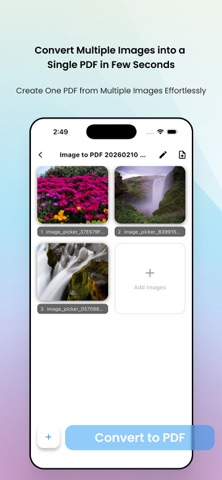
Image to PDF Converter
• Convert multiple photos into a single PDF
• Reorder, crop, rotate, and edit images
• Create professional-quality PDF documents
Merge PDF Files
• Combine multiple PDFs into one document
• Rearrange pages before merging
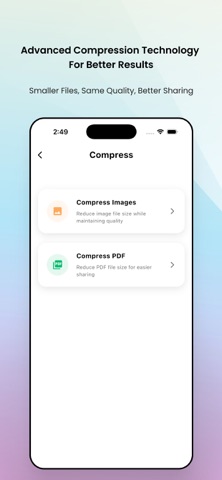
Compress PDFs and Images
• Reduce file size while maintaining quality
• Save storage and share files faster
DOCX to PDF
• Convert Word documents to PDF
• Preserve formatting and layout
PDF to JPG
• Convert PDF pages into images
• Export pages individually or as ZIP files
Privacy First
• Files stay on your device
• No unnecessary uploads to external servers
Perfect for students, professionals, teachers, freelancers, remote workers, and businesses.
Download PDFly today and manage all your PDF tasks in one place.