

PDF Snap - PDF Scanner App
PDF Snap - PDF Scanner App is made and published by Hong Kong Global Cross-Border E-Commerce Co., Limited. AppBrain is an independent app data site and isn't affiliated with Hong Kong Global Cross-Border E-Commerce Co., Limited. The app name, icon, screenshots and description belong to Hong Kong Global Cross-Border E-Commerce Co., Limited and are shown as published on the App Store.
AppBrain's verdict
- Last updated
- May 11, 2026
- Size
- 1.94 MB
User feedback
Ratings and reviews on the App StoreComments on PDF Snap - PDF Scanner App for iOS
We don't have enough comments to show example comments. Please check back later.
Store listing
By Hong Kong Global Cross-Border E-Commerce Co., Limited, from the App Store
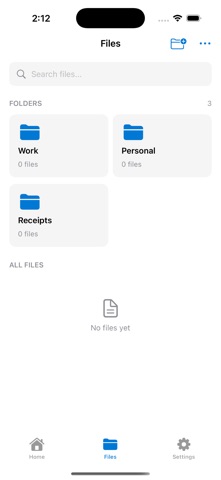

Description by Hong Kong Global Cross-Border E-Commerce Co., Limited Written by the developer, not by AppBrain. Click to read.
Key Features:
- Smart Document Detection: Automatically detects document edges and captures perfectly aligned scans
- Image Enhancement: Apply filters to make your scans clear and readable
- Multi-Page Scanning: Combine multiple pages into a single document
- Flexible Export: Save as PDF, JPG, or PNG format
- File Management: Organize your scans with folders
- Edit Tools: Crop, rotate, and adjust your scanned documents
- Quick Share: Share documents via email, messaging apps, or cloud services
Perfect for digitizing paperwork, archiving receipts, or sharing documents on the go. ScannerSnap makes document scanning fast, easy, and free.
EULA: https://www.apple.com/legal/internet-services/itunes/dev/stdeula/
Privacy Policy: https://laiyuzone.xyz/pdfsaomiao/privacy.html
Safety and technology
Found in the app by AppBrain- Price
- Free
- App size
- 1.94 MB
- Content rating
- Everyone
Technologies used by PDF Snap - PDF Scanner App
Releases
Updates seen on the App Store- Version
- 1.0.2
- Launched
- December 2025
No changelog data
Alternatives
Similar apps and more from Hong Kong Global Cross-Border E-Commerce Co., LimitedAlternatives to PDF Snap - PDF Scanner App



Rankings
App Store top chartsApp Store Rankings for PDF Snap - PDF Scanner App
About the app and developer
About PDF Snap - PDF Scanner App
PDF Snap - PDF Scanner App is a productivity app developed by Hong Kong Global Cross-Border E-Commerce Co., Limited.
User Ratings
The app has no ratings yet.
App Information
PDF Snap - PDF Scanner App is freely available from the App Store. The app size is 1.94 MB. The latest version available is 1.0.2. The last update was on May 11, 2026.
Technical Requirements
The app has a content rating of Everyone. The app has been available on the App Store since December 2025.
Developer information for Hong Kong Global Cross-Border E-Commerce Co., Limited
Frequently asked questions about PDF Snap - PDF Scanner App
Is PDF Snap - PDF Scanner App free?
Yes. PDF Snap - PDF Scanner App is free on the App Store.
Is PDF Snap - PDF Scanner App still available?
Yes. PDF Snap - PDF Scanner App is on the App Store, and the last update we saw was on May 11, 2026.
How large is PDF Snap - PDF Scanner App?
PDF Snap - PDF Scanner App is 1.94 MB.
Is PDF Snap - PDF Scanner App suitable for children?
App Store rates the content of PDF Snap - PDF Scanner App as suitable for everyone.
Who made PDF Snap - PDF Scanner App?
PDF Snap - PDF Scanner App was developed by Hong Kong Global Cross-Border E-Commerce Co., Limited. It is listed in the productivity category on the App Store.
What are the best alternatives to PDF Snap - PDF Scanner App?
People looking at PDF Snap - PDF Scanner App also look at these productivity apps: PDF Assistant:PDF Scanner App, Upload & Sign Docs, PDF Signer: Edit & Merge Docs, PDF Converter - PDF Scanner., pluma | your in class note app.