

PDF Assistant:PDF Scanner App
PDF Assistant:PDF Scanner App is made and published by Dynamic Flywheel Digital Limited. AppBrain is an independent app data site and isn't affiliated with Dynamic Flywheel Digital Limited. The app name, icon, screenshots and description belong to Dynamic Flywheel Digital Limited and are shown as published on the App Store.
AppBrain's verdict
- Last updated
- May 8, 2026
- Size
- 2.63 MB
User feedback
Ratings and reviews on the App StoreComments on PDF Assistant:PDF Scanner App for iOS
We don't have enough comments to show example comments. Please check back later.
Store listing
By Dynamic Flywheel Digital Limited, from the App Store

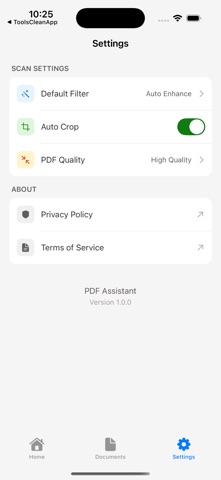
Description by Dynamic Flywheel Digital Limited Written by the developer, not by AppBrain. Click to read.
Document Scanning
Use your camera to scan paper documents quickly. The app automatically detects document edges and captures clear, high-quality images ready for conversion.
ID Card Scanning
Scan both sides of ID cards or other credentials in a guided two-step process. The app helps you position each side correctly for accurate capture.
Photo Import
Select existing images from your photo library and convert them into PDF documents. Great for digitizing receipts, notes, or any paper documents you have already photographed.
PDF Generation
Convert your scanned images into PDF files instantly. Adjust brightness, contrast, and apply filters to enhance document readability before saving.
Document Management
Organize your scanned files into folders, search through your documents, and access recently deleted items when needed. Keep your digital documents tidy and easy to find.
Start scanning today and keep all your important documents at your fingertips.
EULA: https://www.apple.com/legal/internet-services/itunes/dev/stdeula/
Privacy Policy: https://lxjuay.xyz/pdfzhushou/privacy.html
Safety and technology
Found in the app by AppBrain- Price
- Free
- App size
- 2.63 MB
- Content rating
- Everyone
Technologies used by PDF Assistant:PDF Scanner App
Releases
Updates seen on the App Store- Version
- 1.0.1
- Launched
- December 2025
No changelog data
Alternatives
Similar apps and more from Dynamic Flywheel Digital LimitedAlternatives to PDF Assistant:PDF Scanner App





More from Dynamic Flywheel Digital Limited



Rankings
App Store top chartsApp Store Rankings for PDF Assistant:PDF Scanner App
About the app and developer
About PDF Assistant:PDF Scanner App
PDF Assistant:PDF Scanner App is a productivity app developed by Dynamic Flywheel Digital Limited.
What is the rating of PDF Assistant:PDF Scanner App?
PDF Assistant:PDF Scanner App has no ratings yet.
Is PDF Assistant:PDF Scanner App free?
PDF Assistant:PDF Scanner App is free. The app size is 2.63 MB. The latest version available is 1.0.1. The last update was on May 8, 2026.
What are the requirements for PDF Assistant:PDF Scanner App?
The app has a content rating of Everyone. The app has been available on the App Store since December 2025.
Developer information for Dynamic Flywheel Digital Limited
Dynamic Flywheel Digital Limited
Address:
Frequently asked questions about PDF Assistant:PDF Scanner App
Is PDF Assistant:PDF Scanner App free?
Yes. PDF Assistant:PDF Scanner App is free on the App Store.
Is PDF Assistant:PDF Scanner App still available?
Yes. PDF Assistant:PDF Scanner App is on the App Store, and the last update we saw was on May 8, 2026.
How large is PDF Assistant:PDF Scanner App?
PDF Assistant:PDF Scanner App is 2.63 MB.
Is PDF Assistant:PDF Scanner App suitable for children?
App Store rates the content of PDF Assistant:PDF Scanner App as suitable for everyone.
Who made PDF Assistant:PDF Scanner App?
PDF Assistant:PDF Scanner App was developed by Dynamic Flywheel Digital Limited. It is listed in the productivity category on the App Store.
What are the best alternatives to PDF Assistant:PDF Scanner App?
People looking at PDF Assistant:PDF Scanner App also look at these productivity apps: PDF Snap - PDF Scanner App, PDF Converter - PDF Scanner., CamScanify: Signature Scanner, Scanner PDF - PDF Scanner App, PDF Scanner OCR: Smart Scan.