

PDF Scanner OCR: Smart Scan
PDF Scanner OCR: Smart Scan is made and published by Hany Elmehy. AppBrain is an independent app data site and isn't affiliated with Hany Elmehy. The app name, icon, screenshots and description belong to Hany Elmehy and are shown as published on the App Store.
AppBrain's verdict
- Last updated
- August 9, 2026
Rankings
App Store top chartsApp Store Rankings for PDF Scanner OCR: Smart Scan
Competitors
Similar apps and more from Hany ElmehyAlternatives to PDF Scanner OCR: Smart Scan


More from Hany Elmehy


Releases
Updates seen on the App Store- Version
- 3.2
- Launched
- May 2026
No changelog data
User feedback
Ratings and reviews on the App StoreComments on PDF Scanner OCR: Smart Scan for iOS
We don't have enough comments to show example comments. Please check back later.
Technology
Found in the app by AppBrain- Price
- Free
- App size
- 19.2 MB
- Content rating
- Everyone
Technologies used by PDF Scanner OCR: Smart Scan
About the app and developer
About PDF Scanner OCR: Smart Scan
PDF Scanner OCR: Smart Scan is a productivity app developed by Hany Elmehy.
User Ratings
The app has no ratings yet.
App Information
PDF Scanner OCR: Smart Scan is freely available from the App Store. The app size is 19.17 MB. The latest version available is 3.2. The last update was on August 9, 2026.
Technical Requirements
The app has a content rating of Everyone. The app has been available on the App Store since May 2026.
Developer information for Hany Elmehy
Address:
Frequently asked questions about PDF Scanner OCR: Smart Scan
Is PDF Scanner OCR: Smart Scan free?
Yes. PDF Scanner OCR: Smart Scan is free on the App Store.
Is PDF Scanner OCR: Smart Scan still available?
Yes. PDF Scanner OCR: Smart Scan is on the App Store, and the last update we saw was on August 9, 2026.
How large is PDF Scanner OCR: Smart Scan?
PDF Scanner OCR: Smart Scan is 19.17 MB.
Is PDF Scanner OCR: Smart Scan suitable for children?
App Store rates the content of PDF Scanner OCR: Smart Scan as suitable for everyone.
Who made PDF Scanner OCR: Smart Scan?
PDF Scanner OCR: Smart Scan was developed by Hany Elmehy. It is listed in the productivity category on the App Store.
What are the best alternatives to PDF Scanner OCR: Smart Scan?
People looking at PDF Scanner OCR: Smart Scan also look at these productivity apps: Duna's AI Scanner, PDF Assistant:PDF Scanner App, TaskSense: AI To Do List, Scan & PDF by Paperly, OCR Table.
Store listing
By Hany Elmehy, from the App Store





Description by Hany Elmehy Written by the developer, not by AppBrain. Click to read.
Stop paying monthly for basic tools. Smart Scan delivers professional document scanning, powerful PDF control, and private file management — all in one offline-first app.
Built for professionals, students, and anyone who needs a fast, reliable document scanner with OCR and PDF tools — without subscriptions.
WHY SMART SCAN STANDS OUT
Unlike cloud-based scanner apps, Smart Scan works fully offline and keeps your files private.
100% Offline Scanner – No internet required
Complete Privacy – Your scans never leave your device
No Watermarks – Ever
No Ads – Clean, distraction-free experience
ADVANCED SCANNER & OCR
Scan documents with precision and clarity:
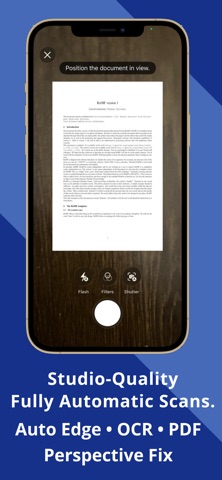
Automatic edge detection
Smart perspective correction
High-quality image enhancement
Real-time OCR text extraction
Convert images to PDF instantly
Scan receipts, contracts, notes, IDs, and more in seconds with a powerful scanner and text recognition engine.
ID, RECEIPT & CARD SCANNER
Built for real-world productivity:
ID scanner with smart formatting
Business card scanner with contact extraction
Receipt scanner for expense tracking
Whiteboard and document scan modes
YOUR PRIVATE DOCUMENT HUB
Turn your iPhone into a secure document scanner and file manager:
Access files from your browser (PC or tablet) — no cables needed
Fast wireless transfer over your local network
Upload, organize, and manage your PDFs with ease
Local-only access — nothing goes through the cloud
POWERFUL PDF EDITOR & SIGNATURE TOOLS
Take full control of your documents:
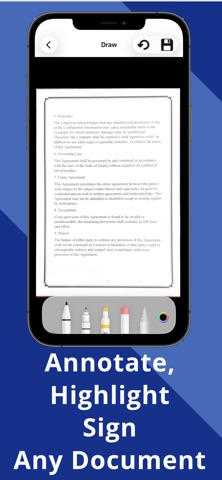
Sign PDFs with ease
Annotate and fill forms
Compress and optimize PDFs
Add watermarks
Face ID & password protection
ONE-TIME PAYMENT. NO SUBSCRIPTION.
Pay once. Use forever.
$3.99 lifetime access
No recurring fees
No locked features
Free 7-day trial
OPTIONAL AI FEATURES (ADVANCED MODE)
Take documents further with optional AI tools:
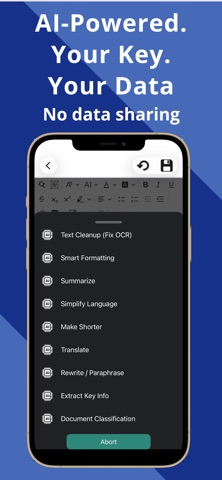
Summarize long documents
Translate text instantly
Rewrite or simplify content
Convert text to audio
These features connect using your own AI API key, so you stay in control of your data and costs — no subscription markup, no middleman.
Download Smart Scan today and experience a faster, private, offline PDF scanner.