

PDF Studio: Scan & Edit Docs
PDF Studio: Scan & Edit Docs is made and published by Boris Spiro. AppBrain is an independent app data site and isn't affiliated with Boris Spiro. The app name, icon, screenshots and description belong to Boris Spiro and are shown as published on the App Store.
AppBrain's verdict
- Last updated
- December 15, 2025
Rankings
App Store top chartsApp Store Rankings for PDF Studio: Scan & Edit Docs
Competitors
Similar apps and more from Boris SpiroAlternatives to PDF Studio: Scan & Edit Docs


More from Boris Spiro


Releases
Updates seen on the App Store- Version
- 2.0
- Launched
- November 2025
No changelog data
User feedback
Ratings and reviews on the App StoreComments on PDF Studio: Scan & Edit Docs for iOS
We don't have enough comments to show example comments. Please check back later.
Technology
Found in the app by AppBrain- Price
- Free
- App size
- 6.03 MB
- Content rating
- Everyone
Technologies used by PDF Studio: Scan & Edit Docs
About the app and developer
About PDF Studio: Scan & Edit Docs
PDF Studio: Scan & Edit Docs is a productivity app developed by Boris Spiro.
User Ratings
The app has no ratings yet.
App Information
PDF Studio: Scan & Edit Docs is freely available from the App Store. The app size is 6.03 MB. The latest version available is 2.0. The last update was on December 15, 2025.
Technical Requirements
The app has a content rating of Everyone. The app has been available on the App Store since November 2025.
Developer information for Boris Spiro
Address:
Frequently asked questions about PDF Studio: Scan & Edit Docs
Is PDF Studio: Scan & Edit Docs free?
Yes. PDF Studio: Scan & Edit Docs is free on the App Store.
Is PDF Studio: Scan & Edit Docs still available?
Yes. PDF Studio: Scan & Edit Docs is on the App Store, and the last update we saw was on December 15, 2025.
How large is PDF Studio: Scan & Edit Docs?
PDF Studio: Scan & Edit Docs is 6.03 MB.
Is PDF Studio: Scan & Edit Docs suitable for children?
App Store rates the content of PDF Studio: Scan & Edit Docs as suitable for everyone.
Who made PDF Studio: Scan & Edit Docs?
PDF Studio: Scan & Edit Docs was developed by Boris Spiro. It is listed in the productivity category on the App Store.
What are the best alternatives to PDF Studio: Scan & Edit Docs?
People looking at PDF Studio: Scan & Edit Docs also look at these productivity apps: Documents Editor - Read & Edit, PDF Editor: PDF fill and sign, ReelHook: Content Studio, ImgPDF: Convert Image to PDF, ScanPocket : PDF Scanner & OCR.
Store listing
By Boris Spiro, from the App Store


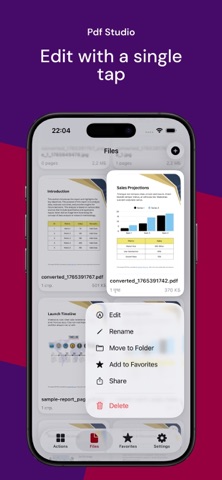
Description by Boris Spiro Written by the developer, not by AppBrain. Click to read.
SCAN & DIGITIZE
• Intelligent document scanner with auto-edge detection
• Multi-page scanning in seconds
• High-quality PDF output from any paper document
EDIT & ANNOTATE
• Add text, images, and shapes to any PDF
• Highlight, underline, and strike through text
• Draw and sketch with precision tools
• Reorder, rotate, and delete pages
SIGN DOCUMENTS
• Create and save multiple signatures
• Sign contracts, forms, and agreements instantly
• Professional digital signatures
CONVERT ANYTHING
• PNG, JPG, HEIC, WebP → PDF
• PDF → PNG, JPG images
• TXT ↔ PDF conversion
• Batch convert multiple files
COMPRESS & OPTIMIZE
• Reduce PDF size up to 70%
• Three compression levels: Light, Medium, Maximum
• Perfect for email attachments and sharing
POWERFUL TOOLS
• OCR: Extract text from images and scans
• Merge: Combine multiple PDFs into one
• Split: Separate PDF into individual pages
• Print: Direct printing to any AirPrint device
ORGANIZE YOUR FILES
• Create folders and organize documents
• Quick search across all files
• Favorites for fast access
• Recent files tracking
CLOUD SYNC
• Automatic iCloud synchronization
• Access documents on all your Apple devices
• Secure cloud backup
WHY PDF STUDIO?
No watermarks on your documents
Works offline — no internet required
Privacy first — files stay on your device
Clean, intuitive interface
Regular updates with new features
Perfect for students, professionals, and anyone who works with documents. Download PDF Studio and take control of your PDFs today!
Download PDF Studio today and experience the most powerful PDF toolkit for iOS!
Terms of Use: https://github.com/spiroba/pdf-studio-legal/blob/main/TERMS_OF_USE.md