




AppBrain's verdict
- Last updated
- November 1, 2026
- Size
- 3.42 MB
User feedback
Ratings and reviews on the App StoreComments on PDF to Word Offline OCR for iOS
We don't have enough comments to show example comments. Please check back later.
Store listing
By Aksana Aheika, from the App StoreDescription by Aksana Aheika Written by the developer, not by AppBrain. Click to read.
Other converters upload your file to their servers. That is why they charge every month, cap you at 20 pages, and stop working without a connection. This one does the whole job on your device, so none of that applies.
WHAT YOU GET
• A standard .docx that opens in Word, Pages, Google Docs and LibreOffice
• Headings, paragraphs, lists, bold and italic, text colour, tables and images — kept, not flattened into plain text
• Scanned pages recognised on the device
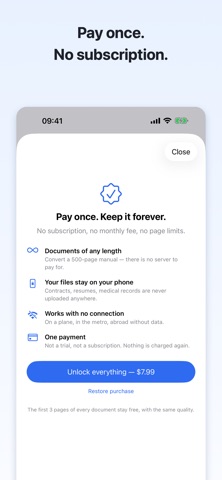
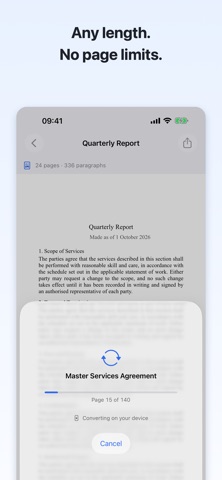
• Documents of any length: a 500-page manual works like a one-page letter
• Everything offline — on a plane, in the metro, abroad with no data
YOUR FILES STAY YOURS
Contracts, resumes, tax forms, medical records. Nothing is uploaded, there is no account, and the app collects no data at all. Airplane mode is a fair test.
TRY BEFORE YOU PAY
The first 3 pages of any document convert for free, at full quality — the real result, not a blurred preview. Unlock the rest with a single purchase. No subscription, no trial that charges you later.
HONEST ABOUT LIMITS
Text documents — contracts, resumes, letters, articles, reports — come out close to the original. Magazine-style multi-column layouts, deeply nested tables and text wrapped around images come out simplified: the text is all there, the arrangement is not. We would rather say so here than take your money and let you find out.
HOW IT WORKS
1. Pick a PDF, or share one from Mail, Safari or Files
2. Watch it convert, page by page
3. Preview the result and send it wherever you need
Privacy Policy: https://pdfconverter.slumbiapp.com/privacy/
Support: https://pdfconverter.slumbiapp.com/support/
Safety and technology
Found in the app by AppBrain- Price
- Free
- App size
- 3.42 MB
- Content rating
- Everyone
Technologies used by PDF to Word Offline OCR
Releases
Updates seen on the App Store- Version
- 1.0.1
- Launched
- October 2026
No changelog data
Alternatives
Similar apps and more from Aksana AheikaMore from Aksana Aheika


Rankings
App Store top chartsApp Store Rankings for PDF to Word Offline OCR
About the app and developer
About PDF to Word Offline OCR
PDF to Word Offline OCR is a productivity app developed by Aksana Aheika.
User Ratings
The app has no ratings yet.
App Information
PDF to Word Offline OCR is freely available from the App Store. The app size is 3.42 MB. The latest version available is 1.0.1. The last update was on November 1, 2026.
Technical Requirements
The app has a content rating of Everyone. The app has been available on the App Store since October 2026.
PDF to Word Offline OCR is made and published by Aksana Aheika. AppBrain is an independent app data site and isn't affiliated with Aksana Aheika. The app name, icon, screenshots and description belong to Aksana Aheika and are shown as published on the App Store.
Developer information for Aksana Aheika
Address:
Frequently asked questions about PDF to Word Offline OCR
Is PDF to Word Offline OCR free?
Yes. PDF to Word Offline OCR is free on the App Store.
Is PDF to Word Offline OCR still available?
Yes. PDF to Word Offline OCR is on the App Store, and the last update we saw was on November 1, 2026.
How large is PDF to Word Offline OCR?
PDF to Word Offline OCR is 3.42 MB.
Is PDF to Word Offline OCR suitable for children?
App Store rates the content of PDF to Word Offline OCR as suitable for everyone.
Who made PDF to Word Offline OCR?
PDF to Word Offline OCR was developed by Aksana Aheika. It is listed in the productivity category on the App Store.