


AppBrain's verdict
Loved by users- Rating on App Store
- 4.91
- 3,055 ratings
- Last updated
- November 10, 2026
- Size
- 86.9 MB
Users love it: 4.9 stars from 3,055 ratings.
User feedback
Ratings and reviews on the App StoreComments on Peptide Tracker Log & Reminder for iOS
We don't have enough comments to show example comments. Please check back later.
Store listing
By Flat Six Labs LLC, from the App StoreDescription by Flat Six Labs LLC Written by the developer, not by AppBrain. Click to read.
Track peptides and GLP-1s in one app. Build your stack, log every dose, manage vials and supplies, monitor injection sites, visualize estimated plasma levels, sync Apple Health, follow your progress, and connect with people using the same compounds.
Whether you’re managing one compound or a complex stack, keep your schedules, dose history, and inventory organized in one place.
TRACK YOUR PROTOCOL
Build Your Stack
Create protocols with custom doses, schedules, frequencies, and durations. Add common peptides in seconds or create your own custom compounds.
Log Every Dose
Record scheduled or past doses, add notes, track injection sites, and edit entries anytime. When you correct a dose or change the vial it came from, your inventory updates automatically.
Manage Vials and Supplies
Keep track of mixed and unmixed vials, remaining volume, blend components, bacteriostatic water, and other supplies so you always know what you have on hand.
See Your Estimated Levels
Visualize how each compound builds and fades over time with an estimated plasma level curve based on your logged doses and the compound's half-life.
Stay on Schedule
Optional reminders help you stay consistent. See taken, skipped, and missed doses at a glance, follow your week with a simple checklist, and watch your consistency build a night sky you can share.
FOLLOW YOUR PROGRESS
Sync Apple Health
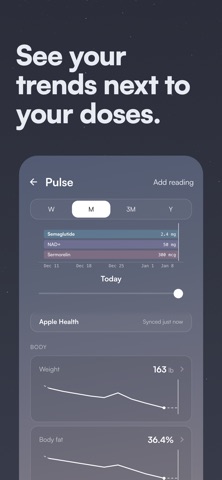
Connect Apple Health to see your weight and body measurements, blood pressure, resting heart rate, HRV, sleep, steps, active energy, and nutrition in Pulse, on the same timeline as your doses. Peptide Tracker only reads from Apple Health and asks your permission first. Connect it from Settings or from Pulse.
Track Your Weight
Log your weight over time, follow the trend, and see your progress alongside the protocols you're running.
Compare Progress Photos
Take consistent progress photos with alignment tools that help you match your framing each time. Browse your photos by month, compare any two side by side, and share the result.
Review Your History
Browse your complete dose history in a calendar and quickly see what you took, when you took it, and which protocol it belonged to.
CONNECT WITH PEOPLE ON THE SAME COMPOUNDS
Ask questions and hear from people who have actually used the compounds you're researching or tracking.
Share your own experience through structured answers, reply directly to others, and continue the conversation in open threads with quotes and mentions. Everyone participates under a username rather than a real name, with reporting, blocking, and community notes built in.
LEARN AND EXPLORE
Browse educational content covering peptide basics and use the Peptide Assistant for general peptide information.
YOUR DATA STAYS YOURS
Your protocol and progress are yours. Export your data by contacting us at any time or delete your account directly from the app.
BUILT FOR PEPTIDE USERS
Peptide Tracker was built around the real workflows, terminology, and challenges that come with managing peptide protocols.
Track semaglutide, tirzepatide, retatrutide, BPC-157, TB-500, GHK-Cu, CJC-1295, ipamorelin, NAD+, TRT, HRT, custom compounds, blends, and more.
Built by peptide users, for peptide users.
Peptide Tracker is for tracking and education only. Estimated plasma levels are provided for informational purposes and are not medical guidance. Peptide Tracker does not provide medical advice or replace guidance from a qualified medical professional.
Download Peptide Tracker and build your first protocol in minutes.
Review our Terms of Use at https://peptidetracker.ai/terms and our Privacy Policy at https://peptidetracker.ai/privacy.
Questions? Email us at hello@peptidetracker.ai
Safety and technology
Found in the app by AppBrain- Price
- Free
- App size
- 86.9 MB
- Content rating
- High
Technologies used by Peptide Tracker Log & Reminder
Releases
Updates seen on the App Store- Version
- 3.2.0
- Launched
- May 2026
No changelog data
Alternatives
Similar apps and more from Flat Six Labs LLCAlternatives to Peptide Tracker Log & Reminder


Also available on Google Play

Rankings
App Store top chartsApp Store Rankings for Peptide Tracker Log & Reminder
About the app and developer
About Peptide Tracker Log & Reminder
Peptide Tracker Log & Reminder is a health & fitness app developed by Flat Six Labs LLC.
User Ratings
Peptide Tracker Log & Reminder is rated 4.91 out of 5 stars. The rating is based on 3.1 thousand ratings.
App Information
Peptide Tracker Log & Reminder is freely available from the App Store. The app size is 86.92 MB. The latest version available is 3.2.0. The last update was on November 10, 2026.
Technical Requirements
The app has a content rating of High Maturity. The app has been available on the App Store since May 2026.
Peptide Tracker Log & Reminder is made and published by Flat Six Labs LLC. AppBrain is an independent app data site and isn't affiliated with Flat Six Labs LLC. The app name, icon, screenshots and description belong to Flat Six Labs LLC and are shown as published on the App Store.
Developer information for Flat Six Labs LLC
Address: