

Phone Clone, Transfer All Data
Phone Clone, Transfer All Data is made and published by Auzi Apps Studios. AppBrain is an independent app data site and isn't affiliated with Auzi Apps Studios. The app name, icon, screenshots and description belong to Auzi Apps Studios and are shown as published on the App Store.
AppBrain's verdict
- Rating on App Store
- 5.00
- 1 ratings
- Last updated
- February 6, 2024
It doesn't have enough ratings yet to judge what users think.
Rankings
App Store top chartsApp Store Rankings for Phone Clone, Transfer All Data
Competitors
Similar apps and more from Auzi Apps StudiosAlternatives to Phone Clone, Transfer All Data






More from Auzi Apps Studios

Releases
Updates seen on the App Store- Version
- 1.2
- Launched
- September 2023
No changelog data
User feedback
Ratings and reviews on the App StoreComments on Phone Clone, Transfer All Data for iOS
We don't have enough comments to show example comments. Please check back later.
Technology
Found in the app by AppBrain- Price
- Free
- App size
- 59.6 MB
- Content rating
- High
Technologies used by Phone Clone, Transfer All Data
About the app and developer
About Phone Clone, Transfer All Data
Phone Clone, Transfer All Data is a productivity app developed by Auzi Apps Studios.
What is the rating of Phone Clone, Transfer All Data?
Phone Clone, Transfer All Data is rated 5.00 out of 5 stars, based on one rating ratings.
Is Phone Clone, Transfer All Data free?
Phone Clone, Transfer All Data is free. The app size is 59.65 MB. The latest version available is 1.2. The last update was on February 6, 2024.
What are the requirements for Phone Clone, Transfer All Data?
The app has a content rating of High Maturity. The app has been available on the App Store since September 2023.
Developer information for Auzi Apps Studios
Address:
Store listing
By Auzi Apps Studios, from the App Store



Description by Auzi Apps Studios Written by the developer, not by AppBrain. Click to read.
Online files transfer is very complicated but if it is the time when you have to switch your whole phone data to another phone then it is really a big task, but you do not have to worry because data transferring is no more a big task when you have this amazing phone to phone transfer app.
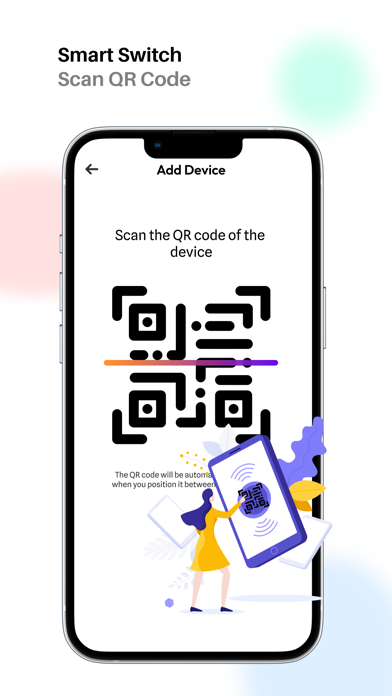
Smart Switch Data Transfer app comes with Transfer photos, Files, videos, Contacts & Documents under the same roof. Contact Transfer app is a simple and fast Data transfer app that migrates data from one phone to another phone. You can Copy My Data & Transfer Photos of any size or contacts. Send anywhere is sent to Transfer My Data & Share Files with one tap. Data Transfer & Clone App is here! The most excellent part of this Smart Switch or phone clone app, you can Share Data of any size with transfer speed.
Transferring data to a new phone is very simple now with this phone clone app, it works on Wi-Fi and mobile cellular data both, so you can switch data from one to another very easily. Attractive User Interface & colorful graphics are the main feature of this phone clone data transfer app.
Features :-
*Switch folders or separately:
When you are sure that you want to send whole photos or videos or contacts, then just select folders. If you have to send some specific files separately then open the folder and choose specific pictures, videos, etc. This online file transfer app gives you this facility if you want to move some specific files or if you want to transfer the whole data of your phone. If you have to share some mix-up video, images, documents, audio, etc. that is also possible in this phone to phone transfer app.
*No size limit:-
Transfer data from Apple to an Apple phone of any size, it has no limitations for size, you can send 100GB files or more for it free.
*Safe & Secure:-
Clone Phone is a very secure & safe data transfer app for sharing data from one phone to another Apple phone.
*Capability:-
Users should not be worried about phone companies because this smart switch data app works on every Apple phone, it has no limits for brands or companies.
*UX/UI Designs:-
Smart data transfer app has very beautiful UX/UI designs and colors that attract users' eyes to view and user must like them.
What can I transfer?
Phone Clone IOS app lets you transfer these types of files such as videos, photos, documents, audio, contacts, calendars, and apps available on your phone.
Permissions: -
Wi-Fi:-
You will have to turn ON Wi-Fi for a direct connection to both devices.
Storage:-
Storage permission is needed to access photos, videos, audio, documents, and more files to move them into the new phone.
Location:-
For peer to peer connection between two IOS devices, clone it app needs location access.
Contacts:-
Phone clone IOS app requires the contacts permission to transfer contacts from one to another phone.
Calendars:-
Clone phone app needs to access the calendars of your old phone to switch calendar data into your new phone very securely.
How it works?
Before starting the transfer process make sure that both devices have installed the phone clone IOS app. After that install the phone clone data moving app on your mobile phone, and click on the Get Started button to proceed with cloning the phone. Now choose your Old and New phone, if you have the old phone and want to transfer data from this phone to the new phone then click on the Old Phone and allow necessary permissions, now choose files and click the Transfer button, now wait for the app to find your device, connect with your device, your files are sending now, so that’s it.
Terms of Use: https://www.apple.com/legal/internet-services/itunes/dev/stdeula/