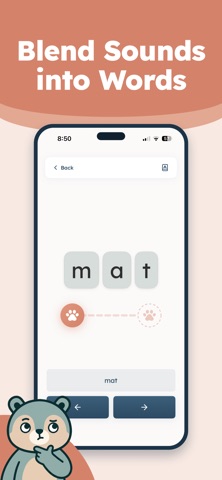
Phonics Bear is an overall app developed by Max Ogles.
Download Statistics
User Ratings
Phonics Bear is rated 5.00 out of 5 stars. The rating is based on 7 ratings.
App Information
Phonics Bear is FREE to download. The APK download size is 408.67 MB. The latest version available is 1.0.3. The last update was on July 1, 2026.
Technical Requirements
The app has a content rating of Everyone. The app has been available on Google Play February 2026.
Description
Phonics Bear teaches kids to read by mastering sounds and blending them into real words.
Short, guided phonics sessions build confidence fast — and Phonics Bear tracks progress so you can see what is working.
What kids do • Learn letter sounds and common sound patterns • Practice blending sounds into simple words • Repeat just enough to turn practice into progress
What parents get • Clear progress tracking and learned milestones • A simple learning path that stays motivating • A calm, premium design that keeps attention on the skill
Built for early readers Phonics Bear focuses on the fundamentals that matter most: sound recognition, blending, and word-building — the core of phonics-based reading.
Designed for real life A few minutes a day is enough to create momentum. Open Phonics Bear, practice, and move forward.
Privacy Phonics Bear is built for families. No ads. We do not capture or track any personal information from children. We use anonymous analytics to improve app performance.
Paid Features & Plans In addition to its extensive free flashcard resources, Phonics Bear offers a premium Gold membership which includes: - Guided practice mode with adaptive flashcards based on your child learning progress - Full phonics curriculum: all phases including digraphs, long-vowel sounds, r-controlled vowels, and more - Progress tracking: view practicing and learned status for every sound
Premium subscription costs: - Monthly plan - $9.99 per month - Annual plan - $59.99 per year
Premium is an auto-renewable subscription. Payment will be charged to your iTunes Account at confirmation of purchase. Subscriptions automatically renew unless auto-renew is turned off at least 24 hours before the end of the current period. You can manage subscriptions and turn off auto-renewal in your Account Settings after purchase.
Terms of Use: https://www.apple.com/legal/internet-services/itunes/dev/stdeula/
Each subscription will automatically renew 3 days before the expiration date for
the same time period. Subscriptions can be cancelled at any time before the renewal.