AppBrain
AppBrain
  • Apps
  • Apps being viewed right now Trending apps today Most popular apps All-time most installed apps Top rated apps iPhone and iPad apps
  • Intelligence ▾
    Intelligence overview → Track any Android app or your whole market
    Track & analyze
    Keyword Tracker & OptimizerTrack & improve Play rankings App Performance ReportOne-off PDF for any app StatisticsFree Android & Play market stats
    Promote your app
    Featured Apps App Links
  • Intelligence
  • Pricing
  • Dashboard
  • Sign up
  • Log in
App Store Apps > Photo & Video > Photo Blur – Brush to Censor
Photo Blur – Brush to Censor icon

Photo Blur – Brush to Censor

by MITSUKO MARGOT KUBOTA ONO · Photo & Video · Free
On the App Store since August 2025 · Data updated 2026-11-02

Photo Blur – Brush to Censor is made and published by MITSUKO MARGOT KUBOTA ONO. AppBrain is an independent app data site and isn't affiliated with MITSUKO MARGOT KUBOTA ONO. The app name, icon, screenshots and description belong to MITSUKO MARGOT KUBOTA ONO and are shown as published on the App Store.

AppBrain's verdict

Last updated
August 29, 2026
Size
16.1 MB
Official page on the App Store

User feedback

Ratings and reviews on the App Store

Comments on Photo Blur – Brush to Censor for iOS

We don't have enough comments to show example comments. Please check back later.

Store listing

By MITSUKO MARGOT KUBOTA ONO, from the App Store
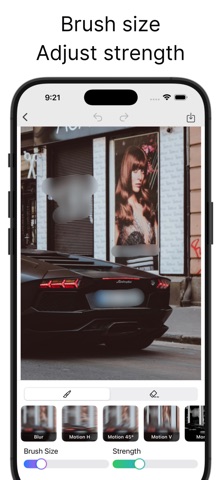
Photo Blur – Brush to Censor Screenshot 1 of 4
Photo Blur – Brush to Censor Screenshot 2 of 4
Photo Blur – Brush to Censor Screenshot 3 of 4
Photo Blur – Brush to Censor Screenshot 4 of 4
Screenshots by MITSUKO MARGOT KUBOTA ONO, from the the App Store listing
Description by MITSUKO MARGOT KUBOTA ONO Written by the developer, not by AppBrain. Click to read.
Hide unwanted parts of your photos by tracing with your finger.

It’s simple: pick a photo, trace the areas you want to hide, and you’re done.
Apply mosaic/blur selectively to protect privacy.

● Features
【Simple workflow】
・Pick a photo → trace to hide → save/share (3 steps)
・One-tap switch between pen and eraser
・Adjust brush size and effect strength (granularity) with sliders
・“Color Pen” lets you fill with any color

【Preview & editing】
・Instant feedback along your strokes
・Undo/Redo so you can revise anytime

【Rich filters】
・Pixelation: Mosaic / Hexagon / Crystallize / Pointillize
・Halftone screens: Dot / Line (Vertical & Horizontal) / Circular / CMYK Halftone
・Blur: Gaussian Blur / Motion Blur (Horizontal / Vertical / Diagonal)
・Others: Monochrome / Color Pen (solid color fill)

【High-quality export】
・Save and share at the photo’s original resolution
・Share directly to social apps and messages

【No sign-up required】
・No account needed
・Start right after installing

【Use cases】
・Quickly hide only what you don’t want to show—faces, name tags, license plates, addresses, parts of screens, etc.
・Mask screenshots before reviews; anonymize photos before posting to social media.
Official page on the App Store

Safety and technology

Found in the app by AppBrain
Price
Free
App size
16.1 MB
Content rating
Everyone

Technologies used by Photo Blur – Brush to Censor

Releases

Updates seen on the App Store
Version
1.2.0
Launched
August 2025

No changelog data

Alternatives

Similar apps and more from MITSUKO MARGOT KUBOTA ONO

Alternatives to Photo Blur – Brush to Censor

Blur Photo ◎ icon Blur Photo ◎
Artur Darbinyan
4.7
Free
2.3K ratings
Blur Photo Editor & Mosaic icon Blur Photo Editor & Mosaic
GIGABUBBLE INC.
4.7
Free
6.3K ratings
Blur Photo Editor: blur effect icon Blur Photo Editor: blur effect
Ryoichi Fukugawa
4.7
Free
1.7K ratings
Unblur - AI Photo Enhancer icon Unblur - AI Photo Enhancer
Anthony Durbin
4.6
Free
7.7K ratings
GlowUp - Photo Editor icon GlowUp - Photo Editor
SNOW Corporation
4.2
Free
1.2K ratings
Blur-Video icon Blur-Video
Alan Cushway
4.8
Free
14.0K ratings
Blur Photo Editor icon Blur Photo Editor
Sohel Ibna Saad
4.4
Free
10.6K ratings
Blur Photo Background icon Blur Photo Background
SUNWOONG JANG
4.3
Free
18.7K ratings

More from MITSUKO MARGOT KUBOTA ONO

Wheel Spinner – Random Picker icon Wheel Spinner – Random Picker
MITSUKO MARGOT KUBOTA ONO
4.0
Free
4 ratings
Habit Dots - Daily Tracker icon Habit Dots - Daily Tracker
MITSUKO MARGOT KUBOTA ONO
5.0
Free
3 ratings
Rewind Recorder icon Rewind Recorder
MITSUKO MARGOT KUBOTA ONO
5.0
Free
2 ratings
Easy Photo Grid icon Easy Photo Grid
MITSUKO MARGOT KUBOTA ONO
5.0
Free
1 ratings
Defaced - Face Filters icon Defaced - Face Filters
MITSUKO MARGOT KUBOTA ONO
2.0
Free
1 ratings
Circle Photo - Crop & Frame icon Circle Photo - Crop & Frame
MITSUKO MARGOT KUBOTA ONO
4.0
Free
1 ratings
Low Resolution Camera icon Low Resolution Camera
MITSUKO MARGOT KUBOTA ONO
5.0
Free
1 ratings
ToDoTabs - Manage Tasks by Tab icon ToDoTabs - Manage Tasks by Tab
MITSUKO MARGOT KUBOTA ONO
1.0
Free
1 ratings

Rankings

App Store top charts

App Store Rankings for Photo Blur – Brush to Censor

This app is not ranked

About the app and developer

About Photo Blur – Brush to Censor

Photo Blur – Brush to Censor is a photo & video app developed by MITSUKO MARGOT KUBOTA ONO.

User Ratings

The app has no ratings yet.

App Information

Photo Blur – Brush to Censor is freely available from the App Store. The app size is 16.10 MB. The latest version available is 1.2.0. The last update was on August 29, 2026.

Technical Requirements

The app has a content rating of Everyone. The app has been available on the App Store since August 2025.

Developer information for MITSUKO MARGOT KUBOTA ONO

MITSUKO MARGOT KUBOTA ONO

Address:

Share Photo Blur – Brush to Censor

Price drops on Google Play Popular Photo & Video Apps Today's trending apps Top new apps Apps other people are watching
Blur Photo ◎ icon Blur Photo ◎
Blur Photo Editor & Mosaic icon Blur Photo Editor & Mosaic
Blur Photo Editor: blur effect icon Blur Photo Editor: blur effect
Unblur - AI Photo Enhancer icon Unblur - AI Photo Enhancer
GlowUp - Photo Editor icon GlowUp - Photo Editor
Blur-Video icon Blur-Video
Blur Photo Editor icon Blur Photo Editor
Blur Photo Background icon Blur Photo Background
Overview Alternatives Reviews Rankings Technology
AppBrain Intelligence premium content

Subscribe now to get full and unlimited access to AppBrain Intelligence. You'll have access to:

  • App Intelligence dashboard (performance timeline, competitor comparison, country rankings, insight cards)
  • Detailed ranking data per app
  • Full timeline per developer
  • Device market shares data per country
  • Unlimited keyword tracking
1 Month

$75/mo
(billed every month)

SAVE 0%
Subscribe
3 Months

$65/mo
($195 billed every 3 months)

SAVE 13%
Subscribe
1 Year

$57.50/mo
($690 billed every year)

SAVE 23%
Subscribe
Each subscription will automatically renew 3 days before the expiration date for the same time period. Subscriptions can be cancelled at any time before the renewal.

AppBrain is an app data site, we track rankings, ratings, installs for all apps and games on Google Play and the App Store. AppBrain doesn't host app files or APKs, all install links go directly to the official store. All trademarks are owned by their respective owners.

More apps

  • Top Android apps being viewed
  • View OneUI 9.5: Dark Icon Pack
  • Trainz Simulator 3
  • GP Tone Builder stats

App statistics

  • Android statistics
  • Google Play Developer stats
  • Trending Android Apps
  • Trending iOS apps
  • Top popular Apps
  • Buy the best Android phone
  • Buy & sell app businesses

About AppBrain

  • Contact
  • Privacy
  • Documentation
  • DMCA takedowns
  • Blog
  • Free App-Ads.Txt Validation
© 2010-2026 - AppBrain