

Photo Export is made and published by Scott Johnson. AppBrain is an independent app data site and isn't affiliated with Scott Johnson. The app name, icon, screenshots and description belong to Scott Johnson and are shown as published on the App Store.
AppBrain's verdict
- Rating on App Store
- 3.71
- 7 ratings
- Last updated
- October 1, 2026
It doesn't have enough ratings yet to judge what users think.
Rankings
App Store top chartsApp Store Rankings for Photo Export
Competitors
Similar apps and more from Scott JohnsonAlternatives to Photo Export




Releases
Updates seen on the App Store- Version
- 1.3.2
- Launched
- May 2025
No changelog data
User feedback
Ratings and reviews on the App StoreComments on Photo Export for iOS
We don't have enough comments to show example comments. Please check back later.
Technology
Found in the app by AppBrain- Price
- Free
- App size
- 2.03 MB
- Content rating
- Everyone
Technologies used by Photo Export
About the app and developer
About Photo Export
Photo Export is a photo & video app developed by Scott Johnson.
User Ratings
Photo Export is rated 3.71 out of 5 stars. The rating is based on 7 ratings.
App Information
Photo Export is freely available from the App Store. The app size is 2.03 MB. The latest version available is 1.3.2. The last update was on October 1, 2026.
Technical Requirements
The app has a content rating of Everyone. The app has been available on the App Store since May 2025.
Developer information for Scott Johnson
Address:
Store listing
By Scott Johnson, from the App Store





Description by Scott Johnson Written by the developer, not by AppBrain. Click to read.
Effortlessly convert and export your iOS photos and videos to PNG, JPEG, or MP4 with Photo Export. Perfect for photographers, creators, and anyone needing fast, flexible media exports.
Photo Export Options:
o PNG or JPEG
o Full Size, Large, Medium, Small, or Custom sizes.
o Set Custom size pixel limits in Settings.
o Adjust JPEG quality with a precision slider.
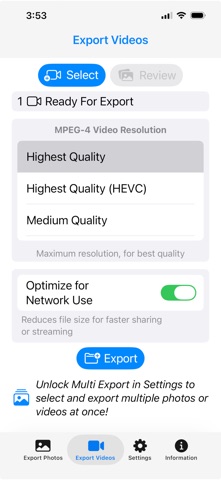
Video Export Options:
o Highest Quality, HEVC, Medium, Low, Full HD, HD, or VGA.
o Transcode to universal MP4 format.
Save Anywhere:
Store files to USB drives (via USB-C or Lightning adapter), cloud services like iCloud and Google Drive or your iOS device.
Multi Export Power:
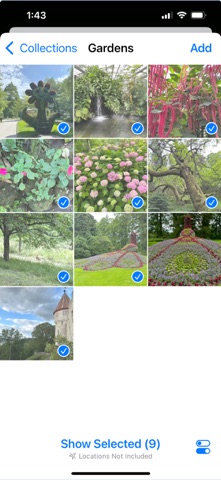
Unlock batch exports with a one-time in-app purchase or a monthly subscription. Process multiple photos and videos in one go.
Download Photo Export now to simplify your media conversions!
Terms of Use (EULA): https://www.apple.com/legal/internet-services/itunes/dev/stdeula/