

Useful Video Mosaic
Useful Video Mosaic is made and published by katapu.net. AppBrain is an independent app data site and isn't affiliated with katapu.net. The app name, icon, screenshots and description belong to katapu.net and are shown as published on the App Store.
AppBrain's verdict
- Last updated
- October 5, 2026
- Size
- 168.5 MB
User feedback
Ratings and reviews on the App StoreComments on Useful Video Mosaic for iOS
We don't have enough comments to show example comments. Please check back later.
Store listing
By katapu.net, from the App Store
Description by katapu.net Written by the developer, not by AppBrain. Click to read.
When you upload videos to social media, do the faces of people in the footage ever get in the way?
This app detects people's faces in a video, applies mosaic blur with one tap, lets you preview the result, and then saves it to help protect privacy.
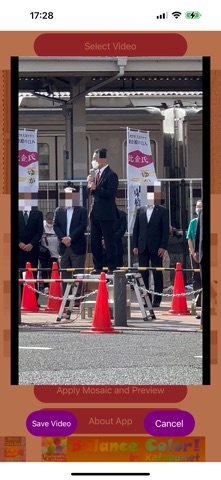
After loading a video, tap “Mosaic and Preview” to detect every person's face in the video, apply mosaic blur, and create a preview video. If the preview looks good, save it.
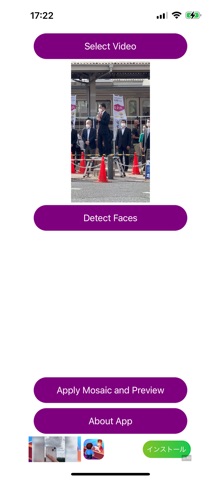
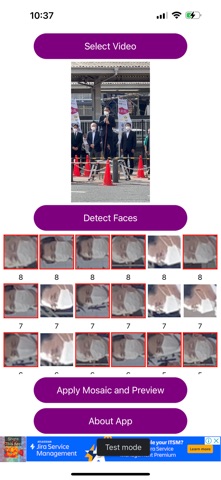
After loading a video, tap “Detect Faces” to detect and identify face images in the video.
By default, mosaic is turned on for every face.
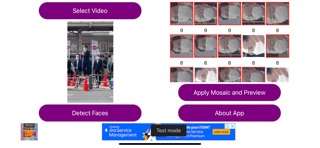
The identified faces appear as tiles at the bottom of the screen. Tap each face tile to choose individually whether that face should be mosaicked.
(Faces with mosaic on appear with a red border and a darkened face image. Faces with mosaic off appear with a white border and the face image displayed normally.)
After choosing mosaic on or off for all faces, tap “Mosaic and Preview” to create a preview video using those on/off settings.
If the preview looks good, save it.
If you want to upload a video to social media but people you do not want to show are visible, this app is worth trying.
The basic flow is simple: process with one tap, create a preview, and save it.
If there are specific people you do not want to mosaic, tap “Detect Faces”, choose mosaic on or off for each identified face, then create the preview and save it.
Please be careful not to upload the original video by mistake instead of the saved mosaic video.
The app is free, so feel free to use it.
A paid ad-free PRO version is also available.
How to use
1-1. Tap “Select Video” and choose a video.
2-1. Tap “Mosaic and Preview” to apply mosaic blur and create a preview.
3-1. If the preview looks good, tap “Save Video” to save it.
1-2. Tap “Select Video” and choose a video.
2-2. Tap “Detect Faces” to detect face images in the video.
3-2. Tap the identified face tiles to set mosaic on or off.
4-2. Tap “Mosaic and Preview” to apply mosaic blur using your selected on/off settings and create a preview.
5-2. If the preview looks good, tap “Save Video” to save it. If not, cancel, adjust the mosaic on/off settings again, and repeat step 4-2.
Videos are saved to your camera roll.
Safety and technology
Found in the app by AppBrain- Price
- Free
- App size
- 168.5 MB
- Content rating
- Everyone
Technologies used by Useful Video Mosaic
Releases
Updates seen on the App Store- Version
- 1.2.0
- Launched
- October 2024
No changelog data
Alternatives
Similar apps and more from katapu.netAlternatives to Useful Video Mosaic





More from katapu.net




Rankings
App Store top chartsApp Store Rankings for Useful Video Mosaic
About the app and developer
About Useful Video Mosaic
Useful Video Mosaic is a photo & video app developed by katapu.net.
User Ratings
The app has no ratings yet.
App Information
Useful Video Mosaic is freely available from the App Store. The app size is 168.51 MB. The latest version available is 1.2.0. The last update was on October 5, 2026.
Technical Requirements
The app has a content rating of Everyone. The app has been available on the App Store since October 2024.
Developer information for katapu.net
Address:
Frequently asked questions about Useful Video Mosaic
Is Useful Video Mosaic free?
Yes. Useful Video Mosaic is free on the App Store.
Is Useful Video Mosaic still available?
Yes. Useful Video Mosaic is on the App Store, and the last update we saw was on October 5, 2026.
How large is Useful Video Mosaic?
Useful Video Mosaic is 168.51 MB.
Is Useful Video Mosaic suitable for children?
App Store rates the content of Useful Video Mosaic as suitable for everyone.
Who made Useful Video Mosaic?
Useful Video Mosaic was developed by katapu.net. It is listed in the photo & video category on the App Store.
What are the best alternatives to Useful Video Mosaic?
People looking at Useful Video Mosaic also look at these photo & video apps: Face Pixelation & Blur, Blur - Photo & Video Editor, Blur Video & Mosaic, MovStash - Blur Video Editor, Blur Video - AI Blur Maker.