

Photo Print Layout is made and published by alitasoft. AppBrain is an independent app data site and isn't affiliated with alitasoft. The app name, icon, screenshots and description belong to alitasoft and are shown as published on the App Store.
AppBrain's verdict
- Last updated
- August 15, 2026
Rankings
App Store top chartsApp Store Rankings for Photo Print Layout
Competitors
Similar apps and more from alitasoftAlternatives to Photo Print Layout


More from alitasoft


Releases
Updates seen on the App Store- Version
- 2.0
- Launched
- July 2024
No changelog data
User feedback
Ratings and reviews on the App StoreComments on Photo Print Layout for iOS
We don't have enough comments to show example comments. Please check back later.
Technology
Found in the app by AppBrain- Price
- Free
- App size
- 8.68 MB
- Content rating
- Everyone
Technologies used by Photo Print Layout
About the app and developer
About Photo Print Layout
Photo Print Layout is an utilities app developed by alitasoft.
User Ratings
The app has no ratings yet.
App Information
Photo Print Layout is freely available from the App Store. The app size is 8.68 MB. The latest version available is 2.0. The last update was on August 15, 2026.
Technical Requirements
The app has a content rating of Everyone. The app has been available on the App Store since July 2024.
Developer information for alitasoft
Address:
Store listing
By alitasoft, from the App Store



Description by alitasoft Written by the developer, not by AppBrain. Click to read.
Photo Print Layout turns your pictures into clean, print-ready sheets for home printers and photo labs. Choose a paper size, select a layout, adjust each crop, then print or save the finished pages.
EVERYDAY SMALL PRINTS
• School portraits at 2×3 inches
• Wallet photos at 2.5×3.5 inches
• Square 2×2-inch keepsakes
• Small craft, journal, and locket photos
• Four-photo strips sized for 2×6-inch photo-booth prints
PRINT AND SAVE
• Print directly with AirPrint
• Save photo-lab JPEG sheets
• Export PDF files that preserve the selected physical paper size
• Use A4, Letter, Legal, 4×6, 5×7, 8×10, and custom paper sizes
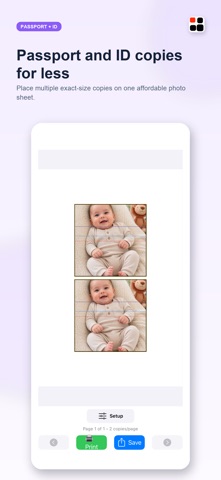
PASSPORT AND VISA PHOTOS
• Create multiple copies on one sheet
• Use country and document-size presets
• Adjust face position with guide overlays
• Choose white, gray, or blue backgrounds
• Unlock on-device background removal with Pro
LAYOUT TOOLS
• Preview cropping before printing
• Fit the full photo or fill the frame
• Adjust individual crops and zoom
• Repeat one photo across every slot
• Create and reuse custom layouts
• Build batch memory pages for baby, school, family, and yearly albums
PRIVATE BY DESIGN
Your selected photos stay on your device. Photo Print Layout does not collect personal data or require an account.
Pro is a one-time purchase with no subscription. It unlocks the complete small-print and memory-layout collections, unlimited custom layouts, premium printables, and visa background tools.
Always verify current official requirements before using a photo for a passport, visa, or identity document.