

Photo Statistic
Photo Statistic is made and published by Michael Schwarz. AppBrain is an independent app data site and isn't affiliated with Michael Schwarz. The app name, icon, screenshots and description belong to Michael Schwarz and are shown as published on the App Store.
AppBrain's verdict
- Last updated
- September 16, 2026
Rankings
App Store top chartsApp Store Rankings for Photo Statistic
Competitors
Similar apps and more from Michael SchwarzAlternatives to Photo Statistic


More from Michael Schwarz


Releases
Updates seen on the App Store- Version
- 2.1
- Launched
- April 2026
No changelog data
User feedback
Ratings and reviews on the App StoreComments on Photo Statistic for iOS
We don't have enough comments to show example comments. Please check back later.
Technology
Found in the app by AppBrain- Price
- Free
- App size
- 6.41 MB
- Content rating
- Everyone
Technologies used by Photo Statistic
About the app and developer
About Photo Statistic
Photo Statistic is a photo & video app developed by Michael Schwarz.
What is the rating of Photo Statistic?
Photo Statistic has no ratings yet.
Is Photo Statistic free?
Photo Statistic is free. The app size is 6.41 MB. The latest version available is 2.1. The last update was on September 16, 2026.
What are the requirements for Photo Statistic?
The app has a content rating of Everyone. The app has been available on the App Store since April 2026.
Developer information for Michael Schwarz
Address:
Store listing
By Michael Schwarz, from the App Store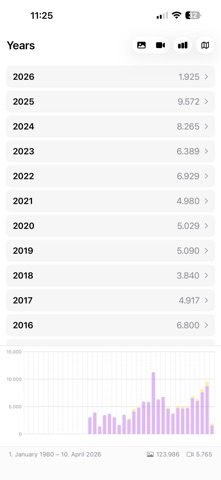



Description by Michael Schwarz Written by the developer, not by AppBrain. Click to read.
There is no account to create, no setup to work through, and no file to import. Open the app, allow access to your library, and start exploring.
KEY FEATURES
From Years Down to Hours
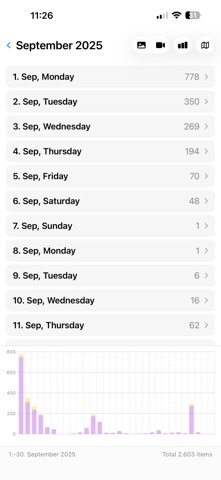
- Your library becomes a timeline you can open like nested drawers: years, then months, then days, then hours, and finally the pictures themselves
- Stacked bars show photos and videos side by side, so you see at a glance when you shot the most
- Tap any bar for the exact numbers, or jump straight into that period
- Switch between photos, videos, or both at any level
- Watch your library grow over time on a chart
Every Year at Once
- One button folds all years onto a single calendar: January holds all your Januaries, 24 December every Christmas Eve
- The way down stays the same - months, days, hours, then the pictures - only with the year left out
- See which day of the year you take the most pictures, or what one date looks like across your whole library
- One tap switches back to the single year you came from
A Map Made of Hexagons
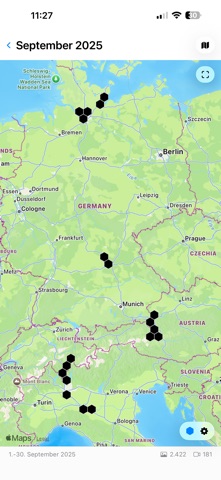
- Photos that carry a location cluster into honeycomb cells, each labeled with how many pictures were taken there
- Adjust the cell size from 1 to 100 kilometers, from a single neighborhood out to a whole continent
- Tap any cell to see the pictures behind it
- Drawn only from coordinates already saved in your photos - the app never asks for your device location
Mark the Ones You Love
- Browse thumbnails grouped by period, and pinch to resize the grid
- Select several pictures at once, or a whole group by tapping its title
- Collect everything you marked into a real album in the Photos app, and clear it again whenever you like
Fix a Stuck iCloud Photos Sync
- When iCloud Photos insists that items are still to sync, the app finds out exactly which ones
- Two devices on the same iCloud account find each other over the local network and compare their libraries year by year, month by month, day by day
- Each device gathers the items the other one is missing into its album, so iCloud picks them up and carries them across
- Every step asks first, and it works between iPhone, iPad, and Mac
Ask Instead of Tapping
- Apple Intelligence: describe what you want in plain language and the app opens at the matching year, month, or day
- Siri answers out loud without opening the app - ask for a photo report for last month, or how many videos you took this year
- Four Shortcuts actions turn your library into a report, a spreadsheet, or a plain number
- Export as CSV or JSON, or build a PDF report inside a shortcut
- Choose today, last month, a specific year, a date range, or any number of days back
Private By Design
- Every calculation happens on your device, using Apple's own PhotoKit
- Nothing is uploaded and nothing is shared; no photo ever leaves your device
- On the Mac the app runs in Apple's App Sandbox, with access to nothing but your photo library and the local network
- The device comparison talks straight to your other device - only counts and anonymous identifiers, never a photo
- No account, no ads, no usage tracking, no analytics
Also Included
- Handoff: start on your iPhone and pick up on your Mac where you left off
- Dark Mode
- One app for iPhone, iPad, and Mac
- Available in English, German, Spanish, and French
- Completely free, with no in-app purchases and no subscription
Photo Statistic only ever reads and counts - it never moves, edits, or deletes a picture, so you can explore your whole library without risk.
Terms of Use (EULA): https://apps.schwarz-interactive.de/terms-of-use.html