It doesn't have enough ratings yet to judge what users think.
Photo Vault & Locker: iLockBox is made and published by
Nitin Gohel.
AppBrain is an independent app data site and isn't affiliated with Nitin Gohel.
The app name, icon, screenshots and description belong to Nitin Gohel and are shown as
published on the App Store.
About Photo Vault & Locker: iLockBox
Photo Vault & Locker: iLockBox is a photo & video app developed by Nitin Gohel.
User Ratings
Photo Vault & Locker: iLockBox is rated 4.78 out of 5 stars. The rating is based on 18 ratings.
App Information
Photo Vault & Locker: iLockBox is freely available from the App Store. The app size is 90.73 MB. The latest version available is 4.3. The last update was on October 2, 2026.
Technical Requirements
The app has a content rating of High Maturity. The app has been available on the App Store since December 2015.
Description by Nitin Gohel(from the App Store)
Your iPhone may already be unlocked, but your private content does not have to be.
iLockBox is a private Photo Vault that helps protect your photos, videos, files, documents, and notes with Face ID, Touch ID, or a private PIN. Your personal content remains protected on your device, and no account is required for core privacy features.
PHOTO AND VIDEO VAULT
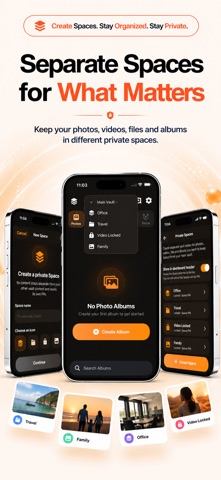
Keep personal photos and videos inside a protected private vault.
- Secure access with Face ID, Touch ID, or PIN - Create private albums and folders - Preserve original photo and video quality - Organize your media with an easy-to-use interface - Import only the photos and videos you select using Apple’s system photo picker
Whether you are protecting family memories, travel photos, important documents, or personal media, you remain in control.
LOCK SCREEN CUSTOMIZATION
Personalize how you access your vault.
- Choose from multiple lock screen styles - Select custom app icons - Follow clear instructions for each lock screen - Use a consistent experience across iPhone and iPad
FOCUS
Use Apple’s Screen Time controls to manage access to selected apps during Focus sessions.
- Choose apps for each Focus profile - Create and manage multiple Focus profiles - Start or stop a Focus session at any time - Control selected apps using authorized Screen Time access
Screen Time access is optional and is requested only when you choose to use Focus.
SECURE FILE STORAGE
Keep important files and documents inside your private vault.
- PDFs and documents - Personal records - Identification documents - Organized folders - Imported files from the Files app
PRIVATE NOTES
Store reminders, confidential notes, passwords, and other personal information in one protected location.
ADVANCED PRIVACY FEATURES
Privacy controls designed for everyday use.
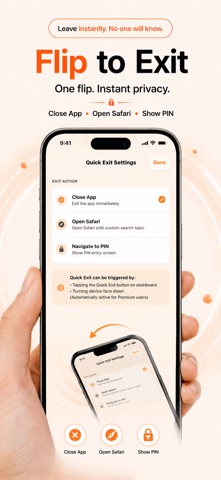
- Intruder Selfie records unauthorized access attempts when enabled - Quick Exit immediately leaves sensitive content - Flip to Lock automatically secures your vault - Album Protection adds another layer of security to selected albums - Two-Step Authentication combines biometric verification with your private PIN
PRIVATE BROWSER
Browse privately and download supported files directly into your vault. Browsing activity remains separate from your everyday browser history.
BACKUP AND RESTORE
Create protected backups of your photos, videos, files, albums, and notes. Restore your content when needed.
BUILT FOR EVERYDAY PRIVACY
Use iLockBox to:
- Protect personal photos and videos - Store confidential work documents - Organize private notes and files - Secure important memories - Keep personal information private
YOUR PRIVACY
iLockBox does not require an account for core vault features. Core privacy features work offline, allowing your photos, videos, notes, and files to remain available without relying on an online account.
Photo Library access is requested only when required for an action you choose. Importing uses Apple’s system photo picker, which provides iLockBox access only to the items you select. Additional permission may be requested when you choose to save items back to Photos or remove selected original items.
ILOCKBOX PREMIUM
Upgrade to unlock the complete iLockBox experience.
Premium includes:
- Unlimited private photo and video storage - Unlimited secure file storage - Backup and Restore - Album Protection - Additional privacy and organization features
Monthly, Yearly, and Lifetime plans are available where supported.
Payment will be charged to your Apple Account after purchase confirmation. Subscriptions automatically renew unless canceled at least 24 hours before the end of the current billing period. You can manage or cancel your subscription in your Apple Account subscription settings.
Each subscription will automatically renew 3 days before the expiration date for
the same time period. Subscriptions can be cancelled at any time before the renewal.