

Video To Mp3: Ringtone Maker
Video To Mp3: Ringtone Maker is made and published by 伟 潘. AppBrain is an independent app data site and isn't affiliated with 伟 潘. The app name, icon, screenshots and description belong to 伟 潘 and are shown as published on the App Store.
AppBrain's verdict
- Rating on App Store
- 4.85
- 46 ratings
- Last updated
- August 7, 2026
It doesn't have enough ratings yet to judge what users think.
Rankings
App Store top chartsApp Store Rankings for Video To Mp3: Ringtone Maker
Competitors
Similar apps and more from 伟 潘Alternatives to Video To Mp3: Ringtone Maker





More from 伟 潘


Releases
Updates seen on the App Store- Version
- 25.1112
- Launched
- November 2025
No changelog data
User feedback
Ratings and reviews on the App StoreComments on Video To Mp3: Ringtone Maker for iOS
We don't have enough comments to show example comments. Please check back later.
Technology
Found in the app by AppBrain- Price
- Free
- App size
- 65.2 MB
- Content rating
- Everyone
Technologies used by Video To Mp3: Ringtone Maker
About the app and developer
About Video To Mp3: Ringtone Maker
Video To Mp3: Ringtone Maker is a photo & video app developed by 伟 潘.
What is the rating of Video To Mp3: Ringtone Maker?
Video To Mp3: Ringtone Maker is rated 4.85 out of 5 stars, based on 46 ratings.
Is Video To Mp3: Ringtone Maker free?
Video To Mp3: Ringtone Maker is free. The app size is 65.22 MB. The latest version available is 25.1112. The last update was on August 7, 2026.
What are the requirements for Video To Mp3: Ringtone Maker?
The app has a content rating of Everyone. The app has been available on the App Store since November 2025.
Developer information for 伟 潘
Address:
Store listing
By 伟 潘, from the App Store


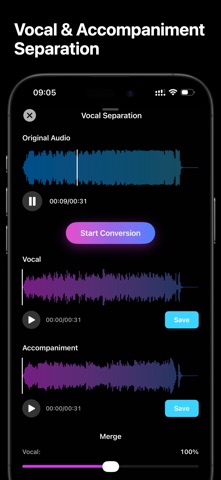


Description by 伟 潘 Written by the developer, not by AppBrain. Click to read.
Quickly and easily convert videos from Photos or Files into MP3, WAV, M4A, and more. The simple, intuitive interface extracts audio in just three taps.
Multi-Format Support
- Supports MP3, M4A, WAV, AIFF, CAF, AAC, AC3, ADX, DTS, FLAC, M4R, MKA, MP2, OGG, TTA, WMA, WV and more
- Compatible with all common video formats
- Lossless audio formats available
Advanced Settings
- Codec Presets: Auto, Fast, Standard, High Quality
- Sample Rate, Bitrate, Audio Filter Settings
- Fade In/Out, Playback Speed Adjustment
- Audio Channels: Keep Original, Mono, Stereo
- Equalizer & Denoise: Custom (69 Hz, 230 Hz, 910 Hz, 3600 Hz, 14000 Hz), Bass/Treble Boost, Vocal Boost, Pop, Jazz, Rock
Precise Video Trimming
- Visual timeline editing
- Real-time video preview
- Second-level trimming control
- Automatic video thumbnail generation
Professional Audio Control
- Adaptive audio quality and high-bitrate settings for optimal sound without complicated adjustments
- Meets all needs, from simple voice recordings to professional music production
Smart File Management
- Built-in audio library for easy management
- Quick search function
- Rename, share, and delete files
- View file details and duration
Built-in Audio Player
- Play, pause, and skip controls
- Timeline scrubber for precise navigation
- Real-time progress display
Privacy & Security
- 100% offline conversion
- All data stored locally on your device
- No personal data collected
- Files never uploaded to any server
PERFECT FOR
- Students: Convert online course videos into audio for review
- Music Enthusiasts: Extract audio from music videos or concerts
- Language Learners: Convert instructional videos to audio
- Podcast Creators: Extract audio from video content
- Content Creators: Repurpose video content
- Professionals: Convert meeting recordings
Why Audio Converter?
- Fast conversion with optimized audio-video engine
- Complete privacy—everything processed locally
- Professional-grade audio output with one-tap conversion
- No data collection of files or personal information
- Real-time conversion progress
- Clean, distraction-free interface, fully ad-free
- Modern native SwiftUI design, optimized for iPhone & iPad, supporting both portrait and landscape
Audio Converter Pro Unlimited Subscription
Subscribe to Audio Converter Pro Unlimited to unlock all premium features, including more format support, unlimited conversion time, richer import/export options.
Billed annually based on the selected plan. A one-time purchase option is also available (non-subscription).
- Payment will be charged to your iTunes account at confirmation of purchase
- Subscriptions automatically renew unless auto-renew is turned off at least 24 hours before the end of the current period
- Your account will be charged for renewal within 24 hours prior to the end of the current period
- Manage subscriptions or turn off auto-renewal in your Account Settings
- Any unused portion of a free trial, if offered, will be forfeited upon purchase
- Annual subscription and lifetime purchase options available
Download Audio Converter now and quickly convert videos to MP3, WAV, M4A, and more. Easily extract high-quality audio from your video collection!
Privacy Policy:
https://indecisive-blackberry-1b0.notion.site/Privacy-Policy-2b4c773b6a07807f8289e61d70b50dfe?pvs=73
Terms of Use:
https://indecisive-blackberry-1b0.notion.site/Terms-of-Use-2b4c773b6a0780a8a504ebccd08ef3de
Feel free to contact us: amosiper@gmail.com