

PinShift Manager
PinShift Manager is made and published by Slash Limited. AppBrain is an independent app data site and isn't affiliated with Slash Limited. The app name, icon, screenshots and description belong to Slash Limited and are shown as published on the App Store.
AppBrain's verdict
Established- Rating on App Store
- 3.00
- 2 ratings
- Last updated
- August 21, 2024
It doesn't have enough ratings yet to judge what users think.
Rankings
App Store top chartsApp Store Rankings for PinShift Manager
Competitors
Similar apps and more from Slash Limited












Releases
Updates seen on the App Store- Version
- 2.41
- Launched
- December 2020
No changelog data
User feedback
Ratings and reviews on the App StoreComments on PinShift Manager for iOS
We don't have enough comments to show example comments. Please check back later.
Technology
Found in the app by AppBrain- Price
- Free
- App size
- 45.2 MB
- Content rating
- Everyone
Technologies used by PinShift Manager
About the app and developer
About PinShift Manager
PinShift Manager is a business app developed by Slash Limited.
What is the rating of PinShift Manager?
PinShift Manager is rated 3.00 out of 5 stars, based on 2 ratings.
Is PinShift Manager free?
PinShift Manager is free. The app size is 45.16 MB. The latest version available is 2.41. The last update was on August 21, 2024.
What are the requirements for PinShift Manager?
The app has a content rating of Everyone. The app has been available on the App Store since December 2020.
Developer information for Slash Limited
Address:
Frequently asked questions about PinShift Manager
Is PinShift Manager free?
Yes. PinShift Manager is free on the App Store.
Is PinShift Manager still available?
Yes. PinShift Manager is on the App Store, and the last update we saw was on August 21, 2024.
How large is PinShift Manager?
PinShift Manager is 45.16 MB.
Is PinShift Manager suitable for children?
App Store rates the content of PinShift Manager as suitable for everyone.
How do people rate PinShift Manager?
PinShift Manager scores 3.00 out of 5 stars, from 2 ratings on the App Store.
Who made PinShift Manager?
PinShift Manager was developed by Slash Limited. It is listed in the business category on the App Store.
What are the best alternatives to PinShift Manager?
People looking at PinShift Manager also look at these business apps: Week at Work Kiosk, Simple Rota Maker, StaffAny Employee Scheduling, Worktrim, Camelo: Work Schedule Maker.
Store listing
By Slash Limited, from the App Store




Description by Slash Limited Written by the developer, not by AppBrain. Click to read.
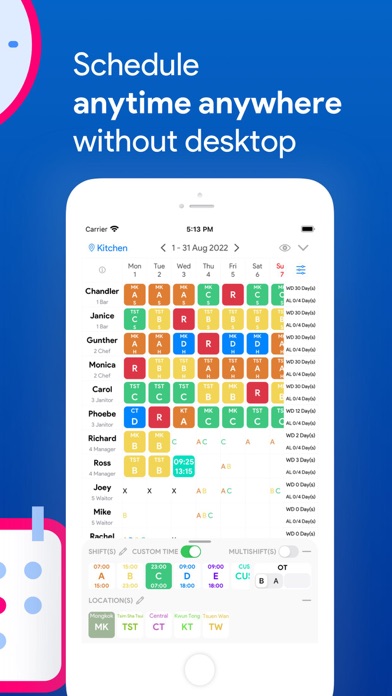
【PinShift Manager】allows you to plan your employee roster anytime anywhere with just your mobile phone and it is totally free.
"HR systems in the market are generally difficult to use. Front-line operators have issues getting used to them"
【PinShift Manager】provides users with a brand new experience in employee scheduling. A monthly roster for 10 employees takes only 3 mins to complete.
"Still taking a photo of your roster/schedule on your excel printout?"
【PinShift Manager】let you share your roster / monthly schedule to your staff in PDF format via WhatsApp, Slack, email, or more.
【PinShift Manager】is made specifically for front-line managers for employee scheduling and roster creation with their smartphones anytime anywhere. Digital transformation of your human resource management made easy.
1. The best rostering user interface ever!
With a few simple taps, managers are allowed to assign employee rosters instantly. Our re-engineered user interface design lets you schedule quickly and with flexibility.
2. Share your roster / employee schedule to others via Whatsapp etc...
We understand that roster distribution is very important and time-sensitive. PinShift Manager lets you share the monthly roster in PDF format and send it to your staff through WhatsApp, email, Slack, etc...
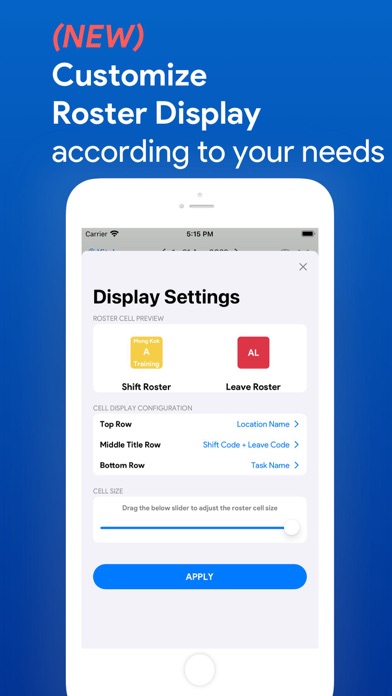
3. ***NEW*** Assign tasks & work locations along with your shift rosters
Managers can mark the task assignment and allocate work locations to staff in the roster. Your staff can have a better understanding of your preferred work schedule with more useful information.
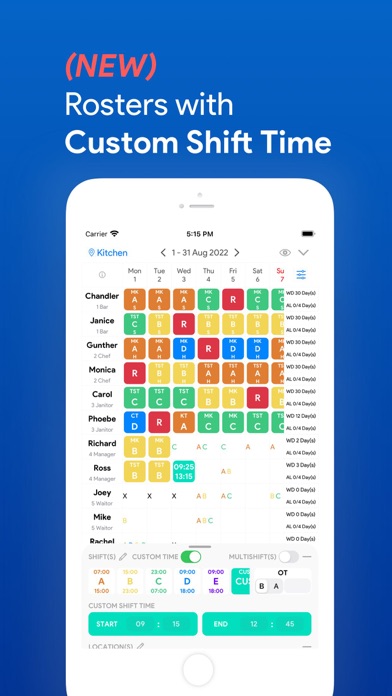
4. ***NEW*** Customizable time for staff with non-regular shifts
Managers can use "custom shift" to quickly select the roster start, end time and directly assign the shift to the employees without needing to create a regular shift. It helps speed up the roster assignment for industries that have many shifts in many different time slots.
5. Complex daily roster, no problem!
PinShift Manager can support assignment of complex rosters such as "Half day leave, half-day shift", "Shift with OT before/after shift", "Time-off before/after shift", "Multiple shifts in a day" etc...
6. Take employees' availability as reference
Availability submission from the "PinShift Staff" app can be synchronized to display in the roster to facilitate schedule planning. Managers can have a better picture of the staff work preferences when assigning rosters with the availability information.
7. ***NEW*** Employee swap request approval
PinShift Manager allows users to review employees' swap requests and complete the approval in the app.
8. Copy the roster from the previous period to speed up the process
Simply copy the shifts from the previous month, managers can easily make minor amendments and the schedule is ready to publish.
9. Simplest setup procedure in 3 steps
You don't have to worry about complicated setup. We simplified the steps required to prepare yourselves for the rostering function. Our quick setup lets you enter only 3 things - store name, shifts, and employees. You can get ready for employee scheduling instantly.
To know more about 【PinShift】, you can visit https://pinshiftapp.com to find out more about the roster, timesheet, mobile attendance, payroll functions, and employee app.